The 5 Most Harmful Types of Email Phishing Attacks

Phishing, in one way or another, has been around longer than the internet or computers have. Phishing is an act in which an individual presents a fraudulent persona to gain trust and obtain something that doesn’t belong to them.

This fraudulent persona could really be a persona, or it could be a website, or an invoice, or an official document.

What they seek to gain could be money, passwords, login credentials, email lists, or other sensitive and private information.

There are many different attack methods in Phishing scams. It occurs over mail, phone calls, texts, but most frequently over email.

In our own lives, we are most used to seeing bulk phishing. This involves sending out mass texts or emails to large groups of individuals. Usually, these will include a link to a website that appears like an email login page we’re used to seeing, or Google, or really just about any service. It will ask us our login credentials and many people will willingly give them over, unaware that the page they’re on is a decoy for hackers to harvest information. Another common method here is to pose as a postal service requesting a fee for taxes or shipping. The fee may be small but this is done so successfully and so regularly it adds up quickly.

When Phishing makes the news, it’s usually Spear Phishing and specifically Whaling. Rather than sending out bulk messages, Spear Phishing is more precise and will go after a smaller group of individuals and employ a high degree of social engineering to extract the required information. Whaling is the natural conclusion to Spear Phishing – Whaling involves targeting high-level executives, managers, or other individuals of positions of power.

Seeing those headlines, you might think the attacks only go after the billion-dollar corporations or governments but that would be incorrect; Most of these attacks are carried out on small, medium, and large businesses. These kinds of attacks are known as Business Email Compromise (BEC), and every business no matter the size should educate employees on the dangers of BEC. The FBI has put the total cost of BEC between 2016 and 2019 at $26 billion in the United States.

Though the corporate world is certainly the biggest target for the hackers behind Phishing attacks, all of us are at risk in our private lives. Read on to learn more about the most harmful types of Phishing emails that you, your business, or your family can face.

The Invoice Scam
Phishing

The invoice scam, or invoice fraud, is one of the earliest forms of phishing which predates the Internet.

This occurs when your business or private email receives an Invoice that is not legitimate. The degree of success for the hacker here balances on a few factors. At home, you are aware of all the household work being carried out, and if any large invoices were coming in you’d expect them, and so could see through this. The smaller invoices may go unnoticed though, like the taxes and shipping fees we mentioned earlier.

For a business, this can get a little tricky. Oftentimes a business as multiple invoices at once, and it can be difficult to tell the real and fake apart. In 2019, Scott County Schools in Kentucky announced it had been hit by a major invoice scam, where they paid out $3.7 Million to an invoice that was “overdue”.

It isn’t just schools falling for this either – In 2019 again, and individual named Evaldas Rimasauskas scammed Facebook and Google with invoices, and made off with $100 million before being discovered.

The Executive Imposter Scam
Phishing

Executive Impersonation is an exceptionally successful form of Phishing. There is a thought that it is so successful because many businesses think they are too small to be targeted, but this is incorrect. Simply having a company LinkedIn with a visible hierarchy makes you a target.

In this type of Phishing, a hacker will pretend to be a high-level executive within the company, usually the CEO, President, etc. They will identify who in the company is responsible for handling money and send out emails to transfer money to another account – Which, of course, belongs to the hacker.

It may seem unlikely that a business could fall for this, but the hacker will often know the companies inner workings. This could be gained through social engineering techniques or using other forms of Malware, especially Spyware.

If somebody in your business contacts you and you’re unsure of their true identity – Call them.

Email Contacts Spam
Phishing

Email Contacts Spam is a form of phishing that not only takes elements of bulk phishing but nearly always uses some form of other Malware in taking its initial steps.

A hacker will target usually one person in the company, whose email they have obtained through another phishing attack, or using Spyware. For it to work, the target must remain unaware they have been compromised.

When the hacker has access to the victims’ email account, they will study company emails to learn the language used, the types of emails sent, and what positions everyone has within the company.

They will then take to the victims’ contact list, sending out a mass of emails to all relevant targets within the company requesting money transfers.

This attack is tricky to pull off successfully, but if pulled off successfully can be lucrative for the hacker and devastating for the business.

Attorney Impersonation
Phishing

The Attorney Impersonation scam is a type of Phishing that can affect business and residential targets equally.

Like the Executive scam, high-end Attorney Impersonation will often involve a large degree of social engineering, and study of the target’s habits and personal information.

These hackers most commonly impersonate the Department of Justice and will pose as an investigator. They will request personal information from the target, who will often hand it over. This particular type of Attorney Impersonation targets the elderly and senior citizens most commonly.

Companies who regularly deal with attorneys must be cautious here also. Hackers will pose as attorneys, looking to settle fees or impose other invoices. If an attorney you know is being impersonated, you should always try to call the real individual if you suspect something is amiss.

Data Theft
Phishing

Data Theft Phishing emails are the most common and most destructive of the methods talked about in this article.

Employees, or family members, will receive an email, which will lead to a fake login screen. The login screen can mimic just about anything; Email accounts, social media, banking, and IRS. Compromising one or more of these accounts can be devastating. Not only is the individual compromised, but it can be used as a launchpad to begin many of the other attack vectors listed above.

Data Theft emails like these can have a domino effect. If someone with a lower rank in the company is breached, the hacker can use their account to get access to someone higher up in the company, and so on until they get C-level access.

With that in mind, security and vigilance against this shouldn’t be reserved just for those at the top but needs to be company-wide to be successful.

Protection against Phishing

No form of protection against Phishing is 100% effective, and beyond doubt, your most useful tool is education. Social engineering is the lifeblood of Phishing, and most forms will fall flat if it doesn’t work. Educating yourself, employees, and family members on spotting what’s fake will secure you as nothing else will.

Even with education, Phishing can still be successful. In years gone, fake login pages were obvious and any familiarity with the real thing would make it immediately clear. In more modern times, these have instead become high-fidelity copies, and any social engineering that goes along with them can nearly be flawless.

For times like these, SaferNet can help fill in the gaps of education when the difference is too small to tell apart.

SaferNet is the perfect solution to the cybersecurity issues that individuals, families, and businesses face today. It not only connects every device using a secure, 24/7 always on, military grade VPN, but it also stops outside cyberthreats, malware and viruses as well. On SaferNet, all users are protected anywhere in the world, all the time, on any cellular or Wi-Fi network. In addition to SaferNet’s VPN and cyber protection, it also offers a range of employee or parental/family internet controls including internet filtering, monitoring, scheduling, and blocking access to websites or even entire website categories

Typically, a business or family would need 3 separate services for a VPN, Malware Protection, and Internet Controls; SaferNet offers all 3 features in one service. SaferNet truly is an endpoint security presence that can be implemented in minutes around the world, on phones, laptops, tablets, and computers at an economical price point that caters to all sizes of businesses and families. SaferNet guarantees a smooth setup and installation process that takes only minutes, and an easily accessible control hub for you to monitor all your employee’s or family members devices; including activity, time spent online, and threats blocked.



The 5 Most Notorious Spyware Attacks

Spyware is somewhat more offensive than other forms of malware in that the attack itself can feel somewhat more personal.

Many Malware categories can lock machines or steal credit card numbers but Spyware can take over a person’s life, harvesting every detail and even giving hackers insight into their private lives.

Spyware, as the name implies, is a piece of malicious spying software. When it takes root on a device, it will communicate back to the hackers’ control center, and there are a few different ways it can manifest.

Screen grabbing is a common Spyware behavior. This kind of Spyware takes screenshots of your devices’ current display. This is not as commonly used as some of the other methods.

Camera Control is an incredibly invasive Spyware manifestation. This Spyware will access a device’s camera, feeding all footage back to the hackers’ command center. There are some novel remedies around this, such as placing a block over your device’s physical camera lens. However, this issue has become much more serious with the adoption of Internet-of-Things devices worldwide. Many homes now have arrays of cameras, both inside and outside, controlled by or linked to an app. These are tempting targets for any hacker with Spyware in their command. Related to this is Microphone Control. This is the same idea, only recording the users’ audio.

Keylogging, or Keystroke logging, is perhaps the most common and most lucrative category of Spyware. When Spyware infects a device with a keylogger, every key pushed on the keyboard is recorded and returned to the hacker. This will return as streams of data, which will need to be searched by the hacker for user passwords and other credentials. This may seem like a cumbersome task, but a malicious program recording text data leaves a much smaller footprint than a bulkier program trying to return audio or video.

Spyware often walks a line between legal and illegal.

For example, many types of Spyware including keyloggers and screen grabbers are available over-the-counter for businesses who wish to install them on company computers to monitor employee activity at work.

Law-Enforcement agencies have long used Spyware. The Federal Bureau of Investigation developed Magic Lantern as a keylogger to monitor suspects and targets. MSNBC broke the news of Magic Lanterns’ existence publicly in 2001, and it lead to a wider conversation regarding if antivirus software should detect government-developed spyware for the user.

This conversation has again heated up. In 2016, The Shadow Brokers stole several tools for the National Surveillance Agency, many of which were Spyware orientated. Considering much government-development spyware has fallen into the wrong hands, it seems wise for antivirus companies to block them.

There has been thousands of Spyware incidents over the years, and many times the same names will appear in one form or another. Let’s look at the 5 most notorious Spyware attacks we’ve seen on the web.

Most Notorious Spyware Attacks #5: DarkHotel

Spyware

DarkHotel first appeared in South Korea in 2014 and has been a persistent threat since. DarkHotel is a remarkably complex form of Spyware and its attack campaigns specifically target hotels.

DarkHotel will target a hotel’s unsecured wifi. Once in, it will falsify certificates and prompt users to make software downloads updated with that network’s certification.

Once downloaded, DarkHotel will activated as keylogging Spyware.

Although anybody in the hotel can fall victim to this, DarkHotel was specifically engineered to target senior company executives.

The executives it targets are from various sectors; investments and development, government agencies, defense industries, electronic manufacturers, and energy policymakers.

The majority of the victims have been in Korea, Russia, China, and Japan, though DarkHotel has hit several US victims in the last 2 years.

DarkHotel will log a certain of keys before deleting itself to avoid detection. Business passwords, banking credentials, and even intellectual properties have all been stolen by DarkHotel.

Most Notorious Spyware Attacks #4: CoolWebSearch

Spyware

CoolWebSearch (also known as CoolWWWSearch or abbreviated as CWS) is not as complicated as its counterparts, but its longevity and propagation cement its place as #4 on the list.

CWS was first spotted way back in 2003, and has never left the digital landscape. Year after year, it tops lists as most-removed Spyware from antivirus companies because of how widespread it is.

When CWS is first installed on a computer is instantly noticeable. The main browser’s homepage will be redirected to coolwebsearch.com. The browser will continuously create pop-ups, usually to pornography and gambling websites. This classifies CWS as Adware as well as Spyware.

CWS will change permissions within the browsers, marking unsafe sites as unsafe and will try pull the user toward them. While it will key log all information typed into these sites, it will also try to key log every other site if it has burrowed deeply enough into a computer.

CWS is generally easy to remove with most antivirus software programs, however it is in a constant state of update, making it more difficult to remove each time.

Most Notorious Spyware Attacks #3: Olympic Vision

Spyware

Olympic Vision is a widespread and lucrative form of Spyware.

It is available to purchase online for just $25, which has lent to it’s global propagation – It is currently in 18 countries, including the United Sates.

Olympic Visions’ ability to make money resides in it’s most common target choice: Businesses.

Once installed in a system, Olympic Vision can access data stored within the Windows Registry (to avoid detection, within the browser, and within Email clients. It will key log nearly 100% of inputs on the host device and send them back to the hackers command center.

A regular attack vector for Olympic Vision campaigns requires a high amount of social engineering. By reading business emails, hackers will study the corporate infrastructure of it’s target, and find who is responsible for making bank transfers.

It will then craft convincing emails, requesting money. This will usually replace regular cash transfers that take place within a business. In 2016, the FBI reported that hackers using Olympic Vision had managed to make off with $800 million dollars from businesses.

Most Notorious Spyware Attacks #2: HawkEye

Spyware

HawkEye was considered dormant for many years, but it made a significant comeback in 2020 at the start of the COVID-19 Pandemic.

In 2013, HawkEye was a notable but standard piece of Spyware; Once it infected it machines, it keylogged some inputs and returned them to the control center.

It enjoyed some time in the center stage, but eventually began to be detected less. There were rumors that HawkEye had seen a change of management between criminal organizations.

The rumours were true, and in 2019 the Internet saw ‘HawkEye Reborn v9’. While operating much like it’s previous form, it now had exceptional anti-detection features, making it very difficult to remove from a host, or even find.

Furthermore, HawkEye had developed a business model for itself. The underworld organization behind it were now selling licenses that independent hackers could purchase, effectively renting HawkEye for a limited amount of uses.

The unscrupulous developers have gone a step forward with HawkEye, adding a constant stream of updates to improve the service.

When the COVID-19 Pandemic hit, HawkEye saw a huge surge in popularity.

The hackers decided to try prey on the fear of people, worried about the nature of COVID itself and of the vaccine.

It began being distributed as an email purports to be an “alert” from the Director-General of the World Health Organization (WHO). The alert email would have important information about either COVID or the vaccine contained in an attachment, but of course the attachment was simply to deploy HawkEye onto the users machine.

At time of writing, HawkEye is still being propagated on the same campaign.

Most Notorious Spyware Attacks #1: Agent Tesla

Spyware

As of February 2021, Agent Tesla (AT) is the most complex and most difficult to detect piece of Spyware available to hackers.

AT will access the machine as a trojan, usually within an email. It will then activate as Remote-Access-Trojan (RAT). What this means is that not only does AT have Spyware capabilities, but it can also control your device entirely.

The organization behind AT may, in fact, be the same as HawkEye’s – They operate a business, selling monthly licenses. They even offer 24/7 support for their users and a Discord (A popular messaging service similar to the chat rooms of the 90s and 00s) chat channel to brainstorm new attack vectors and ideas.

The developers even offer guides on how to proliferate across several avenues.

The combination of key-logging and remote access can prove to be very troublesome. If you have AT, the hacker could take your passwords and then wait until they can confirm your computer is active but unattended. They could then make changes to your accounts without you knowing – Automatic logins will skip 2-Factor-Authentication because they’re coming from a known device.

In January of 2021, AT received an update that allows it to modify the code in Windows Defender to avoid detection. This kind of complexity is a first for Spyware programs.

While initially detected in 2018, it is believed AT has been at large for 7 years without any detection.

With skilled developers, a decent schedule of updates, easy availability, reasonable pricing, and an ever-growing community of subscribers, Agent Tesla may remain #1 on the list of most notorious Spyware for quite a while.

Protection Against Spyware

Like stopping a bullet, there are no cybersecurity solutions that are always 100% effective against Spyware. But SaferNet gives you a fighting chance stopping one of the above deploying on your machine.

SaferNet is the perfect solution to the cybersecurity issues that individuals, families, and businesses face today. It not only connects every device using a secure, 24/7 always on, military grade VPN, but it also stops outside cyberthreats, malware and viruses as well. On SaferNet, all users are protected anywhere in the world, all the time, on any cellular or Wi-Fi network. In addition to SaferNet’s VPN and cyber protection, it also offers a range of employee or parental/family internet controls including internet filtering, monitoring, scheduling, and blocking access to websites or even entire website categories

Typically, a business or family would need 3 separate services for a VPN, Malware Protection, and Internet Controls; SaferNet offers all 3 features in one service. SaferNet truly is an endpoint security presence that can be implemented in minutes around the world, on phones, laptops, tablets, and computers at an economical price point that caters to all sizes of businesses and families. SaferNet guarantees a smooth setup and installation process that takes only minutes, and an easily accessible control hub for you to monitor all your employee’s or family members devices; including activity, time spent online, and threats blocked.


Safer Internet Day 2021: 5 Tips To Enhance Your Online Safety

Today, Tuesday the 9th of February, marks global Safer Internet Day 2021!

Safer Internet Day has been a yearly event since 2004; Internet Safety is highlighted by several companies, spearheaded each year by Google.

Safer Internet Day is targeted towards children and adults.

For children, it’s about teaching them about safe internet usage. Though their outlook on life is nearly always positive, it’s important to be aware that not everyone online is a good guy, and they need to take some extra steps to ensure they’re safe.

For adults, it’s a time to reeducate ourselves on the threats out there, as well as performing best-practice annual security checks on our accounts.

Safer Internet Day is a core part of our ethos here at SaferNet – We even have the same name, almost!

We believe the Internet is an amazing tool and should be safely enjoyed by all ages.

For Safer Internet Day 2021, we’ve put together our top 5 tips to ensure you and your loved ones enjoy a safer internet together.

Safer Internet Day Tip #5: Update Your Passwords

Safer Internet

Considering what they protect, we tend to be a little flippant with our passwords.

Our PIN Codes, Social Security Numbers, and other identification numbers are treated with the utmost respect and security. Still, the passwords we create online more often than not tend to be weak.

Combinations of catchy words, birthday years, and surnames are common but they are exceptionally easy to be cracked by a hacker.

There are a couple of best-practices we can follow here to ensure stronger passwords:

  • Use Google suggested password: When creating an account on Chrome, you’re given the option for Google to create a password for you. This is useful, depending on the service being used. While convenient for services we know we’ll only use on the browser, it can fall short when we need the password to login to an app and don’t know it.
  • Create a complex password: Creating a complex password can be tricky to do right but is one of the best options. Rather than the inherent complexity of a password, the defining strength is its length. Instead of using a short, Instead of using a short, complex password that is hard to remember, consider using a longer passphrase. A password like “Tr0ub4for83” is much easier for an automated program to crack than something like “correcthorsebatterystaple.”
  • Use a subscription-based password manager: There are many services out there that you can sign up to manage passwords for you. Two of the most popular are dashlane and lastpass.

Once you’ve gotten new passwords created, it’s important to perform a password security check with Google. This will scan previous passwords and find if any have been compromised. If they have, change it right away.

Safer Internet Day Tip #4: Enable 2FA

Safer Internet

2-Factor Authentication, or just 2FA, is one of the most important steps you can take in ensuring your accounts are safe online.

When you enable 2FA on a service, logging into that service will send a code to your authenticator app.

The code will be valid for 60 seconds, after which it will refresh, and a new code will appear and must be used instead.

It may sound like an inconvenience at first, but services that remember your device will usually not ask for the extra step every time.

The only way around 2FA is if a hacker somehow seizes your phone physically while trying to hack your account from miles away.

In previous years, many services had their own Authentication app. As the practice caught on, it was becoming cumbersome to have so many apps for different services.

Google standardized the idea, introducing Google Authenticator. The app is free and works with nearly every service that has 2FA as an option.

Safer Internet Day Tip #4: Learn How To Spot Suspicious Links

Safer Internet

Suspicious links appear all over the web – On blogs, social media like Facebook, in messenger services, on YouTube, and most of all, in email.

The browsers and internet security services we use can stop us if we fall for them. Still, the most effective strategy we have is educating ourselves to detect what’s legitimate or not ourselves.

Here are some methods to you can employ to identify if a link is suspicious

  • Consider the source – Do you know the person sending you the link? Is it a company or friend you’re familiar with?
  • Examine the domain – Though becoming more complex, a suspicious link will often try to look legitimate but is not on closer inspection. For example, an email from a company posing as Facebook may look like ‘Facebookadmin@asdasdsdasd.’ This is the same for domain names – If it looks off, it probably is. Any sign of garbled or nonsensical domain names is a giveaway.
  • Stay Away From Attachments – Any link that prompts you to download an attachment, or as an email with an attachment, should be avoided.
  • Spelling & Grammar – If a message accompanies a link, check it for spelling and grammar. Often times illegitimate sources contain plenty of errors.
  • Was It Expected – Were you expecting an email from the postal service asking to pay shipping? If not, it’s illegitimate.
  • Ask! – One of the most reliable ways of finding a link’s legitimacy is asking the source. If you are receiving emails from the likes of Amazon about account action, go onto their website and ask customer support directly if they have been sending emails. Many services, including Facebook, keep a record you can see for yourself of the emails they have been sending you.

Safer Internet Day Tip #2: Talk to your kids about online safety

Safer Internet

If you were a child when the Internet first became available, you’d know how much it’s after changing.

If you were a child when the Internet wasn’t yet available, you probably wonder why kids are so obsessed with it!

We can impose limits on our kids, but it’s no secret that the web plays a large part in our kids’ lives. Be that for education, especially in the COVID-era of online education or entertainment, with plenty of streaming services and video games geared for a young audience.

If children are going to use the internet, it’s important they do so safely.

Talk to your kids. Learn what they do online, get to know their digital habits, what sites they visit, and what apps they use.

Do some research – Are these habits healthy? Are those sites and apps appropriate for the child’s age group?

Talk to them about social media, if they’re using it yet. If they’re not, prepare them for doing so. Ensure things like online privacy and data sharing are being held up in importance. What a child or teenager shares online can very easily come back to haunt them in later life.

The Internet is a group tool and offers so much knowledge to enrich a child’s development, but it can even be damaging if misused.

Safer Internet Day Tip #1: Use a VPN

Safer Internet

The number one tip for online safety on Safer Internet Day is to use a VPN, both for yourself and your entire family or business.

SaferNet is the perfect solution to the cybersecurity issues that individuals, families, and businesses face today. It not only connects every device using a secure, 24/7 always on, military grade VPN, but it also stops outside cyberthreats, malware and viruses as well. On SaferNet, all users are protected anywhere in the world, all the time, on any cellular or Wi-Fi network. In addition to SaferNet’s VPN and cyber protection, it also offers a range of employee or parental/family internet controls including internet filtering, monitoring, scheduling, and blocking access to websites or even entire website categories

Typically, a business or family would need 3 separate services for a VPN, Malware Protection, and Internet Controls; SaferNet offers all 3 features in one service. SaferNet truly is an endpoint security presence that can be implemented in minutes around the world, on phones, laptops, tablets, and computers at an economical price point that caters to all sizes of businesses and families. SaferNet guarantees a smooth setup and installation process that takes only minutes, and an easily accessible control hub for you to monitor all your employee’s or family members devices; including activity, time spent online, and threats blocked.
Internet Security: The First Line of Defense Against Malware

Unlike traditional computer security, internet security is often an afterthought for many users, but it is the first-line defense against malware. Computer security is an area some of us have a little knowledge in – We get it bundled in when buying a device, we may be using a free trial we’ve found online, or most reliably, we use our computer operating systems native security solution.

These methods can be useful for file-scanning or treating a virus after it’s infected a device. Still, very often, they are either underwhelming or useless when it comes to internet security.

Internet Security is less about protecting and scanning files inside your hard drive and more about proactively protecting your machine when you’re using the internet before any attacks have been made.


Why Internet Security is Important

An antivirus may tackle what’s on your computer or phone already, but it’s important to make sure your devices don’t ever get to that stage.

Internet Security is the process of ensuring you and your devices’ safety while you use the Internet.

This can be broken into two areas – Safe browsing and internet security software.

Safe browsing could be thought of as ‘digital street smarts.’ It concerns making sensible decisions online.

The forefront of these decisions would be not following suspicious links or not opening email attachments from individuals you don’t.

On a social level, it’s smart choices like not putting all of your information online. Facebook, Instagram, and TikTok seem like the antithesis to this thought. Still, growing concern about privacy with third-party companies in the news recently reinforces the idea that you really don’t need to divulge every part of yourself in an online persona.

Internet security software is the practical part of internet security. Like you can have an antivirus to diagnose issues on your machine, you should always have a client that works while you’re browsing. Internet security software can be a fallback when you accidentally click that link or open that email attachment.

At a time where Malware attacks become more sophisticated, it can be difficult telling the real and illegitimate apart. Internet security software can sometimes be your only avenue of safety.

Hackers and other bad actors are becoming more and more aware that most people are unprotected online. Last year saw an increase in cybercrime across the board, with attacks occurring 2,244 per day on average.

As phone technology evolves, so does their environment for potential hacking. As they are now, phones are effectively tiny computers, and tiny computers are as vulnerable as regular sized ones!

Last year, 14,204,345 attacks were recorded on mobile devices. This is an overwhelming number, especially considering most mobile users have no antivirus, nevermind Internet Security.

In the battlefield of Internet Security, knowledge is power and knowing how the enemy attacks can ensure your safety.


Malware

Regarding Internet Security, Malware is a broad term and used as an umbrella for several different things. Short for malicious software, Malware encompasses all forms of unwanted software on your browser, machine, or associated with your online accounts.

While many things are classified under the Malware category, the most notable are Adware, Botnets, Phishing, Spyware, Trojans, and Ransomware.


Adware

Adware is one of the most common types of Malware. Many are familiar with it, and how irritating it can be.

When Adware infects your device or browser, it’s noticiable nearly immediately.

Advertisements will appear in places you’re not used to seeing them, including pop-ups all over your desktop, on the header of the screen, embedded within the browser, or even within text.

Adware is often said to be the least harmful of the Malware categories your device or browser can contract. That may be true, but Adware is usually a sign that other Malware has found its way to you.


Botnets

Botnets have become increasingly widespread and sophisticated in recent years, now able to burrow themselves deep within your browser or device.

When your device becomes infected with a botnet virus, it means that its processing power joins a large network of other infected devices and is used for malicious ends.

Usually, a botnet controller will have thousands of infected devices under their control. All these devices can be used at once, usually for distributed denial-of-service (DDoS) attacks or attempting data breaches.


Phishing

Malware is often manifested in a destructive client, but with Phishing, the focus is more on social engineering.

The core thought behind phishing attacks is older than computers themselves.

Phishing attempts to dupe the user into handing over sensitive credentials or details to sources that appear legitimate but are not.

Email is one of the most common attack vectors for phishing attempts. A user will get an email from what looks to be Microsoft, which will contain a link leading to a website seeking sign-in credentials for services like Outlook.

The website may appear in design and function identical to the Outlook website, but behind the page, the details entered are being given to hackers or illegal organizations.

With all the services the average person is signed up for today, Phishing has become widespread. Phishing attempts can often be seen with the naked eye, but higher fidelity attempts appear more regularly, and it’s sometimes too difficult to tell at first glance.


Spyware

When Spyware infects a device, it can spy on all information going through that device, as the name implies.

In the early 2000s, this mostly took the form of ‘Keylogging’ – Reading all the inputs from your keyboard. This may seem like a crude approach, but if the individual behind the keylogger was meticulous enough in their work, they could easily harvest your online banking credentials and other sensitive pieces of information.

Spyware has become more sophisticated since, now, having the ability to spy on network traffic, browser information, your entire screen, or even look through your device’s camera.

Spyware often treads the line between illegal and legal. Legal spyware, if often used by company network administrators, and governments are using it increasingly – this particular variant being coined ‘Govware.’


Trojans

Trojans are a unique category of malware. Rather than being a harmful virus themselves, they instead act as the vector for carrying a harmful payload.

Trojans are vessels that hold malware payloads inside them. They’re named for the wooden Trojan Horse, which was given to the city of Troy by the Greeks as a peace offering. Once inside the city, the gift was revealed to be a trap, as Greek soldiers emerged from the horse’s belly and sacked the city.

Similarly, a Trojan will find its way onto your system, often in an email attachment, and deploy malware.

Trojans have become complex, and some can act as a perpetual backdoor on your system. Once they have established a connection to the hackers’ control center, they can indefinitely bring more malware over undetected.


Ransomware

Ransomware has become one of the most deadly and devastating forms of Malware.

When your device becomes infected with Ransomware, it will ‘lock-up’ – You’ll be unable to use it, instead being brought to a splash screen installed by the software.

The screen will inform you that you’ve been infected and that you need to pay the individual or organization behind the Ransomware to free your device.

Ransomware can cripple companies and organizations in seconds. When a ransomware attack is planned, it is usually done so carefully and on a large scale. On an industrial scale, the most recent Ransomware was WannaCry, which held 66 government and corporate systems to ransom.


The Internet Security Software Solution

There are many software solutions for Internet Security, but SaferNet was built with it in mind.

SaferNet is the perfect solution to the internet security issues that individuals, families, and businesses face today. It not only connects every device using a secure, 24/7 always on, military grade VPN, but it also stops outside cyberthreats, malware and viruses as well. On SaferNet, all users are protected anywhere in the world, all the time, on any cellular or Wi-Fi network. In addition to SaferNet’s VPN and cyber protection, it also offers a range of employee or parental/family internet controls including internet filtering, monitoring, scheduling, and blocking access to websites or even entire website categories

Typically, a business or family would need 3 separate services for a VPN, Malware Protection, and Internet Controls; SaferNet offers all 3 features in one service. SaferNet truly is an endpoint security presence that can be implemented in minutes around the world, on phones, laptops, tablets, and computers at an economical price point that caters to all sizes of businesses and families. SaferNet guarantees a smooth setup and installation process that takes only minutes, and an easily accessible control hub for you to monitor all your employee’s or family members devices; including activity, time spent online, and threats blocked.



Emotet Disrupted By Global Law Enforcement Coalition

An international effort by law enforcement agencies lead to the take of the notorious malware strain.

In 2014, Emotet (Also known as Heodo) was first detected. For the last 7 years it has been one of the most infamous pieces of malware infecting businesses and individuals a like.

At it’s Genesis in 2014, Emotet operated as a Trojan. Specifically engineered for banking, Emotet aimed to infect hosts and harvest banking credentials. It was seen initially in Germany’s banking sector, before the group behind the malware – Mealybug – began targeting Swiss bank customers also.

During the attacks, Emotet began to show signs of evolution; Mealybug had improved on their initial design. Emotet was now also capable of DDoS, malicious spam, and crucially, had a separate module for it’s loader.

This meant that before Emotet was deployed on a system, the attacker could load Emotet with any kind of malware desired.

Most notable of it’s cargo since have been the TrickyBot botnet and UmbreCrypt ransomware.

Emotet Infection Methodology

emotet

Like many attack vectors, Emotet’s attack vector begins via email. The email sent to the target either contained a link to a malicious document download, or had the document itself attached. Once downloaded, Emotet had two components – It’s primary component, and an anti-analysis module. Often the key to solving malware is by reverse engineering them, and Mealybug were aware of this. The anti-analysis module would fire first, doing multiple checks to detect if the host machine was a cybersecurity research machine.

Once Emotet has confirm the host machine is not, it will deploy the main component. This will run through Javascript or Powershell, and begin to download the Trojan, which will deliver a packed payload to the host machine. Emotet at this stage is able to move around the machines directories and obfuscate itself. It can download further malware from the attackers server, or relay any information. Crucially, it can download and implement updates not only for itself, but for what every other malware it’s brought onboard.

As stated, Emotet could download any malicious package and execute, however the most common were:

  • Banking Module – A module which intercepts data from the network traffic to steal banking credentials from it’s host. This module was the initial and most commonly used, and so gave Emotet it’s reputation.
  • Email Module – A module which could access the hosts email server and read information.
  • Browser Module – A module which scanned the browser for data, including passwords.
  • DDoS Module – This module caused the host to become a part of a botnet, used for DDoS attacks.

Worldwide Propagation

As Emotet grew more capable, it spread outside of Europe and across the world. In 2017, Mealybug began coordinating attacks using Emotet against targets in China, the UK, Canada, and Mexico. From mid-2018 onward, it’s primary and almost sole target has been banking customers in the United States.

In their report, the FBI stated that, “Emotet hit nearly every sector within the U.S.—paralyzing school systems, small and large businesses, non-profits, government services, and individuals… Emotet did not discriminate”

The cost of infection was high, costing local, state, tribal, and territorial governments up to $1 million per incident to remediate.

International Takedown

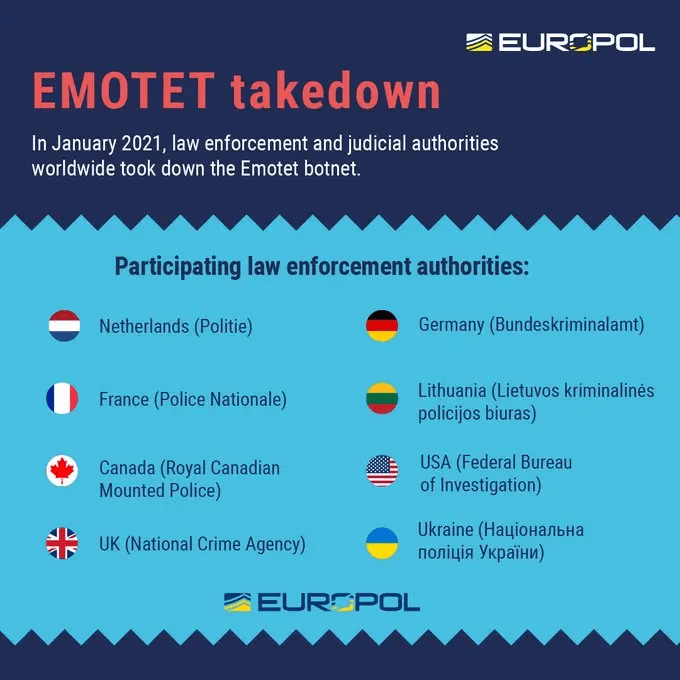
On the 27th of Janaury, the European Union Agency for Law Enforcement Cooperation (Europol) announced that ‘Operation Ladybird’ was successful – the name of the Operation which aimed to bring down Emotet and neuter it.

The method of the takedown was unique to say the least.

emotet

Ukrainian polices forces raided Emotet operators, and seized their systems.

With the systems retrieved, Europol dug through Emotet’s hierarchal infrastructure. All redirects sent to servers controlled by Mealybug were instead sent to servers controlled by law enforcement agencies.

There are 45,000 infected hosts in the US, and many more worldwide – These now have a harmless version of Emotet, which only communicates with government servers.

Public Wifi Versus Private Wifi – The Unseen Dangers Of A Connected Society

Our society, whether we like it or not, is becoming more connected at an exponential rate. Not just in a broader sense as the global community forms with the spread of the internet, but in a practical sense in terms of infrastructure that the movers and shapers of society are building.

On the grand scale, we can see this most clearly in designs like China’s smart cities. For a more visible view of this future-proofing phenomenon, cast your eyes to the sky at the right place, at the right and you’ll be able to catch a glance of SpaceX Starlink satellites.

These tectonic shifts of society are rarely defined by those vast events, but rather the bedrock of any movement – The grassroots level.

In our transformation to an interconnected society, we first saw these grassroots movements in hotel lobbies and cafés. Both are institutes that benefit from supplying their patrons with a sense of comfort and ease, implanting a desire to stay longer or make a return trip. For customers coming from home, this meant supplying the internet connection they were used. For business trippers and those wanting to hold a meeting on neutral ground, it meant supplying the same.

Thus began the spread of public wifi on a consumer, everyday level. After the hotels and cafés, it began creeping into airports, gymnasiums, bus terminals, and of course sporting arenas. Only a handful of years ago, you might see a café get good reviews because it had some public wifi. Nowadays, a café without public wifi will face bad reviews. Public wifi, once a modern and attractive feature to have on your premises, has become an expectation – A necessity as common as fire insurance.

It has been said that technology evolves so quickly that legislation cannot be written and passed fast enough to accommodate for the change it brings. That is true, but it is also true that technological adoption evolves so quickly that the security practices that should protect it cannot hope to keep up.

It is widely accepted by every technological industry is extremely unsafe, but this has not hindered its growth. On the contrary, its inherent danger allowed it to catch on so quickly. Without rigid protocols or secure sign-on processes, public wifi is trivially easy to install at just about any place of business that requests it.

The public, for the most part, seems unaware of this or are generally unaware of how to approach security when it comes to public wifi. Moving forward as a society, public wifi isn’t going away and will continue to propagate in our cities, towns, and villages. It may be too late to halt that, but it is not too late to educate ourselves on public wifi, and how best to protect ourselves when using it.

What is Public Wifi?

Public Wifi, very simply, is mostly any wifi connection your device can connect to in public. As mentioned, this is most commonly seen in establishments like hotels, cafés, and airports. Local governments in cities globally have also been establishing HotSpots of connectivity to busy locations – streets, or busy parks in a city.

The private sector has caught on to this too, most notably Comcast in the United States. Every consumer Comcast router broadcasts a secondary network that acts as public wifi, allowing anyone with Comcast account credentials to use that network. Take a walk down any residential suburb in America and take a glance at your phones available networks and it will become clear Comcast has built up a substantially large network of public wifi across the population hubs.

Mass-adoption at this scale has built a familiarity in public wifi for people, and therein lies the danger.

Wifi

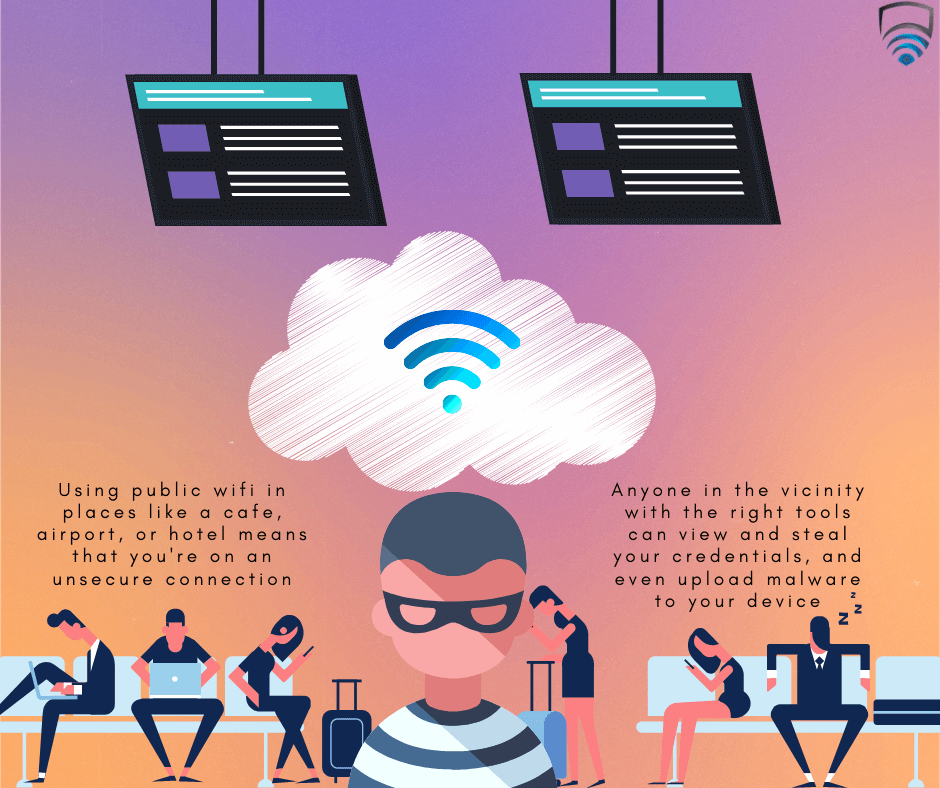
The nature of public wifi means anybody can access it, and because these networks are unsecured, all traffic can be seen on the network.

What this means on a practical level is that all data you send – login credentials, emails, messages and even banking information – can be intercepted by anyone who’s interested.

It is easy for us to picture in our head the individual who may too this, sweater hood up and hunched over a massive laptop (Admittedly, my own image above is guilty of this). It’s true that hackers will often use laptops, but advanced in technology has meant that the required tools needed to spy on you are available on just about any Android phone.

That means that anybody just holding a phone in your vicinity while on public wifi can see what you’re doing, what you’re receiving, and what you’re sending.

What is Private Wifi?

The majority of us are more used to private wifi. Often public cannot be avoided, but most of our work is done using a private connection.

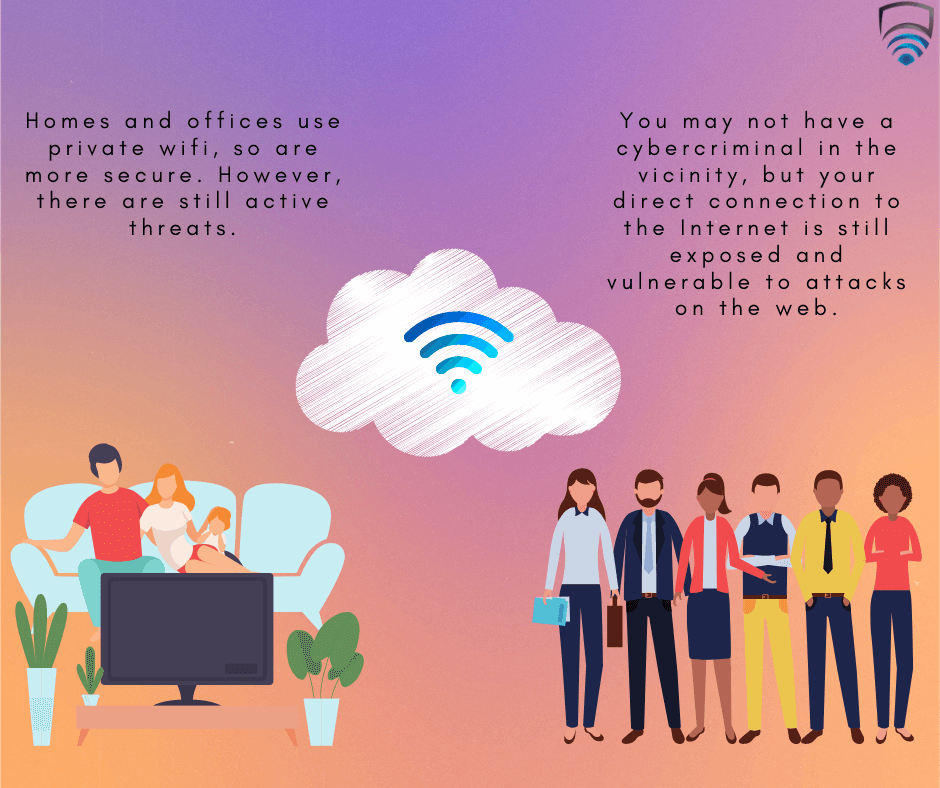
Private Wifi is mostly commonly found in homes and offices. The network makes up of one or more routers, to which you, your family members, or your colleagues are all connected to.

Though often public wifi makes use of passwords, private wifi nearly always requires a password.

One of the key difference between public and private wifi is trust. Trust that your family members and colleagues have your best interests at heart and aren’t secretly cybercriminals, which, thankfully is unlikely to happen. The other members in your network aren’t interested in taking your details, so you’re much safer.

This safety from immediate attackers certainly makes using private wifi much safer than public wifi, but you are nowhere near being fully safe.

Wifi

Like all points of connection to the internet, you are still vulnerable to being attacked from the exterior. Malware, adware, spyware, trojans, and more are rife on the Internet, and the nature of your connection being over private wifi doesn’t protect you or change that fact. Precautions and sensible security practices are always advised.

Do’s and Don’ts of Public Wifi

Hopping on public wifi is often unavoidable unless we have a very good book in our possession or a generous data plan and decent cellular. For those long train journeys, airport layovers, or simply passing the time in a café, try to keep these Do’s and don’ts in mind.

  • Do try to choose public wifi which requires a password or login.
  • Don’t access anything that requires a login, like social media and especially banking accounts.
  • Do ask for assistance if multiples of the same network appear. For example, in a café, you may see two networks with the same name and password. Ask the employees which is the legitimate one, as honeypot clone networks are often an attack vector set up by hackers
  • Don’t leave automatic connectivity or sharing switch on with any of your devices. Connecting automatically to any open network is dangerous while sharing means your files are easy pickings for anyone on the same network as you.
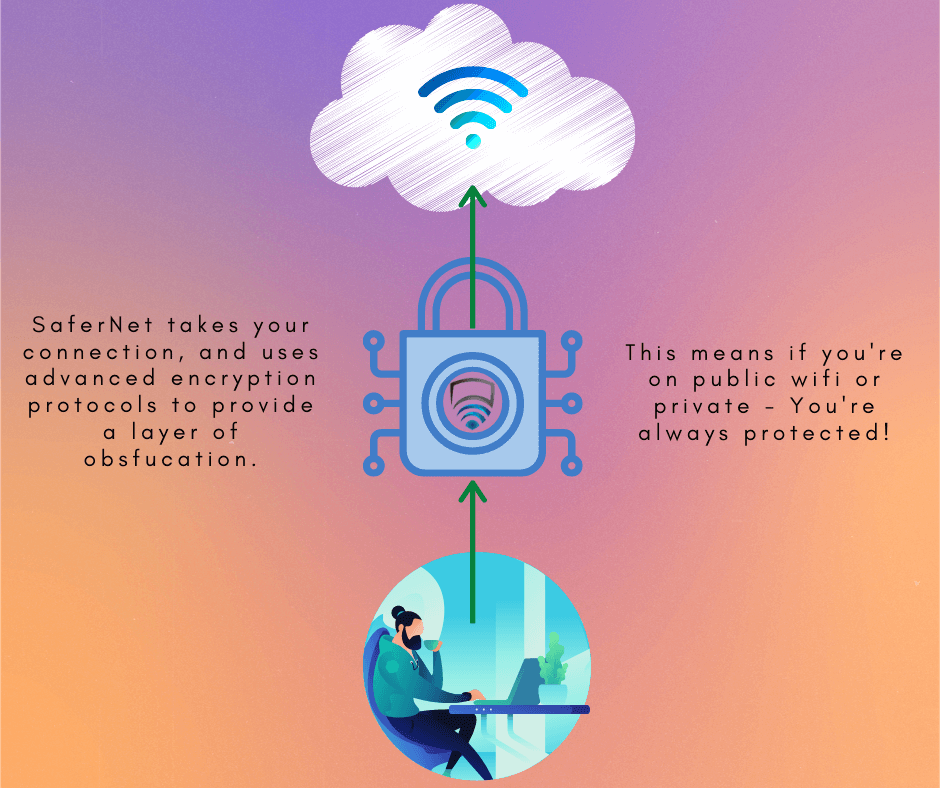
  • Do use a VPN. A VPN can neutralize the negatives of public wifi, and you can browse as you would on private wifi. VPN services, like SaferNet, will encrypt all your data and so it will remain private.

Virtual Private Networks and Public Wifi

As stated above, a VPN can effectively negate any attacks one might encounter on public wifi. SaferNet was engineered to tackle many ills of the internet we find ourselves facing today, including threats encountered on public wifi. Your device – Phone, laptop, or computer – are encrypted before they communicate with the network, public or private. This means your security is assured wherever you find yourself.

Wifi

SaferNet is the perfect solution to the cybersecurity issues that individuals, families, and businesses face today. It not only connects every device using a secure, 24/7 always-on, military-grade VPN, but it also stops outside cyber threats, malware and viruses as well. On SaferNet, all users are protected anywhere in the world, all the time, on any cellular or Wi-Fi network. In addition to SaferNet’s VPN and cyber protection, it also offers a range of employee or parental/family internet controls including internet filtering, monitoring, scheduling, and blocking access to websites or even entire website categories

Typically, a business or family would need 3 separate services for a VPN, Malware Protection, and Internet Controls; SaferNet offers all 3 features in one service. SaferNet truly is an endpoint security presence that can be implemented in minutes around the world, on phones, laptops, tablets, and computers at an economical price point that caters to all sizes of businesses and families. SaferNet guarantees a smooth setup and installation process that takes only minutes, and an easily accessible control hub for you to monitor all your employee’s or family members’ devices; including activity, time spent online, and threats blocked.
DuckDuckGo Takes Great Leap Forward In The Battle For Online Privacy

DuckDuckGo has seen an exponential increase in traffic as it continues to stand up for privacy by implementing Global Privacy Control

The decisions and choices we make now on how we operate online will decide the outlook of the digital landscape for decades to come. Protocols and standards we implement and attribute value to at this juncture will dictate what is tolerated in the future. One such standard is privacy; specifically our privacy online. Privacy should be a right by default, but it’s long been taken for granted on the internet. Worse so, it’s been abused by those who once espoused that they would protect it. Big Tech, and many of their related services have increasingly breached the inherit trust of their users by using their data without their consent.

These breaches haven’t gone unnoticed. Globally, in the last few years, many governments have made steps toward protecting their citizens privacy by introducing various laws to tackle privacy breaches; GDPR, CCPA, LGPD to name a few. If you live in a territory that benefits from one of these, you’ve certainly noticed changes to your general browsing experience – Long forms to fill out on blogs, intrusive pop-ups before you can view websites – it can be daunting. Moreover, many websites make use of Dark Patterns to bypass these laws, and grab your data without your consent regardless. To combat this issue, Global Privacy Control (GPC) was formed – with DuckDuckGo as one of it’s founding members.

Global Privacy Control

Global Privacy Control

Global Privacy Control is a new web standard, and it’s members make up some of the biggest names in online privacy – DuckDuckGo, Brave Privacy Browser, Abine, Disconnect, and more.

Rather than clicking through tedious forms, or even being forced to opt-in without consent, the GPC approaches the problem with a global and by-default solution. In shorts, a user would use a platform which has GPC built in, enable the global switch, and the browser will then send the GPC signal via the browser to whichever website is being visited. It’s a hands-off method for the end user, where they get to exercise their rights to digital privacy without the need for legwork.

Beneath the hood, the implementation is simple enough. With GPC enabled when you visit a website, there will be a ‘Sec-GPC header‘ the website will be able to read. If the value is read as ‘Sec-GPC-field-value = “1”‘ , it means the user has revoked all permissions for their data to be sold to third parties. Giving users the ability to easily control their privacy like this is just the first step to ensuring that privacy can remain a given right, and not something taken from us so easily.

Implementation of GPC by DuckDuckGo

DuckDuckGo has long been an advocate for online privacy , since their foundation in 2008. Being a founding member of GPC, an implementation was expected. In late January 2021, DuckDuckGo announced that they would be implementing GPC in their apps and extensions.

With it enabled, DuckDuckGo users will automatically exercise their opt-out under legislation such as the CCPA and GDPR.

The implementation of GPC is a welcome addition to DuckDuckGo’s toolkit, which already boasts a number of privacy policies; including protecting it’s users from being profiled in their search results, and compatibility with TOR.

DuckDuckGo

The new changes come to DuckDuckGo at a time when privacy is once again in the spotlight – WhatsApp made headlines as it changed it’s privacy policy and caused users to flock en masse to alternative services such as Signal and Telegram. Facebook, who have owned WhatsApp for a number of years, already have their hands full with Apple – who recently made steps themselves to give their users more control over their privacy by default, which would affect personalized advertising. Apple’s decision caused Facebook to lash out, and they went as far as taking out full page ads in the New York Times, Wall Street Journal, and Washington Post criticizing the move.

DuckDuckGo as a rival to Google

DuckduckGo v Google

For better or worse, Google has been become the leading authority in the search engine game and how we browse – So much so that their name has become classified as a verb meaning to search the world wide web.

DuckDuckGo is one of many alternative search engines to Google, but due to their emphasis on privacy, they have pulled ahead of the competition. Online privacy, once only a concern of the most die-hard techies, makes headlines more frequently as the years roll on. This can be seen in DuckDuckGo’s traffic – in 2020, they received 23 billion search queries. 2019 saw 15 billion queries, and the previous year saw 9 billion – a growth rate which is nothing less than exponential.

It is not known exactly how many people use DuckDuckGo; due to their rigid privacy rules they don’t know themselves, but their future, and the future of user’s privacy globally, is looking bright.

Virtual Private Networks

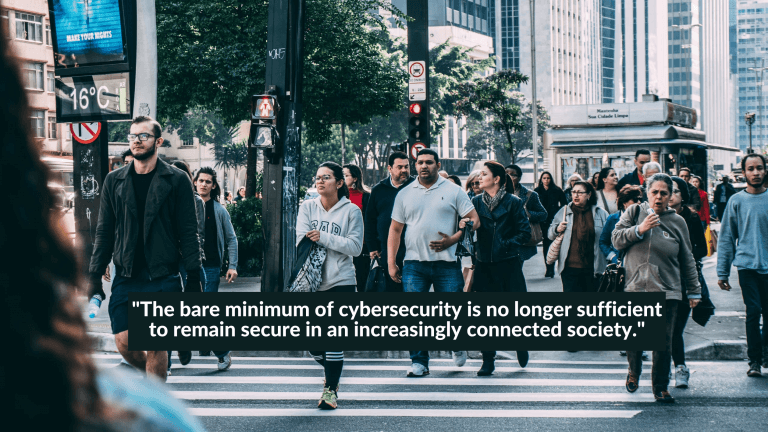
VPN’s, or virtual private networks, have nearly become a household term in recent times. Once being used almost exclusively by businesses, VPNs found favor with journalists and freelancers who needed anonymity for one reason or another, and eventually became popular in countries where Internet censorship and restrictions began to take place. Fast forward to the 2010s, VPNs evolved and gave themselves purpose to appeal to nearly every type of Internet user; be they ordinary people looking to stream on geo-locked services, individuals with privacy concerns, or small businesses trying to set up a cybersecurity solution with minimum overhead. Today, escaping the VPN is nearly impossible – YouTubers, Podcast Hosts, and even TV talk-show hosts are all endorsing various VPN companies. It’s easy to view VPN’s are an add-on for security, but in actuality they’ve become a necessity; the bare minimum of cybersecurity is no longer sufficient to remain secure in an increasingly connected society.

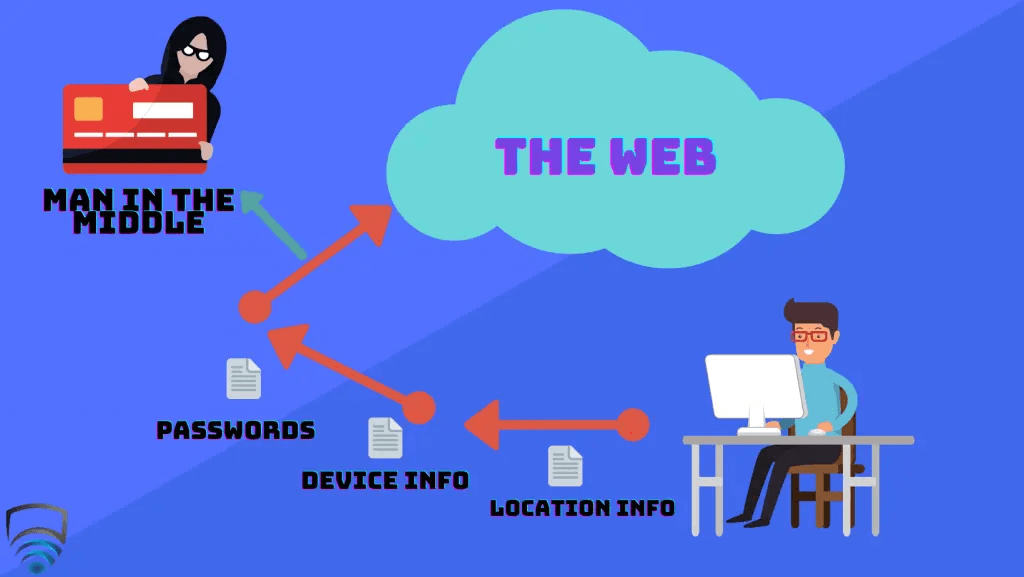
At a purely basic level, a VPN is used to encrypt your data and add a layer of privacy to protect your identity. Often, VPN’s are described as a ‘tunnel’ that your connection enters and accesses the web through. Usually when you connect to the internet, you do so via your internet service provider (ISP) and your connection is unprotected. In this state, the data you send to the internet is visible to anyone. This includes the the IP address of your device, your location, device information, and often times passwords and other private credentials. This is where the vulnerability lies; the most obvious man in the middle who wants to intercept your data here are hackers, but in the modern age you also have to deal with governments, advertisers, and even your own ISP. This is where a VPN comes in.

VPNs

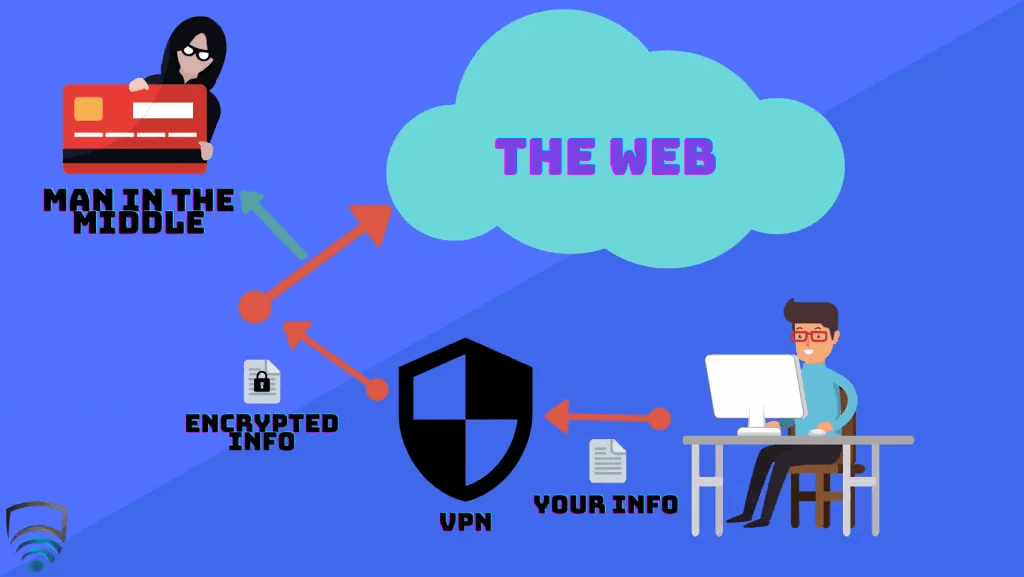
With an active VPN, the data no longer directly goes from your device and to the Internet. Instead, the data first goes through the VPN’s server, and then to the Internet. The connection between your device and the Internet is now in this ‘tunnel’ we mentioned earlier. The key here is that if an entity in the middle does try intercept your data, all they will see is encrypted traffic – Obfuscated information that makes little sense to the viewer, and in the majority of cases, cannot be deciphered. Any party that requests your data would instead be lead the VPN server, and your footprint remains anonymous. Many VPN companies opt to host their servers in a wide variety of locations and this is probably what VPN’s are most known for to everyday people – Location spoofing. Very simply, when you access a VPN server in a different location such as another country, when the VPN server directs your data to the Internet is appears as if you are active from that new location. This has a range of benefits, mostly commonly to view geo-locked streaming services, or booking hotels and flights who’s price vary depending on the buyers location.

VPNs

In non-technical terms, Encryption Protocols and Ciphers are what define the strength, complexity, and resilience of the ‘tunnel’ that protects your data when using a VPN. This is where some VPN companies differ; Though there are certainly industry-standards for both Protocols and Ciphers, different companies may choose different options for a variety of reasons. OpenVPN is a standard Protocol used by most VPN providers, which itself makes use of TLS and SSL Protocols. IKEv2/IPsec also provides comprehensive VPN coverage and is engineered for clients that swap connections often, which makes it ideal for mobile devices. L2TP/IPsec, a proprietary Microsoft Protocol, has it’s uses especially for legacy devices, but can easily be blocked by system administrators and has generally slow performance. SSTP, another Microsoft Protocol, offers the advantages of OpenVPN but is mostly only available on Windows devices. SSTP also suffers from being closed-source, which makes it difficult to scrutinize by researchers. The decision for what Cipher to take is much easier – Advanced Encryption Standard (AES) is the industry standard across the board, offering both AES-128 and AES-256; the latter being more favorable. ‘256’ refers to it’s key-length, and brute forcing through this would take billions of years to run through each possible combination. Overall, the average end user shouldn’t be overly concerned with what types of Protocol and Cipher are being used – Any of the above mentioned will trump an unprotected connection at any time.

VPNs

As VPN’s evolve into a more consumer friendly product, they have become a key weapon in any cybersecurity toolkit. Ten years ago VPN’s were marketed to the public with primarily location spoofing in mind, but VPN’s offer much more now, including malicious website blocking via DNS filtering, as well as parental controls. Businesses have made use of modern VPN’s not just for their inherit cybersecurity, but for their network monitoring capabilities to keep an eye on employees. The same is said for families running parental controls, where parents can now have a view into what their children are viewing online. Cybersecurity is an ever-changing industry, and there are alternatives to VPN’s rising and falling frequently – What’s clear is that given their low-cost, easy setup, and pure accessibility, VPN’s have their role in our online society, and are here to stay.

State Sponsored Hackers Attack US-Based Cybersecurity Researchers

In January, it came to light that state sponsored hackers attacked US-Based cybersecurity researchers. As of February 1st, Google researchers believe the attack is still on-going; a part of a larger campaign by the government of North Korea that has been happening for many months.

The attack was carried out via social engineering, followed by an attempt to install malware on the target’s machine, which would act as a backdoor. With this backdoor in place, the culprits would be able to gather intel on the researchers work; possibly around vulnerability the research community as a whole were working on.

Attack Methodology

Hacker Attack

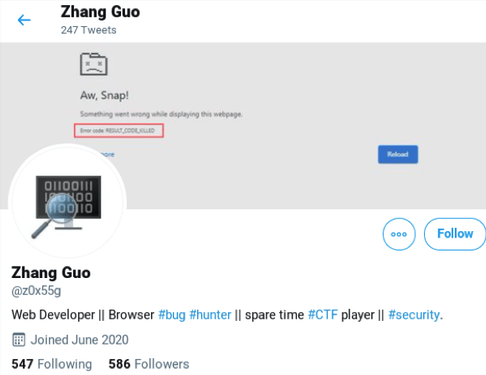
Twitter Account belonging to one of the attacks

In order to gain trust within the research community, the hackers created Twitter accounts – These were linked to their own “research” blogs. From these accounts they would share what you’d expect from a researcher – tweets on their own research including videos, retweets from other researchers, and links to their own blogs and others.

These actions helped build credibility and a sense of legitimacy in their Twitter accounts.

As their blogs increased in popularity, they often has guest bloggers – Legitimate individuals from within the research community. This, again, helped the hackers credibility.

Once they had established themselves on Twitter, the next phase began. The hackers started to reach out to researchers on Twitter via private message.

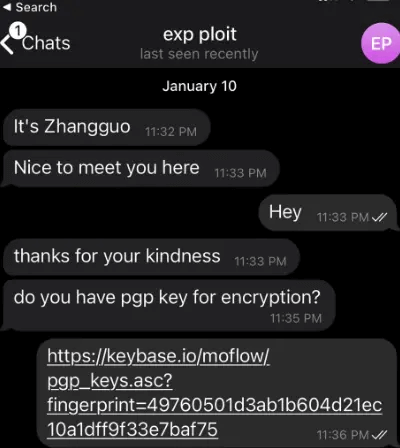
The state sponsored hackers proposed to the target that they should collaborate on research together. Once the target seemed interested, the conversation would then continue via Telegram.

Hacker Attack

Conversation on Telegram between one of the hackers and researcher Richard Johnson

The collaboration was around vulnerability research, and the hacker would provide the target with a Visual Studio Project. Within the Project was the exploit source code, and a DLL. Upon installation, the DLL would immediately begin to communicate with domains controlled by the hackers. Together, these would provide a backdoor into the researchers machine.

It is currently unknown how many targets the attacks were successful on. One such target, cybersecurity researcher Richard Johnson, had run the Project on a Virtual Machine (VM), and was unscathed.

Additional Attack Vectors

Since details of the initial attacks became public, Google’s Threat Analysis Group (TAG) have identified a separate attack vector linked with the same state sponsored hackers.

The blogs created by the hackers were shared on numerous socials – Reddit, LinkedIn, Discord, and the aforementioned Twitter.

Specifically, one blog titled ‘DOS2RCE: A New Technique to Exploit V8 NULL Pointer Dereference Bug’ was shared from October 14th 2020 onward. It was discovered by Microsoft that the simple act of clicking the link to this blog would deploy malware to the victims browser. The malware would reach back to the hackers controlled domains and execute malicious javascript. It is thought that the attack was successful on a up-to-date versions of Chrome, leading Google to remark that it took advantage of a zero-day vulnerability.

Identity of the state sponsored hackers

Hacker Attack

It is suspected the attackers behind these events are a part of ZINC, which works under Lazarus Group. Lazarus Group first came into the public spotlight when they carried out Operation Troy, which ran between 2009 and 2012.

Operation Troy was a series of distributed denial-of-service (DDos) attacks targeting government establishments in Seoul, South Korea.

Lazarus Group made the news again, identifying themselves as ‘Guardians of Peace’, in November 2014 for carrying out the Sony Pictures hack. During the attack, confidential data of many Sony Pictures employees were released, and initially circulated on Reddit. This attack is notable in the history of Lazarus Group; it was carried out in a sophisticated and complex manner, showing the group were now developing their skills rapidly.

Lazarus Group have also been responsible for a number of digital bank-heists; and the amount seized is believed to be at least $97 million.

The WannaCry ransomware attack of 2017, which saw a number of healthcare systems including the NHS in the UK brought to a halt, is believed but not confirmed to have been carried out by Lazarus Group.

As of today, Lazarus Group are involved in a number of additional attacks, notable the late-2020 pharmaceutical company attacks. By using spear-phishing methods, members of Lazarus Group acted as health officials and reached out to a number of pharmaceutical companies. Once trust was gained, Lazarus Group sent a number of malicious links to the companies. It is unconfirmed what the goal of the attack was, but it is suspected that they were looking to sell data for profit, extort the companies and their employees, and give foreign entities access to proprietary COVID-19 Research.

State sponsored hackers in the past

Hacker Attack

State sponsored hackers have been one of the largest forces behind cyberattacks for decades. Other notable state sponsored hackers include Bureau 121, Cozy Bear, The Shadow Brokers, Iranian Cyber Army, Red Apollo, and Equation Group – to name a few.

While state sponsored hackers have been known to the authorities and others in the industry for many years, they became a headline when The Shadow Brokers stole a number of tools from the National Security Agency in 2016. Many of the tools have since been sold to other groups, and now form a cornerstone of many attacks we hear of today.

A notable attack carried out by state sponsored hackers carried out recently was the Solar Winds attack. The attack had been on-going for many months before detection, with many outlets naming it as the ‘Deadliest cyberattack in US History’ due to its scale.

Looking Forward

Attacks carried out by state sponsored hackers often leave long-lasting ripples, and this one by Lazarus Group is no exception. The sense of distrust in the cybersecurity research community has began to grow, though an attack like this can eventually bring a community closer together. In terms of silver-linings, best security practices have been brought to the front such as running Projects and other files within a VM.

Both Google & Microsoft are continuing their research into this incident, as are the cybersecurity researchers on Twitter – the good ones. How far this has reached remains yet to be seen.

The Rise of Cyberattacks During the Pandemic

With the advent of the Coronavirus, or COVID-19, there has been a large spike in global internet activity; be this from individuals having to self-isolate, kids out of school, or the masses of employees who are currently working from home. Sadly, this has lead to a monumental increase of cyberattacks from bad actors; hackers both professional and amateur, taking advantage of an event when we as people are reliant on the web more than ever. These have mostly taken the form of Phishing attacks. Phishing is the fraudulent attempt to obtain sensitive information such as usernames, passwords and credit card details by disguising oneself as a trustworthy entity in an electronic communication. Phishing Scams are happening across all Social Media, Text and Email platforms. It’s hard to know what websites and shared links are safe and legitimate.

Here at SaferNet, we strive to make the Internet a more secure, safer environment. We offer a reliable and robust VPN (Virtual Private Network) that can be used on any device to supply complete protection against phishing scams, malicious attacks, assaults on your network, hacks, and much more. Now, its is more important than ever to protect yourself from digital scams, viruses, and malware. Below, we have outlined some of the most common types of Phishing attempts – What to know, what to look out for, and how to protect yourself.

Email Phishing

Cyberattacks

Most phishing attacks are sent by email. The crook will register a fake domain that mimics a genuine organization and sends thousands out thousands of generic requests. The fake domain often involves character substitution, like using ‘r’ and ‘n’ next to each other to create ‘rn’ instead of ‘m’. Alternatively, they might use the organization’s name in the local part of the email address (such as [email protected]) in the hopes that the sender’s name will simply appear as ‘PayPal’ in the recipient’s inbox.

At a time where many governments are planning on sending their citizens financial relief for those out of work during the Corona Pandemic, there has been an enormous spike in Email Phishing. Hackers pose as government officials, social security workers, and more to try get innocent people to part with their details. These attacks are extremely effective against those who are not tech savvy. There are many ways to spot a phishing email, including double-checking email addresses, but as the attacks become more sophisticated, these are getting harder to spot. One sure way to protect you, your employees, or your loved ones against getting duped is to use SaferNet. SaferNet will block all email phishing attempts. If the target opens the email, and accesses the link, SaferNet will target the link automatically and block it, ensuring your data remains in your hands.

Angler Phishing

Cyberattacks

A relatively new attack vector, social media offers a number of ways for criminals to trick people. Fake URLs; cloned websites, posts, and tweets; and instant messaging (which is essentially the same as smishing) can all be used to persuade people to divulge sensitive information or download malware. Alternatively, criminals can use the data that people willingly post on social media to create highly targeted attacks. In 2016, thousands of Facebook users received messages telling them they’d been mentioned in a post. The message had been initiated by criminals and unleashed a two-stage attack. The first stage downloaded a Trojan containing a malicious Chrome browser extension on to the user’s computer. When the user next logged in to Facebook using the compromised browser, the criminal was able to hijack the user’s account. They were able to change privacy settings, steal data and spread the infection through the victim’s Facebook friends.

These kind of attacks have been on the increase with regards to targeting kids especially, where malicious links are embedded in most commonly YouTube videos, but have also been seen on Instagram. Angler Phishing is soaring, with nearly every person in the globe being involved with some type of social media. As this type of Phishing becomes more sophisticated and harder to detect, SaferNet is ahead of the pack in being the only reliable method to avoid you or your loved ones having their details or accounts compromised.

Smishing (SMS Phishing)

Cyberattacks

With Smishing, telephones replace emails as the method of communication. Smishing involves criminals sending text messages (the content of which is much the same as with Email Phishing). A common smishing scam involves a criminal posing as a fraud investigator (either from the card company or the bank) telling the victim that their account has been breached. The criminal will then ask the victim to provide payment card details to verify their identity or to transfer money into a ‘secure’ account – by which they mean the criminal’s account.

Sometimes they will take the form of a fake direct-message or a cancellation link, which are often designed as a fake page you trust that gathers personal data. These are extremely common, and during the pandemic have seen an increase in popularity; Similar to Email Phishing, the criminal may pose as a government official looking for personal details to issue financial relief. The transaction of course never takes place, and the target is duped. SaferNet provides a shield against Smishing, automatically blocking and quarantining any suspicious link found in these schemes.

Smishing (SMS Phishing)

Cyberattacks

There are two other, more sophisticated, types of phishing involving email. The first, spear phishing, describes malicious emails sent to a specific person. Criminals who do this will already have some or all of the following information about the victim:

  • Their name
  • Place of employment
  • Job Title
  • Email Address
  • Specific Information about their job role

One of the most famous data breaches in recent history, the hacking of the Democratic National Committee, was done with the help of spear phishing. The first attack sent emails containing malicious attachments to more than 1,000 email addresses. Its success led to another campaign that tricked members of the committee into sharing their passwords. These attacks are particularly aggressive in that they most likely already have your social media profiles and select target information. Using SaferNet 256-bit, bank-level encrypted VPN, you, your business, employees or family are safe against all attempts of spear phishing

Smishing (SMS Phishing)

Cyberattacks

Whaling attacks are even more targeted, taking aim at senior executives. Although the end goal of whaling is the same as any other kind of phishing attack, the technique tends to be a lot subtler and sophisticated like Spear Phishing

Criminals attempt to imitate senior staff, and scams involving bogus tax returns are an increasingly common variety of whaling. Tax forms are highly valued by criminals as they contain a host of useful information: names, addresses, Social Security numbers and bank account information. C-Suite posts that have higher access to large databases that can lead to organizational phishing attempts as employees and vendors trust the spoofed domain and potential important information. Banks, Technology, Healthcare are most targeted sectors for these attacks.

Conclusion

SaferNet, our 24/7, always-on, bank-grade VPN is your best, most reliable protection against not only phishing, but all forms of malware attacks during this time. SaferNet guarantees a smooth setup and installation process that takes only minutes, and an easy accessible control hub for you to monitor your network. While our monthly subscribers are guarded against all forms of attack, free users are left open to attempts like those listed above. Protect you, your employees, your loved ones, or your business today. Have peace of mind that your online and network Safety is assured.