Exploring SaferNet’s 3-In-One Cybersecurity Strategy

The need for cybersecurity is undeniable in today’s digital world. However, online security is often clouded by technical jargon, high costs, and complexity, discouraging many businesses and families from taking the necessary steps to protect themselves. At SaferNet, we recognized this challenge and are on a mission to simplify cybersecurity with our innovative 3-in-One Cyber Safety solution. Our goal is clear, and that is to make cybersecurity accessible, efficient, and effective for everyone, regardless of their technical expertise. Feel free to explore our monthly VPN service to experience the peace of mind that comes with uncompromising online security.


Introducing SaferNet: Your Cybersecurity Guardian

At SaferNet, we believe that cybersecurity should be accessible to everyone. That’s why we’ve developed a comprehensive solution that covers three crucial aspects of online security- Virtual Private Network (VPN), Internet Controls, and Virus Protection.

Let’s dive into these components to understand how SaferNet can safeguard your digital world.


VPN – Your Secure Connection to the Digital World

24/7 High-Security VPN Encryption: SaferNet’s VPN offers robust 256-bit encryption, ensuring that your data remains secure round the clock. It connects all your devices to a cloud-based dashboard, allowing you to monitor and manage your online activities. Explore our website or contact us to check the monthly VPN cost.

Military-Grade Encryption: We use AES 256-bit encryption, the same level of security trusted by the military and banking industries. When your devices are connected to SaferNet’s VPN service, all data sent over the internet is shielded with this formidable encryption, making it nearly impossible for cybercriminals to intercept or decipher your information.


Internet Controls – Taking Charge of Your Online Experience

200 Internet Controls: SaferNet empowers you with 200 Internet controls, allowing you to manage and monitor all your connected devices effectively. These controls cover a wide range of functionalities, including internet filtering based on categories, scheduling on/off times, and white/blacklisting of websites.

Traffic Visualization and Monitoring: With SaferNet, you can visualize all your internet traffic and maintain a watchful eye over your devices. Plus, our system identifies and blocks any suspicious “entourage” traffic trying to steal your data, providing an additional layer of protection.

Comprehensive Reporting: Administrators can use SaferNet as a powerful parental control tool for families or a robust business internet management solution. Monitor activity on any device, see allowed and blocked traffic, and gain insights into thwarted outside attacks, which can occur hundreds of times per hour per device.


Virus Protection – Defending Your Devices in the Cloud

Cutting-Edge Virus Protection: SaferNet’s internet Virus Protection is designed to eliminate threats in the cloud before they can even reach your devices. Our system employs OpenSSL encryption and utilizes machine learning-powered DNS filtering and domain identification to shield your devices from current and future malware threats.

Compatibility Across Devices: Whether you’re using laptops, desktops, or smartphones, SaferNet’s Virus Protection has you covered. It’s suitable for any device that accesses the internet, ensuring complete security for your digital world.

Tailored Protection: We offer specialized virus protection for Windows and Mac systems, ensuring that all users receive the utmost security and defense against cyber threats.


Simplicity in Complexity

At SaferNet, we strive to simplify cybersecurity. We understand that the complex world of online security can be intimidating, but we firmly believe it should be accessible to everyone. With SaferNet’s 3-in-One Cyber Safety solution, you can know that your digital world is protected without the confusion and complexity that often comes with cybersecurity.


Choose Your SaferNet Monthly VPN Plan

Our plans come with a 100% money-back guarantee for the first 30 days of service. All SaferNet plans include 24/7 VPN access, Virus Protection, 200 internet controls, customer support, and high-speed unlimited bandwidth. It’s time to take control of your online security and enjoy a safer digital experience. Check us out if you’re looking for the best monthly VPN plan.

SaferNet is here to simplify cybersecurity for you. Our easy-to-use solution ensures that your online presence remains secure, your devices are protected, and your peace of mind is intact. Get the most out of our monthly subscription VPN, and contact us to learn more about our services and offerings.

6 Reasons Why You Need A VPN For Cryptocurrency

Despite the popularity of cryptocurrency, many investors and traders don’t give a second thought to security – Which they pay for dearly. Today we look at the 6 reasons why you need a VPN for cryptocurrency.

Cryptocurrency has been around for over a decade, but it’s fair to say that it only picked up spotlight from the mainstream in 2018, with Bitcoins meteoric rise in the Winter of that year. For the novice investor, this proved to be a costly lesson. Bull runs in any market are destined to end eventually, and cryptocurrency is no different. In January and Februrary 2019, the same bull run became a bear market, and the value of all cryptocurrencies crashes significantly.

This didn’t deter many though, especially those familiar with the ebb and flow of the markets, and those who had believed in the future usability of cryptocurrency.

Those who kept the faith were rewarded, as cryptocurrency saw a massive surge once more during the bulk of the COVID lockdowns. The increasing popularity of NFTs and the Web3 space saw the crypto space gain much-needed use case. No longer a speculative market, cryptocurrency had usage that the average joe on the street could benefit from.

The numbers reflect this. According to statistics website Statistica, the total transaction value in the Digital Payments segment is projected to reach US$8.49tn by the end of 2022. The website also forecast that the total transaction value is expected to show an annual growth rate of 12.31% resulting in a projected total amount of US$15.17tn by 2027.

Despite the massive value cryptocurrency presents, there has been little talk of cybersecurity with regards to cryptocurrency, let alone using a VPN for cryptocurrency.

Anybody who has spent time in the crypto community, especially in the NFT space, knows somebody who has lost out on millions of dollars due to poor security. To this end, we have put together a list of reasons to encourage you to consider a VPN for cryptocurrency transactions, investments, and trading.

VPN FOR CRYPTOCURRENCY – ENCRYPTION

One of the primary uses of a VPN for cryptocurrency is encryption.

Encryption is at the heart of any Virtual Private Network. All VPNs aren’t engineered the same, and depending on the protocols used, a VPN might have different functions, speeds, and vulnerabilities.

The primary role of encryption is make your acitivty inivisble on the net, a huge positive for cryptocurrency. This is done by obsfucating your data – also known as encryption. A VPN with good encryption is one of the strongest digital measures you can take in securing your crypto.

To classify how VPN encryption is used, things like encryption type, protocols, and ciphers used must be considered. These things determine exactly how protection is formed. Each represents a different answer to the cybersecurity question.

There are a lot of moving parts when it comes to this, so we won’t cover them all for the purposes of this article. For ciphers, one of the most powerful choices considering VPN for cryptocurrency is AES-256 (Advanced Encryption Standard). AES is considered the gold standard of encryption ciphers. It is a symmetric block cipher, and is used by the US Government, US Military, and nearly every financial institute in the world. AES is used in software and hardware globally, and is one of the foundational pillars of modern cybersecurity.

It was also taken by the NSA to protect national security systems.

Because of its use by the US government, it became extremeley popular in the private sector, especially as an element of VPN encryption. It is without a doubt the most common choice when looking to setup VPN encryption.

With regards to protocols, using a VPN for Cryptocurrency should be using WireGuard, or the more popular OpenVPN.

OpenVPN is without a doubt the leader when it comes to VPN protocols. It is a protocol but also a software, which uses secure point-to-point and site-to-site connections. Nearly all major VPN providers offer OpenVPN, making it the top dog in the space.

The protocol is responisble for handling client-server communications, and establishes a tunnel between client and software.

OpenVPN handles encryption and authentication, and also uses the OpenSSL extensively. OpenVPN has the option to use either UDP (User Datagram Protocol) or TCP (Transmission Control Protocol) to transmit data.

OpenVPN is best used over UDP, which it will always default to first. It will only attempt TCP if the UDP connection fails.

It uses a custom security protocol that bypass HTTP and NAT.

OpenVPN was the first protocol that championed open-source. Its code isn’t owned by just one entity, and third-parties can always inspect it and continuously improve it. This has lead to some VPN providers building on OpenVPN to build their own custom service, like SaferNet has done.

All in all, OpenVPN is the most popular for a reason. It offers the greatest balance of speed and security, and is truly best-in-class when it comes to using a VPN for cryptocurrency.

VPN FOR CRYPTOCURRENCY – EXTRA PROTECTION FROM HACKERS

To preference this point – The overwhelming majority of VPNs, especially the popular ones, have zero malware protection. This is not always the case, and VPNs like SaferNet do indeed offer comprehensive protection against hackers.

Cybercrime is a huge danger online, more than many internet users know. Cryptocurrency investors and traders are prime targets, given the amount of cash they deal with online.

There are a range of threats online facing cryptocurrency enthuists every second, including:

Ransomware – Ransomware is a virus that encrypts a users device. Following encryption, the user must pay a monetary sum for the return of their device. With regards to using a VPN for Crypto, it is vital that protection is used due to the high amount of ransomware found in the cryptocurrency scene.

Spyware – Spywares main focus is stealing sensitive information from users – Passwords, keys, etc. A VPN for Crypto is invaluable here. Spyware can not only siphon passwords, but also seed phrases which are the final step in accessing an account.

Remote Access Trojans – Remote Access Trojans, or RATs, are very similar to Spyware, however they allow the hacker full control of an infected device. Given their destructive nature, a VPN for crypto is vital in combating RATs.

As stated, the majority of VPNs offer no anti-virus features. This is not the case for SaferNet’s always-on VPN, which was built with twin goals in mind – To offer both the privacy of a VPN and the antivirus capabilities of anti-malware software. While most services require a number of different software solutions to achieve both privacy and security, SaferNet gets it done all-in-one. Given how much cryptocurrency markets and users are targeted, a VPN for cryptocurrency activity is vital.

VPN FOR CRYPTOCURRENCY – PHISHING

Though ordinarily mentioned with malware, the amount of phishing attacks that happen to cryptocurrency investors is so overwhelmingly frequent that it deserves its own entry.

Phishing is perhaps the most well-known attack vector a hacker can utilize. Nearly everyone has seen a phishing attempt at some point in their lives. To put it simply, Phishing is a cybercrime in which a target or targets are contacted by email, telephone or text message by someone posing as a legitimate institution to lure individuals into providing sensitive data such as personally identifiable information, banking and credit card details, and passwords. Phishing is not necessarily all about grabbing credentials, though. Modern phishing methods often revolve around having the target download a file that is covertly malware or enabling macros on a Word document which in turn deploy a virus. Phishing and the act of social engineering come hand in hand.

Between 2018 and 2019 alone, there was over half a billion dollars stolen in phishing attacks, and to date there has been even more in a series of ledger-based phishing attacks.

While Malware in general can lead to huge losses, its clear that phishing is #1 in cryptocurrency attacks. Everybody can get phished, no matter how savvy they are – When considering a VPN for crytocurrency, phishing protection should be a top concern.

VPN FOR CRYPTOCURRENCY – FIREWALL BYPASS

Firewall bypassing is an issue of contention for many, yet still must be considered when looking at a VPN for cryptocurrency. There are also many technical limitations to be considered. While it is not a use case for the many, it is valid for the few.

Firewalls can be found in schools, universities, and more recently in company offices. They are put in place for security purposes – and rightfully so – but often use elements of control like blocking certain website categories. One of these categories is cryptocurrency, and many organisations with a firewall in place do not allow connected uses to access cryptocurrency websites.

When using a VPN for cryptocurrency, many of these Firewalls can be bypassed, and a user can freely trade and invest while on the network. This of course should be used responisibly, and slacking off on the job or in class to trade crypto using a VPN isn’t advisable!

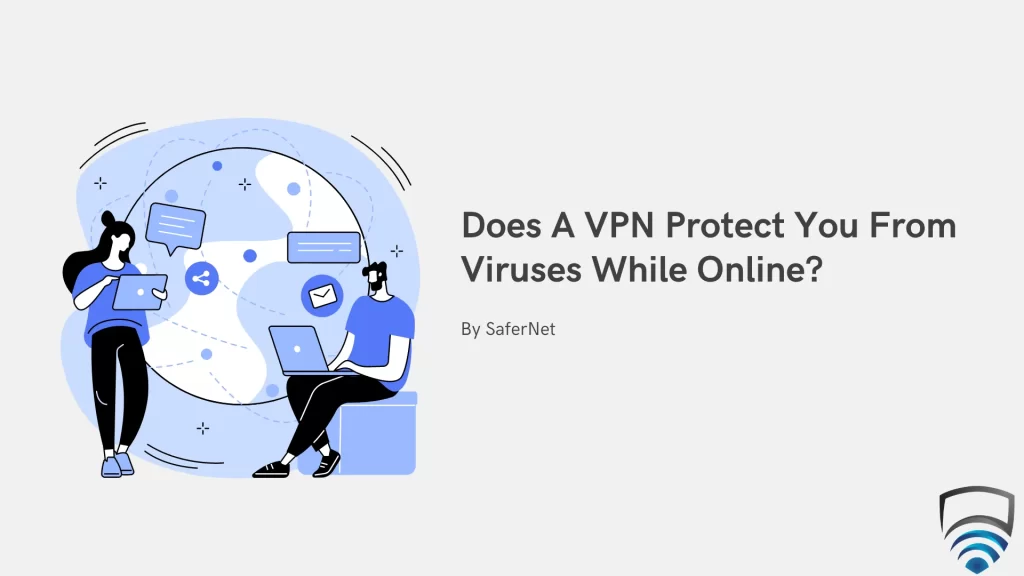
Does A VPN Protect You From Viruses While Online?

VPNs have become ubiquitous, but it’s important to look at how far their protection really goes. One of the most common questions when looking at this protection is “Does a VPN protect you from viruses while online?”

Before we answer that question, its important to understand what a VPN is, how a VPN works.

A VPN, or virtual private network, protects your activity and privacy online by using an encrypted, secure tunnel. While your connection is secured within these tunnels, trackers and third parties aren’t able to investigate your activity. This is because your device is always exchanging data with visted websites and other entities, however, a VPN obfuscates this information.

It’s important to know the tech behind a VPN, starting with ciphers. Understanding the tech is important when asking does a vpn protect you from viruses.

Ciphers are a critical component in VPNs. In simple terms, ciphers are a set of steps can be followed to ensure strong encryption and how this encryption is decrypted. The operation of a cipher depends on a key. Without knowledge of a key, decryption is difficult, and in most modern cases it is impossible. When considering does a VPN protect you from viruses while online, it is important to think about ciphers.

When looking at ciphers, we look at a mixture of the cipher and key-length, which means the amounts of bits in a key. Mostly commonly, this is 256 bits, which is the standard used by banks and the military. It would take billions of years to try every possible combination, so it is not feasible to crack a 256 bit cipher.

Over the years, there has been types of ciphers. Even today, there is a lot of options out there. However, for the purposes of this article, we’ll look at the two most popular ones today – RSA and AES. These are important to understand when considering does a vpn protect you from viruses.

RSA
RSA, or the Rivest-Sahmir Adleman cipher is a great cipher to look at when considering does a vpn protect you from viruses. It is asymmetric, and used in many applications. Though created it 1977, it didn’t see much use until 1997. Unlike many other ciphers, RSA uses both public and private keys as options for encryption, while the opposite will be chosen for decryption. This process ensures confidentiality, integrity, authenticity, and non-repudiation of electronic communications and data storage.

Browsers are the most common applications that use RSA, which is an added layer of protection when considering does a vpn protect you from viruses.

Much of the security of RSA balances around prime numbers, which are fairly watertight at current computing standards – Though this could prove to be a security risk with the advent of quantum computing.

When looking at VPNs, many do use RSA. While offering great security, the need to move to 2048 bit length has caused an already slow cipher type to become even more sluggish. Thus, it doesn’t provide an optimal VPN experience.

AES

The Advanced Encryption Standard, or AES, is the most popular encryption cipher and considered the gold standard of encryption. It is an exceptional choice when considering does a vpn protect you from viruses. It has mass-appeal, given its use by all levels of the US government, including the military. It is also used by every major bank globally.

It was developed in 1997 as a successor to a previous cipher, DES, which had began to age and show some flaws.

The National Institute of Standards and Technology (NIST) stated that the new algorithm would be “capable of protecting sensitive government information well into the 21st century.”. AES has three block ciphers: 128, 192, and 256 bit lengths.

Because of its use in all levels of government, it is extremely popular in industry, especially with VPNs.

The advent of quantum computing poses a far lesser threat to AES than it does to RSA. When considering does a vpn protect you from viruses, you should be looking a VPN that uses strong AES-256 cipher encryption, such as SaferNet.

VPN PROTOCOLS

As well as ciphers, when asking does a vpn protect you from viruses, another factor to consider is protocols. These are a set of instructions on how data is process between a VPN server and your device; it is the bedrock of a secure connection.

Protocols are quite different to one another, and give benefits to VPN users based on their circumstance.

Though there are many protocols, the most effective is OpenVPN, which is used by SaferNet to tackle the issue of does a vpn protect you from viruses.

SSL and TLS
SSL, and its successor, TLS, were invented in the 90s. Both are used to handle web transactions, in particular with regards to eCommerce, and thus were instrumental at the time. However, both can be used to protect any type of network traffic.

Both also benefit from the fact that they can travel through firewalls, providing applications are designed for SSL and TLS. As a result, many users rely on SSL and TLS to a large degree. Many VPN vendors use SSL somewhere in their DNA. Before VPNs were widespread, the question of does a vpn protect you from viruses wasn’t present due to SSL.

Connections rely on authentication of the endpoint the users is attempting to connect to, which is validated by a certificate. These certificates are vetted by certificate authorities.

SSL and TLS both took many years to develop. Though not as commonplace as they once were, they provide foundation technology to both VPNs and browsers. Due to their age they shouldn’t be considered when asking does a vpn protect you from viruses.

IKEv2/IPsec
IPsec is a suite of protocols, of which IKEv2 is a part of (and its predesessor, IKE). IPsec was developed to provide security through authentication through encryption.

At the time of release, IKE brought a lot of great features to IPsec, including automatic negotiation and authentication, anti-replay services, certification authority support and the ability to change encryption keys during an IPsec session.

IKEv2 brought further improvements to IKE, including:

-Less Bandwidth
-Less mathemtically mechanisms
-Needs just one initial exchange mechanism
-Supports mobile devices
-Supports the securing of Stream Control Transmission Protocol (SCTP) traffic
-Greater resistance to DDOS attacks
-Comes equipped with the built-in Network Address Translation (NAT)

While technically impressive, when asking does a vpn protect you from viruses, it shouldn’t be considered.

L2TP/IPsec
Layer 2 Tunnelling Protocol (LT2P) was developed by Microsoft, and as such is a proprietary protocol of the company. Similar to IKEv2, it is relient on and adds to IPSec. Though offering many benefits, it is not a good choice when considering it for a VPN as it is proprietary.

L2TP has also shown quite a bit of trouble navigating firewalls, which holds it back from being a contender in the VPN world. VPN providers generally shy away from LT2P. Though included in the list for its place amongst protocols, it is generally a nonfactor when asking does a vpn protect you from viruses.

Today, it is most seen on legacy devices that do not support OpenVPN, and so isn’t considerable when asking does a vpn protect you from viruses.

SSTP

Secure Socket Tunnelling Protocol (SSTP) is also a Microsoft-controlled VPN. Though offering many of the benefits of OpenVPN, it is only usable on Windows devices.

Furthermore, it is not open-source, which raises some security challenges. Microsoft has also cooperated previously with government entities such as the NSA, so isn’t a good option for individuals with privacy in mind.

Though offering good advantages for Windows users, when asking does a vpn protect you from viruses, we suggest steering clear of SSTP.

WireGuard

WireGuard is the new kid on the block when it comes to protocols, and may even prove to be OpenVPNs first true competitor if development continues as it has. Its creator, Jason Donenfeld, created the protocol specifically to challenge OpenVPN.

The creators argument was that OpenVPN is often too complex to implement for novice developers, and so may create a barrier to good security for smaller companies looking to get a start in the security business.

It is the youngest of the protocols, first being unveiled in 2017.

While OpenVPN will remain as the go-to protocol when figuring out does a vpn protect you from viruses, WireGuard may show up more often in the near future.


OpenVPN
OpenVPN is the most popular of VPN protocols and with good reason. It doubles as a software, allowing VPN companies to build their own stack on top of the already rock-solid base.

It was engineered by James Yonan in 2001, and is one of the few open source protcols to also feature an open source applications accompanying it. In fact, it was the first protocol to champion open source, giving full visibility to anybody who wishes to scrutinize it.

OpenVPN uses 256-bit OpenSSL encryption in most cases, however custom builds can use the AES, Camellia, 3DES, CAST-128, or Blowfish ciphers. It does not support L2TP, IPSec, or PPTP.

The protocol on software has gone through many public audits during its time, giving it further credibility. It is extremely trustworthy when asking does a vpn protect you from viruses.

One drawback is that its implementation can be complex, and so only advanced programmers can implement the base. It takes an even more talented team to build on OpenVPN, as SaferNet has done.

OpenVPN is also one of the few solid protocols available on almost any device. When asking does a vpn protect you from viruses, OpenVPN is your best choice, especially when paired with SaferNet.


VPN ADVANTAGES

While malware might be on your mind when considering does a VPN protect you from viruses, you might also consider the other advantages a VPN offers, including:

Remaining Anonymous Online – Your identity is easily traced when you aren’t using a VPN. This can be done by advertisers, ISPs, governments, and other third parties. With a VPN, thanks to the level of encryption you ordinarily wouldn’t have, your identity remains private.

Security on Public Networks – Though certainly related to does a VPN protect you from viruses, public networks provide a different set of dangers to you and your device. Using a public wifi network such as those found in restaurants, hotels, cafes, airports, bars, or city-wide networks can be extremely dangerous. Others who are connected to the network can do a considerable amount of snooping with the know-how while on these networks. Furthermore, there is a risk of man-in-the-middle attacks, where details you enter online such as passwords and banking credentials can be intercepted by others on the network. A VPN can easily secure your device while using a public network.

Overcoming ISP Bandwidth Limitations – ISPs have been known to limit their users bandwidth in order to make them upgrade their plan. VPNs can overcome this issue, because the data is obfuscated.

Internet Speed – VPNs can often damage internet speed, particularly when using geolocation features. However, this isn’t always the case. When using a VPN and not using these features speed can see an increase – which can be quite a lot when ISPs are attempting to throttle the connection.

There are many other advantages to using a VPN, and these are just some of the highlights.

Phishing is not a type of virus in itself, but rather a method for getting a device to become infected. In essence, it is a social engineering ploy to steal data and deploy further viruses. It is without a doubt the biggest attack vector for all types of malware including those mentioned above.

When a phishing attack takes place, it usually means a hacker is masquerading as a legitimate entity, and tricks the user into opening an email or text message, and convincing them to click a link or download malware. Phishing is a chief concern for does a vpn protect you from viruses.

A huge part of defending against phishing is education, but it doesn’t go far enough. Phishing has become more sophisticated over time, and can be difficult to spot even to the keenest eyes.

DOES A VPN PROTECT YOU FROM VIRUSES?

Sadly, the answer to this question in the majority of cases is No. Some of the most popular VPNs you see advertised have some, little, or no malware protection. This is not always the case, thankfully. Using a VPN for cybersecurity is becoming a more popular idea, and one of the earliest adopters of this line of thinking is SaferNet, which was engineered to present an option for those seeking out cybersecurity via VPN. Using a number of DNS-filtering and machine-learning driven features, SaferNet stands out from the crowd in terms of protecting its users from viruses while online. It is the answer to does a vpn protect you from viruses?

SAFERNET

When asking the question, does a vpn protect you from viruses while online, SaferNet is the only reasonable answer. While connected, all devices have 24/7 protection, and malware is held at bay. SaferNet is available globally, which means you have peace of mind wherever you are. When it comes to VPN protection, SaferNet is best-in-class.

Not only does SaferNet offer cybersecurity-enhanced VPN, it also offers Internet Controls for parental and employer use. It is the complete package, and the best choice for individuals, families, businesses, and organizations. With a simple and fast setup which can be completed in minutes, SaferNet can protect you from the threats of today and of tomorrow.

6 VPN Protocols: What Are They And How Are They Used?


VPN Protocols are a key component to VPNs, Virtual Private Networks. VPNs are a tool that allows users to layer traffic among multiple networks within a secured encrypted tunnel, which gives a number of benefits. VPN Protocols are required to use VPNs, as they provide many key aspects of encryption and decryption.

VPN Protocols are essentially a set of standards for encoding information that travels between one’s device and the web. Each VPN Protocol has different attributes, and certainly, not all VPN Protocols are created equally. Some VPN Protocols are restricted to platforms, or are for a specific use, or are for general purposes use, such as OpenVPN.

Something often mentioned with VPN Protocols is Encryption. Encryption is a technology that encrypts data, and is often the ‘how-to’ directions a VPN takes into account encrypting and decrypting data. We have spoken at length about Encryption in other articles, and so for the purpose of this one, we won’t be looking at it.

So, what VPN Protocols are there? Which should I use? Which is the best? Let’s get into it!

VPN Protocols

PPTP

Though mostly obsolete, PPTP is worth discussing for its historical relevance when looking at VPN Protocols. PPTP was first published in July 1999, and was developed by a consortium consisting of Microsoft, 3Com, Ascend, and some others.

PPTP encapsulates network protocol datagrams within an IP envelope. Following encapsulation, all encounters from that point will it as an IP packet. This encapsulation allows transfer across an IP-only medium, namely the Internet.

PPTP largely revolves around Microsoft RAS and Windows NT. RAS allows for network admins to configure an NT server for remote employees over a dial-in point. Authentication for the RAS users occurs on the NT server, which is governed by a PPP protocol.

PPTP was designed to streamline this process. It allowed users to connect to a RAS server from anywhere while having the same authentication, security, and encryption they’d get when manually dialing in. PPTP and RAS worked in tandem to create a VPN.

Though rarely used anymore, PPTP provided a blueprint for later models. Microsoft went on to engineer many more VPN Protocols, some of which are covered in this article.

L2TP/IPSec

L2TP (Layer 2 Tunnel Protocol) by itself is a VPN protocol with an unusual downside in that there is no encryption offered at all. This is why its bundled with IPSec, a suite of tools focusing on encryption. Thus, the two are often discussed together.

L2TP and IPsec are two different VPN Protocols technically. L2TP is a tunneling VPN Protocol. This means it creates a separate tunnel for data to travel through.

IPSec provides the encryption aspect for the network layer, so all traffic running with the L2TP VPN Protocol is kept secure

L2TP/IPSec is a successor to the PPTP VPN protocol. L2TP/IPSec is a joining of the best aspects of the (then) most popular VPN protocols, L2F and PPTP, while avoiding any disadvantages found on these VPN Protocols.

L2TP encapsulates PPP in virtual lines over IP, and as such requires an IP protocol – mostly IPv4 or IPv6. Again, this is not encrypted, which is why IPSec sits on top of L2TP.

The relationship between the two is not one-sided by any means. IPSec by itself doesn’t have any method to handle authentication or key distribution. And so the two are used together and can provide the following benefits as a VPN Protocol:

-Authentication through local user accounts or EAP
-Message authentication and checks on the integrity of all data
-Mutual Authentication

L2TP/IPsec has a long history when it comes to VPN Protocols and due to its engineering has remained relevant. However, it has mostly been phased out in favor of SSTP.

SSTP

SSTP, or the Secure Socket Tunneling Protocol, a common VPN Protocol that is quite popular. It is a proprietary VPN Protocol developed by Microsoft, so is found on Windows devices. SSTP was developed to replace both the PPTP and L2TP/IPSec VPN protocols. Today, native VPN connections mostly use SSTP if created in Windows. SSTP prides itself in ease of use for both users and network admins.

Unlike its predecessors, SSTP uses SSL/TLS to provide secure key dealings and encrypted transfers. This also gives the user greater freedom when it comes to navigating firewalls.

SSTP uses the same port as SSL/TLS, and it bases the connection on this authentication rather than the devices. With regards to VPN protocols comparison, it is often compared to OpenVPN, which is the golden standard in both encryption libraries and VPN Protocols, and is used in SaferNet.

SSTP was introduced alongside Windows Vista, and has retained its place as a secure VPN Protocols throughout Windows 7, 8, 10, and 11

Like OpenVPN, SSTP uses the Advanced Encryption Standard (AES) encryption cipher, which makes it a very secure option. Some downsides of SSTP is that it is proprietary, and so can’t be scrutinized under the hood. Furthermore, it is mostly only available on Windows devices, so isn’t ideal for everybody.

IKEv2

IKEv2, or Internet Key Exchange version 2, is another VPN Protocol used alongside IPSec. Many VPN Providers will refer to it as IKEv2/IPSec

IKEv2 was a joint collaboration between Microsoft and Cisco. The VPN Protocol has a great reputation, especially when it comes to stability. It is also known to be one of the more speedy VPN protocols.

The role of IKEv2 is to authenticate both parties using a SA attribute.

SA is a method of creating a security agreement between two parties on a network. This is done by forging a symmetric encryption key for both. This information is transferred between client and server and is decrypted using these forged keys.

IKEv2 operates within the user space, while IPSec is a kernel operation, providing good synergy in the VPN Protocol. IKEv2 sends data and establishes security, and IPSec uses this to encrypt the traffic.

IKEv2 is the successor to IKEv1. It provided many advantages over its predecessor, including:

-Fewer messages are required to create a secure connection
-Supports NAT traversal
-Supports EAP
-Supports the MOBIKE Protocol, which prevents data leaks
-Less security associations required to create a VPN tunnel
-More resistant to DDOS attacks
-Implements asymmetric authentication

WIREGUARD

WireGuard is a new kid on the block in the street of VPN Protocols. It’s somewhat of a maverick VPN Protocol, and aims to dethrone OpenVPN and IKEv2.

WireGuard was developed by Jason Donenfield, and was first worked on in 2016. It was originally developed for Linux, but is now available for Windows, Mac, Android, and iOS.

One of the major features that make WireGuard attractive, especially to developers, is it’s incredibly simple to implement. Between them, OpenVPN and IKEv2 have over a million lines of code. WireGuard uses just under 5000 lines, and retains many of the benefits.

WireGuard has reduced CPU usage and faster connection times also, and works very well on mobile devices or IoT devices that don’t have a large amount of processing power. The VPN Protocol also uses very modern cryptography protocols such as Curve25519, ChaCha20, Poly1305 and BLAKE2

Due to the fact it works inside the Kernel, WireGuard can offer a speed boost to internet connection. This is an oddity within the world of VPN Protocols, as many VPN Protocols can slow down a connection. In a conference in 2021, Donenfeld showed a wifi speed increase of a significant amount, but it is unclear if this is typical for all connections.

WireGuard is now widely supported in the world of VPN Protocols, and many VPN vendors offer it.

It isn’t without disadvantages however – For example, it doesn’t offer dynamic IP addresses. It also doesn’t delete the IP address on disconnection, meaning it isn’t without logs. The likes of OpenVPN go much further in protecting user privacy.

Keys are somewhat less secure using WireGuard also, as there is no support for forward secrecy.

Though these disadvantages are present, there is no doubt that WireGuard brings a lot to the VPN Protocol table. It’s hard to say what the future holds for this VPN Protocol, and it very may well take the top spot with further development.

OpenVPN

OpenVPN is without a doubt the most popular VPN protocol, and for good reason. It is considered the gold standard VPN protocol for safety, and you will be hard-pressed to find a VPN Protocol to match it.

It was developed in 2001 and is an open source VPN Protocol, meaning it is open to scrutiny from anybody and easily modified into more advanced VPNs, such as SaferNet.

There are so many variations of OpenVPN that there are constantly new releases, with new features, making the VPN Protocol more faster and more secure frequently.

OpenVPN uses SSL and TLS. It draws extensively from the OpenSSL library and or an extra layer of security, the VPN Protocol uses TLS-auth for packet inspection. This confirms only the right users can encrypt and decrypt data.

OpenVPN offers a large amount of cipher, but as standard implements 256-bit encryption. Mostly commonly, the VPN Protocol uses AES, which SaferNet does in its own OpenVPN implementation.

The VPN Protocol also has an additional encryption feature called Perfect Forward Secrecy, which creates a new key with each connection.

OpenVPN is platform agnostic, meaning it can run on nearly every platform, and so can secure every device.

There are so many features to OpenVPN that they go outside the scope of this article, but rest assured that it is the most secure, customizable VPN Protocol available.

WHICH IS THE BEST VPN PROTOCOL?

Though it can be circumstantial, there is no doubt that the best VPN Protocol is OpenVPN, which is why SaferNet has opted to use it. If you are in a situation where do not own a smartphone and only use the Windows operating system, IKEv2 is an option. WireGuard does have a bright future, but it may be best to wait and see how future development goes

SAFERNET – The Only Name In Cybersecurity By VPN

When looking at VPN Protocols, OpenVPN is the obvious choice. But what VPN to go with? The best option is SaferNet, which was engineered on a modified version of OpenVPN, which was only made possible due to the open-source nature of the VPN Protocol. SaferNet offers around-the-clock protection, ensuring both privacy and antivirus capabilities no matter where you are, and no matter what type of device you are using.

Not only does SaferNet feature cybersecurity features, a rarity in the VPN world, it also offers over 200 Internet Controls that can be used by familys and employers to secure their network.

SaferNet is a 3-in-1 complete package, offering a secure VPN, Malware Protection, and Network control, all in one solution. The setup is easy and can be completed in minutes. With a cost price for every kind of user, check out SaferNet today!

The Conti Ransomware Gang: A Retrospective

Conti Ransomware has been one of the most infamous strains of ransomware in recent years. The malware itself is expertly written and is able to encrypt data and spread to adjacent systems with speed previously unseen in the ransomware community. It was first observed in 2020, and is lead by a Russian-based cybercrime group simply known as the Conti Ransomware gang. Attacks by Conti have been on a global scale. In May 2022, the US government offered a reward of up to $10 million for information on the Conti ransomware gang.

The Conti Ransomware gang partake in what is known as double extortion. A recent practice in the cybercrime underworld, it is also known as pay-now-or-get-breached. In this strategy, the attacks will first exfiltrate large quantities of private information, and then encrypt the files. Once this is complete, the hackers will threaten to leak the data publicly (or sell it on the darkweb). Unless they are paid a ransom, which is usually in the millions.

After two years of global attacks, the Conti Ransomware gang seemingly shut down last month. Moreover, taking key pieces of its infrastructure offline. The decommissioning took place just weeks have a massive attack on the country of Costa Rica. The attack caused the country to declare a state of emergency.

The shutdown of a ransomware operation is an odd thing. It is not uncommon for the operation to simply rebrand. Othertimes they may just resurface months later. The organization may also splinter off into several smaller gangs. Still, these operations do occasionally shut-down permanently. This remains to be seen for the Conti Ransomware Gang, who now exist as Schrödinger’s Cybercrime Gang, so to speak.

A huge blow to Conti was self-inflicted. Following the invasion of Ukraine, the gang publicly aligned itself with the Russian government. Not only did this move draw ire from the hacking community, who are notoriously anarchistic. The gang has upset some of the wrong people – including one who may have been an ex-member.

Shortly after the Russia announcement, a Ukrainian hacker sent logs of internal Conti conversations to many western publications and cybersecurity researchers around the globe. These logs, compromising of many GB’s of data, shed a light on names, wallet address, online handles, and more of active Conti members. These details can provide law enforcement an edge in perusing Conti, and the leak may well have been what pushed the gang into decommissioning. These logs, and their contents, will be discussed later in this article.

The Conti Ransomware gang have proved to be the most dangerous malware outfit in years, and have targeted IT systems of many sectors around the globe. Their double extortion tactics proved so successful that it’s become the de facto tactic of hackers worldwide.

The FBI, who have done extensive research into Conti ransomware, have described the virus as “the costliest strain of ransomware ever documented.”. The Bureau estimate more than 1000 organizations have been hit by Conti Ransomware, and ransom payout exceed $150 million. The payout number is hard to estimate, as many victims will not admit if they paid the ransom or now.

According to AdvIntel researchers, Yelisey Boguslavskiy and Vitali Kremez, the Conti brand is dead, but the organization itself may not be. Members of the group as still skilled, adept programmers, as well as excellent businessmen when it comes to efficiency.

At present, the FBI have played it cautiously with regards to the status of the Conti Ransomware gang. “As this is an ongoing matter, we do not have any additional information to provide at this time,” the Bureau said.

“They might come up under a new name, which happens from time to time, where they kind of rebrand in order to escape some of the reputation or the law enforcement scrutiny on the group,” said Adam Meyers, SVP of intelligence at Crowdstrike.

Conti stands out amongst others not just for its advanced tech, but for its fearless attack on nations. These attacks have felt justified to them after declaring their ties to Russia.

“It’s still quite baffling to see a ransomware group target a country like this. And to also make threats to other countries,” said Allie Mellen, a Forrester analyst.

“The group was creating new tools as recently as last month,”” Meyers said.

“Conti, or whatever it calls itself now, isn’t going to willingly let that go,” he added.

The Work/Life Balance of Hackers

As mentioned previously, the internal communication logs from Conti were leaked some time ago, and they provide a fascinating insight into how the organization functions.

The leaks, after being sent to media, independent journalists, and cybersecurity researchers, were also disclosed on Twitter. In total, there were more than 60,000 chat messages sent among members of the gang. Its source code, and scores of internal Conti documents. The author of the tweet simply stated “Glory to Ukraine”.

The leaks provide a look into the Conti Ransomware gangs operations that has never quite been seen before in the cybercrime underworld. While there is a misconception around how hackers operate due to TV and Movies. However, the logs instead paint a picture of a sophisticated, fully functional business, along with a hierarchy one would expect in any corporation. Furthermore, the logs showcase the hackers individual personalities, ransomware negotiations, and conversations about evading law enforcement.

“We see the gang progressing. We see the gang living. We see the gang committing crimes and changing over the course of several years,” says Alex Holden.  Alex Holden, whose company Hold Security has tracked Conti members for most of the last decade.

The Conti Ransomware gang, like any business, has multiple departments, from HR and administrators, to programmers and researchers. It has best-practice cases for how code is written, and best-practices around how members should evade authorities.

The leader of the gang – effectively, CEO – is named Stern, and often goes by the handle ‘Demon’. To other members of the gang, Stern is known as “big boss”. Every member in the group uses various handles which change often. Stern seems to value accountability and productivity above all else. “Hello, how are you doing, write the results, successes or failures,” Stern wrote in one message sent to more than 50 Conti members in March 2021.

Another top member at Conti is Mango, who seemingly works as a general manager. He frequently goes on tirades to Stern in private chat, either complaining about workers, or giving updates. “They seem to be responsible for procuring different tools for different departments and making sure that the employees are being paid,” says Kimberly Goody. Kimberly Goody is the director of cybercrime analysis at security firm Mandiant.

The team have fluctuated in size. In the middle of 2021, Mango tells stern that the organization consists of 62 people. Later, this grows to 100. They have to seem to have an issue with keeping staff too, as members drop off regularly. Stern wishes to keep the group growing – In one chat log, Stern says they are thinking of recruiting 100 more participants. “The group is so big that there are still middle managers,” group member Revers tells Meatball in June 2021.

Members are recruited via hacking websites as well as legitimate job websites. There is an onboarding process – When a members joins, they’re introduced to their team leader, who will assign their tasks. “I will hold a planning meeting in the evening and appoint you to the team,” Revers says in another message.

“What could be striking at first glance is the size, structure, and hierarchy of the organization,” says Soufiane Tahiri. Soufiane Tahiri is a security researcher who has been reviewing the documents. “They operate pretty much like a software development company. Contrary to popular belief it seems that many coders have salaries and do not take part in the paid ransom.”

The salaries do not reflect the intensity of their work, with many programmers making below $2000 per month. The group even claimed to have an unnamed journalist on its payroll in April 2021, who would get a 5 percent cut by helping put pressure on victims to pay up. “We have salaries on the 1st and 15th, usually 2 times a month,” Mango tells one member of the group.

Money is often discussed in group chats in the gang. The logs show lengthy debates regarding the cost of ransoms that should be charges.

“We found through our logs that they have the full plethora of manuals of how they should maintain team spirit,” says Vitali Kremez. Vitali Kremez is the CEO of security company AdvIntel. Kremez’s research is name-checked by Conti multiple times throughout the chats. “They are not just making money, they are thinking about people. The think how to be more successful in the environment they have created.”

Many of the conversations are standard water-cooler talk – About girlfriends, sports, weekend plans. These are in quite a contrast when considering what the gang actually do for a living.

“There were channels created specifically for potential victims or infected victims,” says Émilio Gonzalez. Émilio Gonzalez is a Canadian security researcher who studied the Conti files and re-created the group’s Rocket. Chat conversations. Companies are listed as “dead” or “done” in channel names. Each channel has two to four participants with different levels of seniority and responsibilities, Gonzalez says. “The conversation usually starts with credentials or access to a specific machine on the network of the victim.” The attacks then progress from there. A review of February 2022 RocketChat messages by The Intercept shows the group discussing drug use content in general channels. Also, making anti-Semitic comments about Ukrainian president Volodymyr Zelensky.

Despite the apparent friendship, there are often plans in the logs to take out other members. One member in particular is discussed quite often, who goes by the handle Dollar.

“Let’s get the dollar out of the game,” Cyberganster wrote to Mango. “He is a fcked up bstard.” It is believed Dollar was using Conti target hospitals, which are not considered fair game in Ransomware culture. Of course, Conti actually broke this rule themselves later. Six days after the complaint from Cybergangster, Mango confronts Dollar. “You really [are] more problems than good,” one message in a series of 11 says. Mango says “everyone constantly complains about you and gets angry” and accuses Dollar of spoiling the gang’s “reputation” by targeting hospitals.

With the release of their these logs, many details were disclosed about Conti and its members. These include a trail of personal details, such as the handles they use online, Bitcoin addresses, and email addresses. “If this information is true, it definitely makes life easier for law enforcement,” says Tahiri. “By dismantling the group behind Conti we can be sure that the whole infrastructure will suffer.” It’s something the group’s members are well aware of: “We are already in the news,” read one of the last messages sent before the leak.

Let’s take a look at some of their biggest attacks of the Conti Ransomware Gang in the last two years.

Conti Ransomware Vs The HSE

Conti Ransomware

In May 2021, the Irish Health service, known as the HSE, was entirely overwhelmed by a Conti Ransomware attack. After the attack, over 80% of its systems were encrypted.

The attack staggered the HSE throughout Ireland, leading to severe distruptions in public and private clinics, as well as every hospital in the country.

The attack itself exposed the information of nearly every citizen who had received a COVID-19 vaccine to date, and the information stolen was nearly 700GB in size. The data stolen was sent directly from the HSE’s network to the attackers’ servers.

Though details concerning the attack were scarce at first, an independent post-incident review revealed the scale of the attack. Notably, the review pointed out that the primary cause of the attack was the lack of the HSE’s preparedness to deal with any sort of cyberattack on its network.

“The HSE did not have a single responsible owner for cybersecurity, at senior executive or management level at the time of the incident. There was no dedicated committee that provided direction and oversight of cybersecurity and the activities required to reduce the HSE’s cyber risk exposure,” the HHS report said.

“The lack of a cybersecurity forum in the HSE hindered the discussion and documentation of granular cyber risks, as well as the abilities to identify and deliver mitigating controls. The HSE did not have a centralized cybersecurity function that managed cybersecurity risk and controls.”

To add to all of this, the HSE had absolutely no security monitoring solutions deployed across its IT environments which would help in monitoring and remedying attacks across its network.

Due to this, Conti Ransomware was given free run of the health service network. The review revealed several Cobalt Strike beacons being deployed across servers weeks before the attack. These beacons were detected by endpoint antivirus solutions, but the alerts were ignored.

“The impact of the ransomware on the IT environment was reported by the HSE’s management to lead to 80% encryption,” the report added.

“The impact of the ransomware attack on communications was severe, as the HSE almost exclusively used on-premise email systems (including Exchange) that were encrypted, and therefore unavailable, during the attack.”

Eventually, the Conti Ransomware gang gave the health service a free decryptor to at least make systems operational again. However, there was an added caveat – The data would be sold and/or published if the HSE did not pay a $20 million ransom.

“We are providing the decryption tool for your network for free. But you should understand that we will sell or publish a lot of private data if you will not connect us and try to resolve the situation,” the Conti ransomware gang said on the negotiation chat page.

“The HSE is aware that an encryption key have been provided,” the Irish Department of Health told BleepingComputer at the time. “However further investigations have to be conducted to assess if it will work safely, prior to attempting to use it on HSE systems.”

The attack lead to intense coverage nationally and internationally. The Taoiseach of Ireland, or Prime Minister, stated that the ransom would not be paid.

The information was eventually leaked. To this day, there is not much known about who bought the data, or where on the dark web it is being kept. Usually, in cases like these, information such as medical records are used in identity theft – and these cases can take years to manifest the full extent of damage.

Conti Ransomware Takes Aim On Tulsa

Conti Ransomware

May 2021 was indeed a busy month for the Conti Ransomware gang, as shortly before the attack on the Irish health service, they carried out a devastating attack against Tulsa, Oklahoma. The city is the second largest in the state, and home to over a million residents.

The gang attacked a number of government organizations within the city, including both the water systems and police service. The water systems were brought entirely offline, and websites for every city organization was taken down.

From the police service, the Conti Ransomware gang stole the records of 18,938 people, as well as internal documents. Much of the data was compromised of police citations. Shortly after the attack, the police service issued a statement to citizens to be on the look out for evidence of identity theft within their personal accounts.

Though the citations did not include social security numbers, it did include information such as name, date of birth, address and driver’s license number – all valuable currency on the dark web.

“Out of an abundance of caution, anyone who has filed a police report, received a police citation, made a payment with the City, or interacted with the City in any way where PII was shared, whether online, in-person or on paper, prior to May 2021, is being asked to take monitoring precautions,” according to the statement.

Though SSNs are usually the silver bullet when it comes to pulling off identity theft successfully, the other information can be used in social engineering and phishing attacks by hackers to garnish further information.

“In this instance, the disclosure of police records can be used to construct convincing stories to trick unsuspecting victims or their families into paying fake fees or fines by claiming to be lawyers or court representatives,” Chris Clements, vice president of solutions architecture for Cerberus Sentinel, said in an email to reporters. “Even normally scam-savvy people may be fooled if a fraudster has enough detailed information.”

The attack was said by many to be the Conti Ransomware Gang simply showing off its power – To them, nobody was safe.

“The Conti group is showing a blatant disregard for the authority of law enforcement as they continue their attacks on these vital services,” Erich Kron, security awareness advocate for KnowBe4, said in an email to reporters. “Even after the shutdown of the DarkSide gang, the arrests in the takedown of the Clop group, and even in light of the Ziggy ransomware gang providing all of their encryption keys for victims due to the fear of law enforcement actions, Conti continues their attacks without skipping a beat.”

The Conti Ransomware Gangs Biggest Corporate Heist

In one of their biggest corporate attacks, the Conti Ransomware gang stole 1.7TB of data from Japanese company JVCKenwood, and demanded a $7 million ransom. JVCKenwood are an international brand with billions of dollars in revenue each each. They’re known for their brands JVC, Kenwood, and Victor, which manufacture car and home audio equipment, healthcare and radio equipment, professional and in-vehicle cameras, and portable power stations.

The attack took place in September 2021, and knowledge of the attack was brought to light by JVCKenwood when they disclosed that its sales companies in Europe were breached.

“JVCKENWOOD detected unauthorized access on September 22, 2021 to the servers operated by some of the JVCKENWOOD Group’s sales companies in Europe. It was found that there was a possibility of information leak by the third party who made the unauthorized access,” JVCKenwood announced in a press statement.

“Currently, a detailed investigation is being conducted by the specialized agency outside the company in collaboration with the relevant authorities. No customer data leak has been confirmed at this time. The details will be announced on the company website as soon as they become available.”

Sources who got hold of the ransom note at the time confirmed that it was the Conti Ransomware gang.

In the negotiation chat, the gang demanded a $7 million ransom not to publish the 1.5TB of data and to provide a decryptor.

Despite the company claiming the attack was not as bad as it seemed, hackers in the Conti gang shared a PDF file showing scanned passports for JVCKenwood employees, a sign that there was plenty more sensitive data on their servers.

To date, JVCKenwood have never released on a statement regarding if they paid the ransom or note. Many commentators and researchers do believe they did eventually, however.

Costa Rica In A State Of Emergency

Conti Ransomware

Proving that there is no target too big, the Conti Ransomware gang caused the Costa Rican President Rodrigo Chaves to declare a national emergency following an assault by the group a number of government entities.

The attack occurred in May just gone, and Conti have already published a large portion of the 672GB stolen from the Costa Rican government.

The emergency was signed into law on May 8th, which was the same day Chaves assumed office as the country’s 29th president.

Costa Rica’s Social Security Fund (CCSS) had previously stated, “a perimeter security review is being carried out on the Conti Ransomware, to verify and prevent possible attacks at the CCSS level.”

According to cybersecurity researchers, Conti’s data leak site had been updated to state that the group had leaked 97% of the 672GB stolen.

The first government entity to feel the attack was the Ministry of Finance, which still hasn’t evaluated the full extend of the attack on taxpayers’ information, payments, and customs systems

Before the leak, the Conti Ransomware gang had demanded a $10 million ransom, which was not paid.

The leak seaked published information on the following agencies:

  • The Costa Rican Finance Minsitry, Ministerio de Hacienda
  • The Ministry of Labor and Social Security, MTSS
  • The Social Development and Family Allowances Fund, FODESAF
  • The Interuniversity Headquarters of Alajuela, SIUA

It is also believe SQL data from government websites was published.

Instead of attributing the attack to being state-sponsored hackers, Conti claim to have acted of their own volition. At the time, the gang promised future attacks would continue at this level of severity.

“The attack that Costa Rica is suffering from cybercriminals, cyberterrorists is declared a national emergency and we are signing this decree, precisely, to declare a state of national emergency in the entire public sector of the Costa Rican State and allow our society to respond to these attacks as criminal acts,” said the President, accompanied by Minister of the Presidency, Natalia Díaz, and the Minister of Science, Innovation, Technology and Telecommunications (Micitt), Carlos Alvarado.

“We signed the decree so that the country can defend itself from the criminal attack that cybercriminals are making us. That is an attack on the Homeland and we signed the decree to have a better way of defending ourselves,” added President Chaves.

Other agencies hit by Conti within the country are:

  • Administrative Board of the Electrical Service of the province of Cartago (Jasec)
  • The Ministry of Science, Innovation, Technology, and Telecommunications
  • National Meteorological Institute (IMN)
  • Radiographic Costarricense (Racsa)
  • Costa Rican Social Security Fund (CCSS).

Conti’s Busiest Month
Conti Ransomware

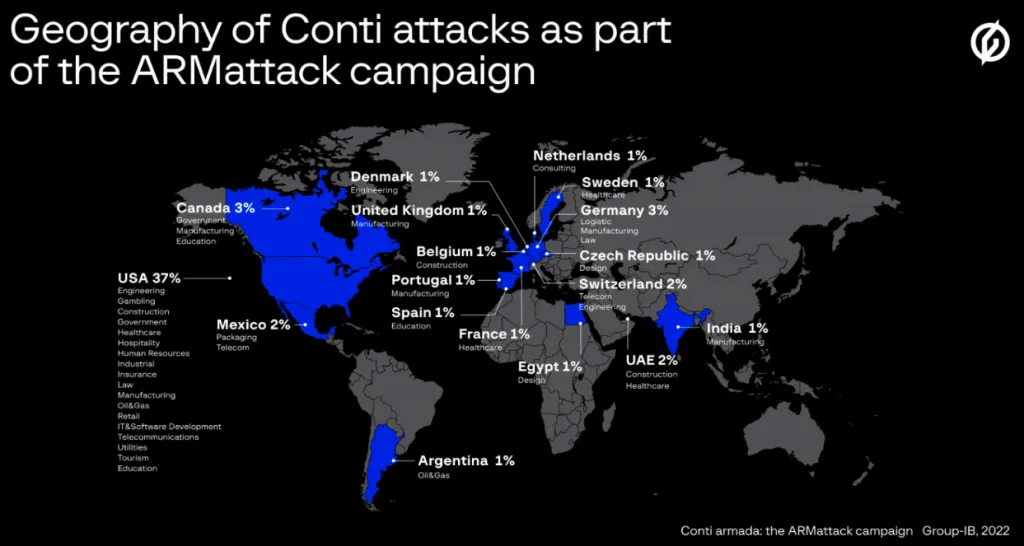
As you have read, the Conti Ransomware gang is an aggressive cybercrime outfit which is extremely organized. However, one month stood out for them more than any – Between November and December 2021, when they managed to hack over 40 separate companies from locations all over the world.

The month-long campaign, known as ARMattack, has been described by cybersecurity researchers as being one of the group’s “most productive” and “extremely effective.”

Group-IB, an organization who have spent the most time researching Conti, detailed ARMattack some months ago, and gave it its name – based off the domain the gang were using at the time.

During ARMattack, Conti managed to breach more than 40 organizations across various sectors. While there was clearly a focus on American companies, nearly every continent was affected in the campaign.

A Group-IB spokesperson told reporters that ARMattack was very swift and explained that the company’s report refers to organizations that had their networks compromised. It is unknown whether any of the victims paid the ransom demanded by the attacker.

It is worth noting that while the Conti leak site published data for as many as 46 victims in just one month (e.g. April 2022), the compromise date remains unclear.

“After gaining access to a company’s infrastructure, the threat actors exfiltrate specific documents (most often to determine what organization they are dealing with) and look for files containing passwords (both plaintext and encrypted). Lastly, after acquiring all the necessary privileges and gaining access to all the devices they are interested in, the hackers deploy ransomware to all the devices and run it” said the Group-IB spokesperson.

Group-IB, who have had insight into Conti’s internal chats, even went as far as to analyze the working hours of Conti members and programmers. They concluded that the average Conti member worked 14 hours every day, only take a New Year holiday. This sort of work schedule accounts quite a bit for their efficiency.

“Conti’s increased activity and the data leak suggest that ransomware is no longer a game between average malware developers, but an illicit RaaS industry that gives jobs to thousands of cybercriminals worldwide with various specializations” – Ivan Pisarev, Head of Dynamic Malware Analysis Team at Group-IB’s Threat Intelligence team

Conti Ransomware Analysis
Conti Ransomware

In breaching any network, the gang will use a number of tactics.

This may first begin with social engineering, and trying to convince employees to hand over credentials. In more difficult cases, members can attempt to exploit vulnerabilities, or or attack the internet-facing RDP (Remote Desktop Protocol) servers.

Once a gang member has breached the network, they will usually attempt to gain access to the domain administrator account.

If the hacker does gain this access, they will be able to deploy Conti ransomware on the network. At this moment, the attacker might also gain access to accounts with extra priviledge, in order to steal important information, including backups. When they are at this level, they can also tinker with security settings to avoid being noticed. This allows them to move laterally across the network while their presence is obscured.

Before the attack, the gang will usually scan the network for servers, endpoints, backups, sensitive data, apps, and protection software. IP addresses will also be compiled, as well a list of server names.

Popular post-exploitation tools like Mimikatz, which dumps credentials from memory, are frequently used by attackers. They could also try to break things on purpose in order to grab the administrator’s credentials when they login to examine the problem.

Commonly, backdoors are also installed, to allow for future attacks. These backdoors also allows the gang to transfer data to their Command & Control (C&C) servers and monitor network traffic. This is beneficial in knowing how the victim is recovering from the attack. They’ll frequently utilize programs like AnyDesk and Cobalt Strike to help them with remote access and control, as well as Tor proxies to hide their contact with the C&C server.

Before the ransomware is executed, the gang will try to steal as much business-critical data as possible. Data discovery technologies are frequently used by attackers to identify sensitive data. This data can be saved on their owner server, or uploaded through anonymous cloud storage.

Once all information has been lifted, backups have been deleted, and security measures have been disengaged, the attackers will execute the ransomware. Batch scripts are used to loop over identified IP address to deploy Conti to as many servers and endpoints as possible. In advanced cases, they infect a logon script in a Group Policy Object (GPO), which runs the code every time the computer starts up and joins the domain.

Once encryption is complete, and note is dropped on the users systems, stating the terms of ransom and how it is to be paid. In the majority of cases, the user is powerless when it has reached this stage.

The Future Of The Gang

It is difficult to say for sure if Conti are to be believed, and that the organizations has shut down. As Meyer puts it, “It’s all kind of a ‘no honor amongst thieves’ type of situation where you can believe what they say, but still take it with a grain of salt.”

Shier has a similar sentiment, “These are criminals who wouldn’t think twice about lying and cheating to make a buck”

It is possible that Conti are merely regrouping for a more high-level attack campaign, which they initially threatened in previous months. However, researchers note that at the end of the day, its the ransom money they’re after.

“For any organized business, cybercriminal or not, the bottom line is very often always more important than political positioning,” one researcher said.

The U.S. government and others need to take these threats seriously and prepare adequately because cyberattacks on government institutions or political leaders can have geopolitical ramifications, according to Mellen.

At what point, she asked, does a cybercriminal outright targeting government officials and infrastructure become a combatant?

Meyers maintains Conti’s mandate is to make money, he said. “They’re a significantly large organization, they’ve got a lot of mouths to feed. And as long as there’s money to be made doing these types of data extortion and ransomware operations, they’re not going to shut down.”

To other researchers, there is a belief that the gang have become several splinter cells, all striving to start their own operation. This could potentially be more harmful than one singular gang.

Or perhaps, Conti really is gone, in all forms. It’s unlikely, but such things have happened. Only time will tell.

How To Protect Against Threats Like Conti

No matter if Conti is truly gone or not, ransomware will remain a fact of life for all internet users, be they individuals or businesses. There are several steps you can take to protect yourself or your business online.

Firstly, attempt to foster a cybersecurity aware culture or mindset. The best defense is a good education, and keeping your wits about you. Phishing and social engineering are the most common routes into a network, and need to be taken seriously. Strange e-mails or websites are the door to a full network infection. Take note of grammar, mistakes, or potential impersonations. Treat every click on an email as a serious issue and potential threat to your entire network. Security Awareness Training as well as phishing simulations for employees can go a long way in educating a group to the dangers of cybercrime.

Secondly, keep software patched and up-to-date. This can seem trivial, but vulnerability exploits are a key attack vector for hackers, and unpatched software can lead to harsh infections. Security researchers work tirelessly on updating software to iron out any vulnerabilities, so take heed of any updates offered.

Thirdly, for networks with many users, apply the principle of least privilege (POLP), a zero-trust theory. Users should be granted the minimum amount of access to applications and systems to perform their tasks, no more and no less. In case of a breach, a segmented series of access like this can shut down attackers right away and lets security teams know that they’ve become a target.

Additionally, make and maintain backups of your network and critical systems. As you’ve read, advanced ransomware strains such as Conti can take these backups offline, but this hasn’t always been the case, and sometimes the likes of Conti can fail to locate backups. This effectively neutralizes an attack – The business may lose a day or two of work, but the alternative is much worse.

Lastly, but by no means least importantly, is using a multi-layered cybersecurity approach. Reliable cybersecurity solutions to safeguard your network are essential, even with the rest of the recommendations above checked off. There are an endless amount of tools such as firewalls, file-scanner, automated software patching, but one of the best solutions you can choose is SaferNet. SaferNet is an always-on VPN designed with cybersecurity in mind. While other VPNs are more geared toward location-spoofing and the like, SaferNet was built to work as a cybersecurity solution for individuals as well as businesses of any size. Furthermore, SaferNet was designed to protect against many attack vectors associated with ransomware, such as phishing attacks. It truly is an all-round solution for all cybersecurity needs.. The

SaferNet – The Solution To Ransomware

Attacks like the Conti Ransomware campaign show that cyberattacks are increasing at an exponential rate, and both government and business leaders are underprepared to face the fallout of an attack. There are several tools internet users should use to increase their online protection. One of these tools is SaferNet.

SaferNet is the perfect solution to the cybersecurity issues that individuals, families, and businesses face today. It not only connects every device using a secure, 24/7 always on, military grade VPN, but it also stops outside cyberthreats, malware and viruses as well. On SaferNet, all users are protected anywhere in the world, all the time, on any cellular or Wi-Fi network. In addition to SaferNet’s VPN and cyber protection, it also offers a range of employee or parental/family internet controls including internet filtering, monitoring, scheduling, and blocking access to websites or even entire website categories

Typically, a business or family would need 3 separate services for a VPN, Malware Protection, and Internet Controls; SaferNet offers all 3 features in one service. SaferNet truly is an endpoint security presence that can be implemented in minutes around the world, on phones, laptops, tablets, and computers at an economical price point that caters to all sizes of businesses and families. SaferNet guarantees a smooth setup and installation process that takes only minutes, and an easily accessible control hub for you to monitor all your employee’s or family members devices; including activity, time spent online, and threats blocked.

A Plague Against Privacy – A Deep Dive Into Spyware

A Deep Dive Into Spyware. Like many forms of malware, Spyware nests inside an infected device without a users knowledge. The primary goal of Spyware is to steal sensitive information and relay it back to some kind of server or service. This information could be anything – internet usage, what is typed on the device, camera or microphone activity – truly any activity that occurs on the device.

This information can be relayed to a number of different entities. Very often, these are advertisers or big data companies. In more malicious cases, it could be sent to private servers belonging to a lone hacker, or hacking group.

At times, the definition of Spyware can tread a line between morally black or white. Employee monitoring software, for example, while installed for innocuous reasons, can be considered a form of Spyware. Every form of Spyware has the potential to be abused or twisted for truly malicious purposes.

When it comes to hackers or hacking gangs that deploy spyware, the purpose is very often to steal credit card numbers, banking information, or passwords. With passwords, Spyware may act as the initial stage of a larger breach into a network, such as a corporate network hack.

One special category of spyware that is unfortunately becoming more common is known as stalkerware. This spyware is secretly installed onto a smartphone by ex-partners or jealous spouses, can can track the physical location of the victim. More sophisticated strains intercept emails and texts, and can record phone calls. Worryingly, there has also been an increase of individuals who are on child abuse registers using stalkerware.

Spyware leaves a much smaller footprint than its malware siblings such as Ransomware. Thus, it can be more difficult to detect. Those who have a keen familiarity with their device may notice a slow down in processing power or network connection. For mobile devices, data usage and battery usage often spike when Spyware is installed.

Some spyware can be blunt in announcing its presence. For example, some strains will change the default browser to one more easily monitored, which is also a feature of adware. If you notice your browser has been changed, this is a clear sign you are infected with spyware or adware.

Like other forms of malware, Spyware is deployed using a range of attack vectors. It can hide in apps, websites, and most commonly, in a phishing email.

Truly sophisticated spyware can be devastating to an individual or business. With enough personal information gathered, identity theft can happen, as well as siphoning of bank accounts. This information is usually sold on to third parties, especially buyers on the dark web.

Like Ransomware, advanced Spyware can make modifications to firewall settings, which can allow additional payloads – As mentioned previously, Spyware is often the first in a barrage of cyberattacks. It can sometimes be considered as an attack in a reconnaissance stage.

Spyware has many variations – Stalkerware, adware, keyloggers, trojans, browser hijackers, and more.

Adware are usually bundled with free software, shareware, and very often with utility software pretending to be ‘cleaners’ and the like. Adware is the most common form of malware, and many internet users have had some interaction with it. At its core, Adware involves showing the user intrusive ads over and over. It has become harder to detect with the advent of Windows 10 and desktop notifications, which adware can easily masquerade as.

Keyloggers, above all other spyware, straddle the malicious/innocuous line the most. Keyloggers track what has been typed on a keyboard or mobile device. There are many legitimate companies who develop keylogging software and sell it to businesses, to install on worker laptops. It is so common that employees who are given a device, especially a laptop, from work should assume that there is keylogging software installed. It is also used by parents as well as law-enforcement agencies. Of course, it has an obvious malicious use too. A user with a keylogger may be typing in all kinds of sensitive information, unaware it is being siphoned to a hackers server.

In this article, we’ll look at some of the biggest Spyware stories that have occurred in recent months.

IM5 Spyware Used By Domestic Violence Offenders

Spyware

In recent weeks, authorities in Australia arrested a man charged with developing and selling a spyware tool named Imminent Monitor (IM5), which was used to spy on victims’ devices remotely.

​IM5 was sold to 14,500 individuals across 128 countries. Of particular worry is that a large portion of the buyers are on a register of domestic violence offenders.

“A statistically high percentage of Australia-based PayPal purchasers of IM RAT (14.2%) are named as respondents on domestic violence orders. Additionally, one of these purchasers is also registered on the Child Sex Offender Register,” reads a press release by the authorities.

“Of the 14 individuals, 11 bought the RAT during the active period of their domestic violence order (DVO) or within two years a DVO was issued.”

IM5 first hit the digital shelves in 2013, and it is believed the man behind the spyware made nearly half a million AUD from the illicit sales. He faces six charges with a maximum penalty of 20 years imprisonment.

IM5 was first marketed across hacking forums, as well as on a dedicated website.

The spyware was sold as a remote administrator tool which could be purchased for as little as $25 for a lifetime license, which included customer support.

The website seemed as if the product it was selling was a legitimate tool, and not illegal. The man behind it promoted the tool under the alias ‘ShockWave’

In April 2019, a member of the hacking forum that IM5 was advertised on advised other posters that ShockWave had gone missing, and was likely arrested. This caused a panic amongst buyer, who feared they would face legal action due to their use of the spyware.

Months later, Europol announced the seizure of over 430 devices that were involved in the IM5 operation, and the seizure of the website itself. The domain has since been sold on to a Vietnamese news aggregation company.

During the operation, Europol cut the IM5 servers, and arrested 13 of its most active users. Search warrants were also used to arrested a developer and another IM5 employee in Belgium.

It is believed that the Australian Police were aided by cybersecurity researchers from Palo Alto Unit 42.

Process Manager, The Spyware Hiding in Plain Sight

In recent months, cybersecurity researchers identified a new Android-based spyware known as ‘Process Manager’. Interestingly, Process Manager shares the same infrastructure used by Russian state-sponsored hackers Turla. Turla, over the years, have been known to target American and European networks for the purposes of espionage.

Though it is not fully clear at present how Process Manager is distributed, it does use a novel approach for cover. The .APK itself uses a gear-shaped icon, and pretends to be a system component on the victims device.

For those who are perhaps a little more cautious about app permissions, including those that appear to be a system component, suspicion may be raised when the app prompts permission for a number of access points. The list is quite extensive, as follows:

  • Access location
  • Access network state
  • Access WiFi state
  • Camera
  • Foreground service
  • Internet
  • Modify audio settings
  • Read call log
  • Read contacts
  • Read external storage
  • Write external storage
  • Read phone state
  • Read SMS
  • Receive boot completed
  • Record audio
  • Send SMS
  • Wake log

Within the context of this article, it is clear that this list of permissions is excessive, but in day-to-day life many smart users given apps permissions without a second thought. To give any app this many permissions is effectively a death sentence on device privacy – It would allow the app to view location, send and read texts, access storage, control the camera, and record audio.

Worse yet, Process Manager may be capable of abusing Android Accessibility services and granting itself all these permissions, while bundling the prompts into one simple prompt for the user.

In a subtle move, after receiving permission, the icon for Process Manager will vanish from the users phone. There will occasionally be notifications stating ‘Process Manager is running’, which would seem normal to many smart phone users.

This is a somewhat strange move. Many strains of spyware strive to be completely hidden within a device. However, the developers behind Process Manager seems to keen to be ‘hidden within plain sight’

The information collecting by Process Manager includes lists, logs, SMS, recordings, and event notifications. These are sent in JSON files to the C&C server, which is located in Russia.

As stated, the attack vector is unknown. However, if the developers are indeed Turla, it is likely a mix of social engineering and phishing, as well as watering hole attacks.

Researchers at Lab52 found that Process Manager is also able to additional payloads to the infected device. In one case, they found the app downloading an app directly from the Play Store. The app in question is named “Roz Dhan: Earn Wallet cash”. The app is popular, with over ten million downloads, and features a money-generating referral system. It’s ties with Process Manager of course casts some doubt over its legitimacy.

This fact also suggests that Process Manager may be part of a larger, shared attack campaign.

At the end of their report, Lab52 did have doubts about the connection with Turla.

“So in this report, we want to share our analysis on the capabilities of this piece of malware, although the attribution to Turla does not seem possible given its threat capabilities,” explain the Lab52 researchers.

A Flurry Of Attack Campaigns

Spyware

Researchers at Kaspersky uncovered a number of large-scale, linked spyware campaigns that target industrial enterprises. It is believed the campaigns are being run by a single entity. In each stage of the campaign, the threat actor has used off-the-shelf, Malware-As-A-Service tools. However, each tool has only been employed for a very limited time, as a means to evade detection.

Some of the spyware tools used in the campaign include AgentTesla/Origin Logger, HawkEye, Noon/Formbook, Masslogger, Snake Keylogger, Azorult, and Lokibot.

In their report, Kaspersky called the spyware attacks ‘anomalous’ due to their flash-in-the-pan lifespan, compared to what is regular in the spyware space.

Each tool is used for 25 days, approximately. The majority of spyware campaigns use the same tools for months, and very oftentimes years – As seen with IM5 earlier the article, which last nearly a decade.

The threat actor is clearly cautious. The attacks in each campaign are always limited to a number below one hundred. Half of these attacks are against ICS (integrated computer systems) machines deployed in industrial environments.

Researchers pointed out that the hackers use stolen employee credentials they acquire via spear-phishing to dig deeper into the network.

Additionally, they used previously compromised corporate mailbox as C2 servers to new attacks, making detection a challenge.

“Curiously, corporate antispam technologies help the attackers stay unnoticed while exfiltrating stolen credentials from infected machines by making them ‘invisible’ among all the garbage emails in spam folders.”, said researchers.

Kaspersky identified at least 2,000 corporate email accounts abused as temporary C2 servers. A further 7,000 email accounts were used in other ways.

These credentials are a hot commodity on the dark web, and are often sold to other threat groups. This can make tracking attacks difficult, as the credentials may change hands several times.

Very often, the buyers are Ransomware operators, who use the credentials to deploy their payloads.

Typically, these listings trigger the interest of ransomware actors who use RDP access to deploy their devastating malware.

Apple has issued a warning to US Department of State employees stating that their iPhones were hacked by unknown attacks in order to deploy Pegasus Spyware. Pegasus was developed by Israeli surveillance firm NSO Group.

According to the Washington Post, the attacks hit at least 11 US officials. The officials were based in, or focused on issues concerning Uganda.

NSO has since canceled the customer accounts behind the attacks, and promised to investigate. NSO declined to name the suspended customers.

“On top of the independent investigation, NSO will cooperate with any relevant government authority and present the full information we will have,” an NSO spokesperson separately told reporters.

“To clarify, the installation of our software by the customer occurs via phone numbers. As stated before, NSO’s technologies are blocked from working on US (+1) numbers. Once the software is sold to the licensed customer, NSO has no way to know who the targets of the customers are, as such, we were not and could not have been aware of this case.”

The attacks come just after the US sanctioned NSO Group, as well as companies from Russia and Singapore for spyware development, and selling spyware tools used for state-sponsored hackers.

“Specifically, investigative information has shown that the Israeli companies NSO and Candiru developed and supplied spyware to foreign governments that used this tool to maliciously target government officials, journalists, businesspeople, activists, academics, and embassy workers,” reads a ruling from the Department of Congress.

Last year, Apple separately filed a lawsuit against NSO for spying on Apple users.

Apple have since notified any of its users that were targeted by Pegasus Spyware.

Spyware Masquerading As Lifestyle Apps

Spyware

An ongoing spyware campaign, dubbed ‘PhoneSpy’, continues to target South Korean users via a range of lifestyle apps. These apps nest within the device and quietly exfilitrate data.

The spyware is capable of stealing sensitive information, as well as taking over the phone’s microphone and camera.

Researchers at Zimperium discovered the spyware campaign, and reported their findings to both US and South Korean authorities.

PhoneSpy wears plenty of masks, and can come disguised as a yoga app, the Kakao Talk messaging app, an image gallery browser, a photo editing tool, and more.

Researchers identified 23 PhoneSpy apps in total, all which run in the background, spying on the users.

To do so, PhoneSpy asks for a number of permissions, which only cautious users would see as a sign of trouble.

When PhoneSpy has infected a device, it can carry out many actions, including:

  • Fetch the complete list of the installed applications
  • Uninstall any application on the device
  • Install apps by downloading APKs from links provided by C2
  • Steal credentials using phishing URLs sent by C2
  • Steal images (from both internal and SD card memory)
  • Monitoring the GPS location
  • Steal SMS messages
  • Steal phone contacts
  • Steal call logs
  • Record audio in real-time
  • Record video in real-time using front & rear cameras
  • Access camera to take photos using front & rear cameras
  • Send SMS to attacker-controlled phone number with attacker-controlled text
  • Exfiltrate device information (IMEI, Brand, device name, Android version)
  • Conceal its presence by hiding the icon from the device’s drawer/menu

PhoneSpy uses many attack vectors, but mostly phishing. These phishing campaigns mimic login portals for Facebook, Instagram, Kakao, and Google.

The hijacked apps themselves are not uploaded to the Google Play Store.

It is believed that infected devices are used for SMSishing, as PhoneSpy can access a users contacts. This leads to follow-on infections, and the amount of devices infected can increase exponentially.

Though PhoneSpy seems limited to South Korea, several similar campaigns are often seen within the US and Europe, and the wider world.

FakeCop, one of the most infamous strains of Spyware, has a new variant which was spotted by cybersecurity researchers in Japan. Researcher Yasuke Osumi warns that the distribution of the malicious APK is growing exponentially.

A new variant of the Android info-stealer called FakeCop has been spotted by Japanese security researchers, who warn that the distribution of the malicious APK is picking up pace.

The spyware variant is being distributed via phishing campaign which impersonates KDDI, a Japanese telecommunications company.

Worryingly, the malware is only detected by 22 out of 62 Antivirus platforms on VirusTotal, showing a sophistication behind its design.

Cybersecurity firm Cyble found the spyware to be masquerading ‘Anshin Security’, which is a popular Antivirus in Japan.

Cyble listed the features of the spyware in their report as follows:

  • Collect SMSs, contacts, accounts information, and apps list
  • Modify or delete SMSs in the device database
  • Collect device hardware information (IMEI)
  • Send SMSs without the user’s knowledge

Because these permissions are requested by what looks to be an Antivirus, users are more likely to accept them.

The hackers behind the malware also use a custom packer to conceal the actual behavior of the app, which is also used to evade detection.

FakeCop also scans the device app list, and if an antivirus is found, it pushes a notification requesting the user uninstall it.

The hardcoded Antivirus solutions that malware will prompt users to remove include Anshin Security, McAfee Security, and the Docomo Anshin Scan.

Cyble found the most common attack vectors were SMSishing and email phishing.

Spyware Prevention

Though we live in an age where digital privacy has taken a spotlight, Spyware is without a doubt on the rise. Not only is it popular with non-hackers, more and more strains have become so sophisticated that detection can be extremely difficult.

Due to the increase of infections, the US National Counterintelligence and Security Center (NCSC) and Department of State released a joint statement regarding Spyware earlier this year. The purpose of these guidelines was to defend against spyware infections, especially those that use over-the-counter commercial tools.

“Companies and individuals have been selling commercial surveillance tools to governments and other entities that have used them for malicious purposes,” the two US government agencies said.

“Journalists, dissidents, and other persons around the world have been targeted and tracked using these tools, which allow malign actors to infect mobile and internet-connected devices with malware over both WiFi and cellular data connections.”

“In some cases, malign actors can infect a targeted device with no action from the device owner. In others, they can use an infected link to gain access to a device.”

The two entities listed measures to prevent Spyware attacks:

  • Regularly update device operating systems and mobile applications.
  • Be suspicious of content from unfamiliar senders, especially those which contain links or attachments.
  • Don’t click on suspicious links or suspicious emails and attachments.
  • Check URLs before clicking links, or go to websites directly.
  • Regularly restart mobile devices, which may help damage or remove malware implants.
  • Encrypt and password protect your device.
  • Maintain physical control of your device when possible.
  • Use trusted Virtual Private Networks (VPN).
  • Disable geo-location options and cover cameras on devices.

Infection can always happen, no matter what steps are taken. However, it is critical that individuals and businesses take a best-practice approach to mitigate as much risk as possible.

SaferNet, our cybersecurity-focused VPN, was created to mitigate risks around threats such as Spyware, as well as other malware types like ransomware and remote-access-trojans. While many popular VPNs focus purely on location spoofing, at SaferNet we believe that this is not the full potential of what a VPN can do, and so we developed our platform to provide our users with best in class, 24/7 protection.

SaferNet – The Solution To Spyware

There are several tools internet users should use to increase their online protection against Spyware. One of these tools is SaferNet.

SaferNet is the perfect solution to the cybersecurity issues that individuals, families, and businesses face today. It not only connects every device using a secure, 24/7 always on, military grade VPN, but it also stops outside cyberthreats, malware and viruses as well. On SaferNet, all users are protected anywhere in the world, all the time, on any cellular or Wi-Fi network. In addition to SaferNet’s VPN and cyber protection, it also offers a range of employee or parental/family internet controls including internet filtering, monitoring, scheduling, and blocking access to websites or even entire website categories

Typically, a business or family would need 3 separate services for a VPN, Malware Protection, and Internet Controls; SaferNet offers all 3 features in one service. SaferNet truly is an endpoint security presence that can be implemented in minutes around the world, on phones, laptops, tablets, and computers at an economical price point that caters to all sizes of businesses and families. SaferNet guarantees a smooth setup and installation process that takes only minutes, and an easily accessible control hub for you to monitor all your employee’s or family members devices; including activity, time spent online, and threats blocked.

Turning Devices Against Their Users: A Brief History Of Botnets

At its core, a Botnet is a network of hijacked host devices that are used in a number of illicit activities, chiefly cyberattacks. The word is a portmanteau of ‘robot’ and ‘network’. Botnets are primarily used to automate large scale attacks, or to distribute additional malware.

Users are unaware if a device they own is infected. While infected, besides for carrying out attacks, the host device can also be used to infect nearby devices or devices in any part of the world.

To understand why a hacker would use a botnet, it is best to use an analogy of a business owner wishing to undergo a large scale construction process. Think of a football team owner desiring to build a new stadium for their team. To do so, they need to hire a huge number of construction workers to have the task completed in a reasonable amount of time. If the owner tried to build it themselves, it would be impossible, and take many lifetimes! However, in the case of botnets, these attacks can be carried out in seconds, with enough infected hosts.

And so, a hacker will use a botnet to leverage a vast number of devices of joined processing power to carry out devestating attacks in only a few moments.

A botnet is usually led by a hacker-controlled device, called a herder. The herder uses commands to call the shots, and directs the rest of the infected network in their actions.

Botnets and bot herders aren’t always used by the hackers that developed them, and many services operate on a leasing or rental bases, for prices much cheaper than you would think.

The stages of a full infection and attack can be broken into three steps, usually.

Step 1 – Preparation and Exploitation – Here a hacker will get into a device, and deploy the malware underlying the botnet. These attack vectors are varied, and will be covered shortly.

Step 2 – Infection – This is the stage at which the underlying botnet infects the device, and is now controlling it. Security is breached and in most cases the device is past the point of no return. The device may not be used for an attack yet however, as the hacker may need to gather more devices into the botnet first.

Step 3 – Activation – At this point, the device is actively used in attacks. It will work in sync with every other host in the botnet. Depending on the objective of the botnet, the user may or may not notice that a device of theirs has been compromised.

One active, a botnet shares some similarities to a trojan or spyware. A botnet can often read and write data, collect personal information, monitor the user, send files, and install applications.

It’s usual end goal is to perform distributed denial-of-service (DDoS) attacks, though botnets are often sold on for other hackers to do the same. More sophisticated botnets can install additional payloads, such as ransomware. Botnets are also used to harvest login credentials, and play a huge role in crimes like identity theft.

Traditionally, Botnets infected computers and laptops. With the advent of smartphones, these were added to list of targets. The biggest growth for botnets has only come in the last decade, however, with the rise of Internet-of-Things (IoT) devices.

These can be smart light bulbs, doorbells, and even fridges. A common misconception about these smart, connected devices is that they only serve their intended purpose. However, under the hood, they are all computers, no matter how tiny. Thus, a fully connected smart home can serve as an arsenal to any hacker.

IoT devices face a unique problem as it is difficult, if not impossible, to detect if one is a part of a botnet. This is due to their limited feedback – A smart lightbulb doesn’t have a user interface outside an app, for example. It may sound like science fiction to hear that your fitness watch is being used as part of an international crime gangs activites, but this is much more common than you would think.

Along with the herder, a botnet is usually controlled at the Command-and-control (C&C) center. For bigger hacking organizations, this may be a large scale operation involving a server room, which will also host the herders main server.

In this article, we aim to give a top-level view of botnets, their history, their impact, as well as some recent stories that hit the news regarding botnets. Hopefully after reading this, you will be better prepared to face some more of the threats out there on the web – And prepared to make sure your devices are used by you, and you only.

Botnets Through The Years

Botnets

Botnets have long been a staple of the internet. The first trio of Botnets existed on the Internet Relay Chat, known as IRC. IRC is considered one of the first chat rooms, and in a sense was the genesis of social media, where like minded individuals could come together in designated spaces to talk about their internets, ranging from politics, to religion, to computers, and much more.

The first botnets shown on IRC were Jyrki Alakuijala’s Puppe, Greg Lindahl’s Game Manager, and Bill Wisner’s Bartender. These IRC bots were developed with good itentions – They provided automated services to users, and stayed in the channel 24/7 to avoid inactivity shutdowns, which was a common problem on IRC.

More commercial early bots were web crawlers used by search engines. The first web crawler appeared in 1994, and was used to index web pages. Pretty simply, it was known as WebCrawler. AOL later used this technology in 1995, and later was used by Excite in 1997. The most efficient web crawler was named Googlebot, and was created by Scott Hassan, also known as BackRub. Suffice to say, Googlebot was the foundation of the company Google.

Hassan is often considered the ‘third founder’ of the company, but had left before they were officially incorportated. Googlebot has of course gone under many developments throughout the years.

In terms of early botnets that are more similar to what we now see were Sub7 and Pretty Park, a Trojan and worm respectively. They flooded IRC and would install themselves convertly on machines. These botnets listened to IRC channels for specific commands.

The most infamous botnet of this era was GTbot, which used a fake IRC client and was capable of the first DDoS attacks.

Botnets didn’t stay within IRC (or a later addition, mIRC) for much longer, and were later found on the wider web.

Botnets continued to grow as adoption of home internet increased. The late 00s saw one of the more destructive botnets of the era, named Storm. Storm was believed to have infected 50 million devices, and used from everything from stock price fraud to identity theft.

At this time botnets were particularly popular for sending spam emails. 2009 saw a botnet named Cutwail which sent out 74 billion spam emails a day.

In more recent time, the COVID lockdowns saw an increase of all kinda of malware attacks, including botnet attacks. Q3 of 2020 alone saw 1.3 billion attacks.

There may come a time when botnets will be a thing of the past, when cybersecurity technicians will develop fool-proof methods to distinguish bot from human traffic. However, these bots, for good or bad, are here to stay for now.

The Biggest Attack Of The Summer

Botnets

This summer saw the largest distributed denial-of-service (DDoS) attack in Europe, which occured in July. The target was a client of cybersecurity company Akamai, had went through a barrage of assaults that lastest 30 days.

DDoS attacks skyrocketed across the board since earlier this years. These attacks involve denying access to victims digital services by flooding them with thousands of requests. The increase in attacks is due to a number of reasons, including the situation in the Ukraine.

Akamai’s reported of the attack detailed the DDoS attack that occured on July 21st, and in 14 hours it peaked at 853.7 Gbps (gigabits per second) and 659.6 Mpps (million packets per second).

Akamai did not revealed details regarding the identity of their client. They added that the client was the target of 75 seperate DDoS attacks over the entirity of July.

The most popular attack vector during this time was UDP (user data protocol). This method was seen in each record attack spits too.

There were a number of additional attack vectors used, including UDP fragmentation, ICMP flood, RESET flood, SYN requests flood, TCP anomaly, TCP fragment, PSH ACK flood, FIN push flood, and PUSH flood.

Akamai reported that the DDoS attacks came from a “highly-sophisticated global botnet” of infected devices. With the advanced of consumer technology, more and more botnets are capable of record-breaking DDoS attacks.

The campaign was reminiscint of the Meris botnet, which hit Russian internet giant Yandex with 21.8 million RPS (requests per second). Later in this article we will cover the Mantis botnet, which peaked at 26 million RPS.

Though the reasons behind the attack remain unclear, it is known that they took place in Eastern Europe, so may have politicial reasoning.

Disrupting A Russian Botnets

Recently, the US Department of Justice announced its disruption of the Russian Rsocks botnet. The botnet was used to hijack millions of computers, android phones, and IoT(internet of things) devices across the globe.

The disruption operation was a joint one from law enforcement agencies around the world, including Germany, the Netherlands, the UK, and the USA. The botnet maintained its infrastructure across these countries.

The RSocks botnet used residential computers as proxy servers, allowing clients of the botnet to use them for malicious activities. If any of these attacks were traced, it would simply ping back to the residential IP address.

The botnet was also promoted as a shopping bot, which aren’t usually banned from online retail websites.

The FBI started tracking the botnets infrastructure in an undercover sting when they purchased a large number of proxies in 2017.

According to the public report, the botnet prices ranged from $30 per day for 2,000 proxies to $200 per day for 90,000 proxies.

During the initial investigation, authorities identified 325,000 compromised devices, nearly all of which were located in the US.

It is believed Rsocks compromised affected devices by brute-forcing passwords and installing the botnet onto the devices.

“Several large public and private entities have been victims of the RSocks botnet, including a university, a hotel, a television studio, and an electronics manufacturer, as well as home businesses and individuals,” explains the DOJ announcement.

“At three of the victim locations, with consent, investigators replaced the compromised devices with government-controlled computers (i.e., honeypots), and all three were subsequently compromised by RSocks.”

There has not been any arrests announced as of yet, but it is know that the botnet is severely disrupted.

Botnets

One the strongest botnet attacks occurred earlier this year, the Mantis botnet attack, which was mentioned previously in this article. Much of the attack was mitigated by Cloudflare.

At its peak, the botnet built up 26 million requests per second coming from over 5000 devices. Before the Mantis botnet attacks, the previous record was by the Meris botnet, which spiked at 21.8 million RPS.

Mantis had been tracked by Cloudflare previously, which was part of the reason it was able to be mitigated.

The Cloudflare report stated that its analysts named the botnet Mantis after the Mantis Shrimp, which can attack quickly and powerfully. The analysts felt the botnet behaved in a similar manner.

Usually, a botnet needs to compromise a massive number of devices to perform a large scale attack. However, Mantis focuses on servers and virtual machines, which have more resources to carry out heavy attacks.

The previous record holder, Meris, acheived its strong attacks by taking over MikroTik devices, which came with very powerful hardware.

Mantis targeted entities in the IT and telecom (36%), news, media, and publications (15%), finance (10%), and gaming (12%) sectors. Over 30 days, it launched 3000 DDOS attacks against over 1000 Cloudflare clients.

The targets were from around the globe, with nearly half being from the US and Russia. This is somewhat unusual, as hackers usually only focus or one on the other, but rarely both.

The ‘Frankenstein’ Botnet

Botnets

Early this year, researchers at Securonix discovered the EnemyBot botnet, which was put together using code from multiple malware strains. It has quickly expanded its reach, and affects targets quickly by using exploits and vulnerabilites. The botnet has mostly been found in web servers, content management systems, Androids, and iOS devices.

The botnet was first discovered in March, with Fortinet conducting additional research in April. At this point, the botnet has already infected many devices.

Like many botnets, EnemyBots prime directive is to launch denial-of-service (DDoS) attacks. Additional, it uses modules to scan for new host devices to infect.

The latest report by AT&T Alien Labs stated that EnemyBot uses exploits for 24 vulnerabilities. The majority of these are critical errors.

Some flaws affect IoT devices specifically, with CVE-2022-27226 (iRZ) and CVE-2022-25075 (TOTOLINK) being the most recent. It also includes the Log4Shell exploit, one of the most infamous bugs found last year.

Some newer versions include a number of additional bugs, including:

CVE-2022-22954: Critical (CVSS: 9.8) remote code execution flaw impacting VMware Workspace ONE Access and VMware Identity Manager. PoC (proof of concept) exploit was made available in April 2022.

CVE-2022-22947: Remote code execution flaw in Spring, fixed as zero-day in March 2022, and massively targeted throughout April 2022.

CVE-2022-1388: Critical (CVSS: 9.8) remote code execution flaw impacting F5 BIG-IP, threatening vulnerable endpoints with device takeover. The first PoCs appeared in the wild in May 2022, and active exploitation began almost immediately.

One of the latest updates to the botnet allows it to bypass firewall restrictions, a feature rarely seen on Botnets.

The hacking group behind EnemyBot, Keksec, have an infamous reputation in the malware scene already, and have created a number of malware strains, including Tsunami, Gafgyt, DarkHTTP, DarkIRC, and Necro.

To make matters worse, the source code for EnemyBot has been released. This means that copycats will likely spring up rather quickly.

Though EnemyBot is currently used for DDoS attacks, it is very likely that as it becomes more advanced, it will be used for additional acts, such as cryptomining.

Botnet Leader Sees Prison Time

Recently, a 28 year old from the Ukraine was sentenced to 4 years in prison for using a botnet to steal thousands of login credentials and sell them on the dark web.

Glib Oleksandr Ivanov-Tolpintsev claimed to his peers in the hacking space that he could get the credentials for over 2000 devices a week by using a brute force attack carried out by a botnet.

“During the course of the conspiracy, Ivanov-Tolpintsev boasted that his botnet was capable of decrypting the login credentials of at least 2,000 computers every week,” the Department of Justice revealed today.

“From 2017 through 2019, Ivanov-Tolpintsev listed for sale thousands of login credentials of servers on the Marketplace, including more than 100 in the Middle District of Florida.”

These stolen credentials, when sold, can be used for a range of illicit activites, ranging from data theft to identity theft. They can also be used for sophisticated proxy attacks.

Ivanov-Tolpintsev operated a number of aliases, and the DOJ subpoenaed Google to discover his identity. They also got a hold of his Jabber account, which revealed his extensive conversations with fellow hackers as well as representatives of the dark web marketplace.

The FBI soon made a timeline of Ivanov-Tolpintsev’s activities, and narrowed down his actions on the dark web.

They reported that while using the alias, “Mars”, the hacker sold over 6,705 crdentials, earning over $80,000 on the dark web.

He was initially arrested in Poland in 2020, and soon extradited in the US.

Steps To Mitigate Risk From Botnets

Botnets

Many methods to prevent malware attack vectors are similar between types of malware, however given the nature of Botnets, there are some extra steps to take.

One of the primary things to keep in mind when securing devices against botnets is to consider of their largest attack markets – IoT devices, smart devices like bulbs, thermostats, doorbells etc. These often come with factory standard passwords that are well known in the hacking community. Due to ease of access, users may be tempted to change passwords on these devices to easier versions, such as ‘pass12345’. This is move is even worse, as it can be brute forced in seconds.

Ideally, users should think of a long (20 or so characters) alpha-numeric password. Though it may mean initially onboarding will take a few minutes, it can immensely bolster the protect of that device. It is worth writing this password on a piece of paper and keeping it with your personal records, locked away.

The inner security of an IoT device should be considered too. With the popularity of IoT devices, there is a flood of cheaper models, many of which could be considered ‘knock-offs’ of bigger brands. These cheap models may function identically, but they tend to prioritize convenience over security. Do your research before purchasing a new gadget, or if in doubt, go with one made by a recognise big brand name, such as Philips or Ring.

When to comes to devices like phones, laptops, and computers, be aware of phishing emails and email attachments – By far the most common attack vector for botnets. Don’t open emails from unknown senders, and be cautious with attachments and links from people you know – As explored earlier, email addresses can be compromised, and used to send phishing emails to contacts. The same logic applies to SMS messages, and social media messages.

Any anti-virus software, including OS defaults such as Windows Defender, can also be a great defence against botnets, given their file scanning capabilities.

One of the greatest lines of defense you can make against botnets is using a cybersecurity focused VPN, such as SaferNet. SaferNet was designed to safeguard users against threats as Botnets, and many other types of malware – especially those that using phishing emails and messages as attack vectors. SaferNet also protects against drive-by-downloads, and unwanted trackers associated with botnets. It is in a constant state of development to ensure that you are protected against both present and future threats.

SaferNet – The Solution To Botnets

There are several tools internet users should use to increase their online protection against Botnets. One of these tools is SaferNet.

SaferNet is the perfect solution to the cybersecurity issues that individuals, families, and businesses face today. It not only connects every device using a secure, 24/7 always on, military grade VPN, but it also stops outside cyberthreats, malware and viruses as well. On SaferNet, all users are protected anywhere in the world, all the time, on any cellular or Wi-Fi network. In addition to SaferNet’s VPN and cyber protection, it also offers a range of employee or parental/family internet controls including internet filtering, monitoring, scheduling, and blocking access to websites or even entire website categories

Typically, a business or family would need 3 separate services for a VPN, Malware Protection, and Internet Controls; SaferNet offers all 3 features in one service. SaferNet truly is an endpoint security presence that can be implemented in minutes around the world, on phones, laptops, tablets, and computers at an economical price point that caters to all sizes of businesses and families. SaferNet guarantees a smooth setup and installation process that takes only minutes, and an easily accessible control hub for you to monitor all your employee’s or family members devices; including activity, time spent online, and threats blocked.

Handheld Hacks: The Rise Of Android Malware

Android malware isn’t something we consider every day, nor does it make the news as often as the big-scale corporate hacks we see on TV or read about online. Viruses are confined to our desktops and laptops, right?

We oftentimes can look at the devices in our pockets and not see them for what they are, which is tiny computers. Far more advanced than anything one could have imagined a few generations ago, smartphones have changed our lives and how we interact with each other on a dramatic scale.

All computers, no matter their size nor function, will all share the same base logic and very often follow similar hardware architecture. In this sense, a smartphone could be thought about like a desktop computer on your pocket – They share nearly all the same features, though the input is quite different!

And like a desktop computer, all smartphones, no matter the make, model, or operating system, are vulnerable to malware. There is no mobile operating system that has more malware designed for it than Android. The reason? Market share.

When many businesses are trying to sell a product, they want to try to target as big a chunk of the market as possible to increase their chance of a potential sale. For example, would you rather sell to fifty people, or one hundred? Of course, you’d say one hundred – It doubles your chance of a sale when compared to the first option.

And so it is with hackers and malware developers – Android is simply the largest market. Infact, the Android market is so big that it may be the biggest market out of any product ever created.

Take the mobile market – Android makes up roughly 70% of this market. iOS takes the lions share of the rest, however about 5% of this 30% is made up of linux smartphones or those using more obscure operating systems.

This number is impressive enough – If you’re reading this online, it’s likely you live in a place in the world where 95% of the people you know own a smartphone.

But let’s compare this to the entire operating system market – Including operating systems like Windows, Mac, Linux – any type of operating system one can use on a computer of any type.

In this context, Android makes up nearly 50% of the market. That is to say, nearly half of all existing computers on the planet are Android. This number lines up with a Google conference in 2021, which stated that active Android devices are nearly at 3 billion – 1 in 2 people on the planet own an Android smartphone. 1 in 2 not may seem special in the Western World, but when you consider the multitudes who simply do not have access to smartphones, it becomes quite impressive.

With regards to the total number above – The remaining is made up of Windows at about 30%, with iOS, OSX, Linux, and others making up the last 20%.

Given these numbers, it isn’t difficult to see why the majority of mobile malware is found on Android – There is simply a larget pool of victims to catch.

Though iOS has its fair share of malware too, it really is nothing compared to Android. It is worth noting that Apple’s App Store is very tight in security regulations also, whereas Google Play often lets malware just walk in undetected. There is also the question of unofficial, non-Google sources for apps and .apk installations. Though offering a brilliant selection of applications far greater than Google Play, these so-called ‘black’ markets are often rife with malware.

Downloading apps, be it through the Play Store or unofficial channels is one of the most common attack vectors for Android malware.

It is also quite common for hackers to target operating system vulnerabilities. We often get pings on our phones requesting an update be performed – These are crucial to complete, as they patch out many security flaws being exploited by hackers.

Similar to its desktop counterpart, Android malware also commonly enters the device through phishing. Phishing, which we often associate with email, has an extra attack layer on smartphones as it can also occur through text messages, and even voicemails. These lures often lead users to fake login pages, or request a malicious app be downloaded.

Another attack vector that occurs more on mobile is non-secure WiFi. Of course, this can happen with laptops too, but is less common. Using unsecure WiFi on your mobile device can you leave you open to man-in-the-middle attacks, as well as web browser attacks.

Android malware can range from being an irritation to being destructive to our private lives. It is common to see malware that functions as adware, spamming a users phones with annoying popups. But the more serious threats including theft of banking credentials, contact details, email access, social media access, and more.

Banking Trojans are a particularly nasty piece of malware that focus in an specific banking apps on androids.

With the information collected from a device, hackers will often sell this on and leave you at risk of robocalls, more phishing texts, more ads, and more serious malware.

In this article, we’ll look at the genesis of mobile malware, some of the big android malware stories this summer, and give you advice on how to prevent your Android smartphone from becoming infected.

History of Android Malware

Android Malware

The smartphone was first introduced in the late 90s/early 00s, with Symbian OS. Symbian OS a joint effort by between Psion, Nokia, Ericsson, Motorola, and Sony in an effort to halt Microsoft from extending its desktop monopoly into the mobile devices market.

2000 was a big year for Symbian, with the launch of the Ericsson R380 and the Nokia 9210, which were both the first truly ‘smart’ phones.

These initial years were malware free, and the first virus wouldn’t appear until 2004. This malware was Cabir, a worm designed to infect Symbian OS.

Cabir itself wasn’t designed maliciously and was made as a proof of concept. It could infect any device running Symbian, which was all smartphones at the time.

Cabir was harmless, all it did was displaying the message ‘Caribe’ anytime the phone was turned on. As a proof-of-concept, the source code was not shared with the public.

The peace didn’t last long however – The code for Cabir was eventually stolen by hackers, who began to repurpose it for more malicious ends.

Within 12 months, there was a plaethora of Symbian malware based off Cabir. These included trojans like Pbstealer, which could steal address books and transfer them off the device using bluetooth.

In 2007 and 2008, the iPhone and first Android smartphone were released respectively, signalling the end for Symbian. Nokia, who by now had largest control of the OS, managed to cling on for a number of other years but eventually made the switch to Windows Phone OS, and scrapped Symbian. Effectively, they blew a ten year lead to Apple and Google.

Like Symbian, Android didn’t have enough of a user-based to attract many malware developers initially. This would change by August 2010 with the first Android malware appearing, a trojan named AndroidOS.DroidSMS.A. The trojan was used for SMS fraud.

Within a week, TapSnake emerged, a virus which could transmit GPS locations of infected phones.

At almost the same time, FakePlayer appeared. It masqueraded as a movie player app, and did actually carry out this function (Rather poorly, though). However, FakePlayer would covertly send SMS messages to premium numbers.

iPhone users saw few threats during this time. Individuals who jailbroke their iPhones for greater freedom were targeted, however.

Android malware rapidly became more sophisticated. Backdoors, trojans, and spyware were becoming commonplace.

NickSpy was one of the earliest spyware strains for Android, which would record phone conversations and upload them to a C&C. Later versions would do the same but with SMS infomation and photos. NickSpy was ingenius for its time, as modern Android spyware carries out these activities to this day.

2011 saw the first cross-platform attacks. Hackers behind the infamous Zeus Trojan which affected desktops used man-in-the-middle attacks against Android phones to harvest mobile authorization codes. These codes were then used to access a victims banking accounts on desktop.

Android malware continues to advance. Google has tried to stay ahead, but truthfully it is a never-ending digital arms race against legions of hackers, with new ones emerging everyday. What the future holds for Android is unclear, despite its monumental market share it is worth remembering that Symbian once held and even bigger share. What is for certain though, is that mobile malware is here to stay.

A Flurry Of Attacks On The Google Play Store

Android Malware

Earlier this month, it was revealed that a batch of 35 Android malware apps had made their way onto the Google Play Store. The apps have been installed over 2 million times already.

The discovery was led by researchers at Bitdefender, during a routine behavior based analysis of potential malware apps.

Using a tried and trusted method, the Android malware apps lure users into installing by offering specialized functionality. After installation, the apps change their name and icon, making them difficult to locate for most users.

These 35 apps all share similar behaviour when deployed, which is to serve intrusive advertisements to the users by abusing WebView. This generates fraudulent impressions and ad revenue for the hackers behind the apps.

Due to the fact that the Android malware collection uses their own frameworks to generate the ads, it would certainly be possible for them to drop additional malware payloads to a device.

Bitfender also noted that the apps recieve future updates to enable them to hide easier on users devices in future.

Typically, one of these apps will masuqerade as a system function. For example, it is common for the icon to change to a cog wheel and rename itself as ‘Settings’. Another common name is ‘System Processes’, and the like.

If a user is to tap the icon, the app launches with a size of 0 pixels, making it invisible. It will then launch the legitmate settings menu, in order to trick the user.

Very often the app icons will take the look of a popular manufacturer, such as Samnsung.

The apps use code obfuscation and encryption to defend themselves against reverse engineering, as well as to hide their primary payloads.

Many of the group hide themselves from the ‘Recent Apps’ list, adding an extra layer of invisibility.

The most popular apps of the group, which have 100,000 downloads each, are the following:

  • Walls light – Wallpapers Pack (gb.packlivewalls.fournatewren)
  • Big Emoji – Keyboard 5.0 (gb.blindthirty.funkeyfour)
  • Grand Wallpapers – 3D Backdrops 2.0 (gb.convenientsoftfiftyreal.threeborder)
  • Engine Wallpapers (gb.helectronsoftforty.comlivefour)
  • Stock Wallpapers (gb.fiftysubstantiated.wallsfour)
  • EffectMania – Photo Editor 2.0 (gb.actualfifty.sevenelegantvideo)
  • Art Filter – Deep Photoeffect 2.0 (gb.crediblefifty.editconvincingeight)
  • Fast Emoji Keyboard APK (de.eightylamocenko.editioneights)
  • Create Sticker for Whatsapp 2.0 (gb.convincingmomentumeightyverified.realgamequicksix)
  • Math Solver – Camera Helper 2.0 (gb.labcamerathirty.mathcamera)
  • Photopix Effects – Art Filter 2.0 (gb.mega.sixtyeffectcameravideo)
  • Led Theme – Colorful Keyboard 2.0 (gb.theme.twentythreetheme)
  • Animated Sticker Master 1.0 (am.asm.master)
  • Sleep Sounds 1.0 (com.voice.sleep.sounds)
  • Personality Charging Show 1.0 (com.charging.show)
  • Image Warp Camera
  • GPS Location Finder (smart.ggps.lockakt)

At the time of writing, many of these are still available on the play store. All of them are still available on non-Google stores, such as APKPure.

Hackers Quash Security Updates

In August of this year, Google released Android 13, promising a litany of new security features. One of these was a ‘Restricted Setting’ feature. However, this feature has already been bypassed by Android malware developers.

A core goal of Android 13 is to cripple Android malware, in particular those that used permissions to perform extremely destructive attacks.

Despite these efforts, researchers at Threat Fabric have found that hackers are already rolling out Android malware droppers that can bypass these restrictions, and deliver malicious payloads that can access high privileges on a users device.

As stated previously in this article, a common attack vector on Android is the Play Store. When one of these malicious apps are installed, they very often ask for high-level permission access. Giving malware access like this guarentees that the app can do as much damage as possible, especially when it allows for additional payloads to be dropped. This is normally done by abusing the Accessibility Services function.

Accessibility Service is a disability assistance system that allows apps to perform swipes, taps, and screen changes automatically. All these can be carried out without a users knowledge of what is occuring.

Android 13’s ‘Restricted Setting’ feature blocked sideloaded applications from requesting Accessibility Service privileges, which in theory should have stopped the attacks.

Researchers at ThreatFabric demonstrated that this wasn’t the case when they developed a proof-of-concept dropped that entirely bypassed the feature, and gained access to Accessibility Services. Additionally, they pointed out in their report that there were several strains of Android malware that have been doing the same.

One of these is BugDrop, named so due to the amount of bugs generated in its initial deployment.

This novel dropper features code similar to Brox, a freely distributed malware development tutorial project circulating on hacker forums, but with a modification in one string of the installer function.

“This string, which is not present in the original Brox code, corresponds to the action required by intents to create an installation process by session.” said researchers in their report.

“When fully implemented, this slight modification would circumvent Google’s new security measures fully, even before they are effectively in place.”

Though BugDrop is in its early stages, the group behind it, Hakoden, are no strangers to the Android Malware scene. The gang are behind the Gymdrop dropped as well as the Xenomorph Android banking trojan.

When BugDrop is complete (and less buggy), researchers speculate that it will be used in Xenomorph campaigns, enabling on-device credential theft on even the most recent of Android devices.

A Banking Trojan With Ransomware DNA

One of the most profilic Android banking trojans, SOVA, has added an array of new features, code improvements, and a new ransomware feature that encrypts files. The SOVA Android malware is now capable of targeting over 200 cryptocurrency exchanges and digital wallets, and attempts to steal sensitive data and cookies from them.

SOVA is also more capable of hiding itself on compromised devices.

The updates were discovered by researchers at Cleafy, who have followed the project since its genesis in mid-2021. As far as malware goes, SOVA has seen rapid updates, and is now already on 5.0. A development cycle as productive as this is rarely seen even in industry software.

3.0 saw the addition of 2FA interception, cookie stealing, and increased the amount of banks it could hack using overlay injections.

4.0 was released in July, which increase the amount of targeted banks 200, and added virtual network computing for on-device fraud.

SOVA will send a list of installed apps to the C&C, and recieves an XML with a list of addresses that point to correct overlays for the bank in question. It is also capable of taking screenshots, interacting with the screen, and copying/pasting files.

As for the new ransomware capability, SOVA uses AES encryption to encrypt files.

“The ransomware feature is quite interesting as it’s still not a common one in the Android banking trojans landscape. It strongly leverages on the opportunity arises in recent years, as mobile devices became for most people the central storage for personal and business data.” said Clefy in their report.

Researchers believed SOVA 5.0 is still in development, due to a missing moduling as well as the fact it hasn’t been spotted in the wild much yet. Despite this, Cleafy still believe that SOVA 5.0 is ready for mass-deployment in the Android Malware market.

Due to its rapid developed and sophisticated features, SOVA is becoming a leader in the world of mobile malware.

Sophisticated Spyware

Android Malware

Earlier this year, researchers at Meta reported on a new Android malware strain known as ‘Dracarys’. At the time, Dracarys was mentioned as being capable of data theft and geolocation, as well as using microphone capabilities.

The malware has become more popular, and more details have emerged on Dracarys, revealing it to be a more than capable piece of spyware. It was developed by the Bitter hacking gang, and using in cyberespionage across New Zealand, the UK, India, and Pakistan.

Researchers at Cyble performed a deeper dive into Dracarys, which was shared with reporters at various publications.

Dracarys is delivered via a trojanized version of Signal, a popular messaging app. Victims are directed to a phishing page which appears as a legitimate Signal download portal, and uses the domain, “signalpremium[.]com”.

Signal uses open source code, and in a move displaying sophistication, Bitter compiled a version of Signal with its regular features and functions. However, Dracarys is is embedded within the modified source code.

Permissions requested upon installation include contacts, SMS, camera, access, microphone, r/w storage, make calls, and access location.

These should raise flags, but to most users this may seem quite typical for a messaging app like signal to ask.

When running, the Android malware contacts its C&C server to recieve instructions governing what data needs to be collected from the host device.

Dracarys can collect quite a bit of data, including the contact list, SMS data, files, GPS position, and more.

Like any good spyware, Dracarys can capture screenshots and record audio, relaying these files back to the C&C.

Using social engineering to impersonate legitimate apps is a extremely common, and users should be on the lookout for this kind of behaviour at all times.

Malware Trinity Hits Google Play

As mentioned previously in this article, it is common for Android Malware to make its way to the Google Play store. Though we spoke about malware that appears as intrusive ads, there can be much more serious variations found on the Play store.

Recently, researchers at Zscaler discovered three potent malware strains on the play store, namely Joker, Facestealer, and Coper.

At the time of writing, the apps containing these viruses have been removed, but those still using the apps are still affected. Furthermore, it is only a matter of time until they appear once more.

The Joker malware family is no stranger to the aisles of the play store, having repeatadly being uploaded there on numerous ocassions in the last few years. Joker is a data theif, harvesting informating from SMS messages and other sources. It subscribes numbers to premium application services to get its creators paid.

In their latest inflitration, Joker trojanized 50 apps and accounts for over 300,000 downloads.

The majority of these were communication apps, which usually ask for a number of risky permissions. This makes it easier to avoid detection.

“Many Joker apps hide the payload in the assets folder of the Android Package Kit (APK) and creates an ARM ABI executable to avoid detection by most sandboxes which are based on x86 architecture,” explains Zscaler in the report.

Facestealer, as the name applies, is adept at stealing Facebook accounts. It does this by using fake login overlays, a sting which has proven to be successful in previous attempts.

This particular virus hides in utility apps, in one example researchers found an app named “Vanilla Snap Camera” which was installed over 5000 times.

Coper is a particularly sophisticated strain, being capable of intercepting SMS, scanned SMS, deploying overlays, sending SMShing texts, and relaying this information back to a C&C.

Coper isn’t hidden directly in the app download, but is downloaded seperately as a fake program update.

Adware Nesting On Social Media

We tend to trust advertisements on websites we feel are credible, but this is a mistake. Recently, Facebook saw a number of aggressively promoted ads, which were recommending adware apps. These apps were presenting themselves as cleaners and optimizers, and have seen millions of installations.

The apps, of course, lack their promised functionality, and instead push advertisements and try to remain undetected as long as possible.

Like previously mentioned malware strains, the apps will hide themselves by changing names and icons, pretending to be Settings or even the Play Store.

The advertisements and the apps were discovered by researchers at McAfee, who noted the users don’t actually need to launch the the app to be affected with intrusive ads.

The apps will create a permanent service for displaying advertisements, which, if killed, will relaunch.

Because users are brought through both facebook and the play store, there is a high level of trust assumed. This has led to a huge number downloads, with some of the apps mentioned below:

  • Junk Cleaner, cn.junk.clean.plp, 1M+ downloads
  • EasyCleaner, com.easy.clean.ipz, 100K+ downloads
  • Power Doctor, com.power.doctor.mnb, 500K+ downloads
  • Super Clean, com.super.clean.zaz, 500K+ downloads
  • Full Clean -Clean Cache, org.stemp.fll.clean, 1M+ downloads
  • Fingertip Cleaner, com.fingertip.clean.cvb, 500K+ downloads
  • Quick Cleaner, org.qck.cle.oyo, 1M+ downloads
  • Keep Clean, org.clean.sys.lunch, 1M+ downloads
  • Windy Clean, in.phone.clean.www, 500K+ downloads
  • Carpet Clean, og.crp.cln.zda, 100K+ downloads
  • Cool Clean, syn.clean.cool.zbc, 500K+ downloads
  • Strong Clean, in.memory.sys.clean, 500K+ downloads
  • Meteor Clean, org.ssl.wind.clean, 100K+ downloads

Users should always be wary of ‘cleaning’ software, as they are one of the most common vessels for malware attacks on any device.

Mitigating Android Malware

Android Malware

It is much easier to tell if your Android has malware than if your desktop device is infected. Here are some tell-tale signs that your Android is infected

  • Pop-ups, intrusive ads
  • Ads on websites where they shouldn’t be any
  • Increased battery drain not just due to age nor usage
  • Apps you don’t recognise
  • Your Android has slowed down, crashes often, or keeps displaying error messages
  • New icons in your toolsbars
  • Your Android won’t shut down, or restart, or allow you to remove apps
  • Your browser has tabs you didn’t open
  • Your contacts say they have emails from you which you didn’t send.

If you do believe your device has been infected, the first course of action should be using Play Protect. This is a security module built into all Android phones, and is accessed in the Google Play Store. Simply open the store, access the menu, select Play Protect, and choose Scan. If Play Protect identifies malware, it will ask you would you like to remove.

As you’ve seen throughout this article, Googles defenses aren’t always water-tight. As useful as Play Protect is, it fails to handle every attack.

There are several preventative steps you can take to avoid getting infected to begin with:

Using Google Play Only
Using third-party marketplaces will increase your exposure to malware. Again, there is plenty of malware on Google Play, but much less than on the black market.

Examine App Permissions
Don’t allow every app all its requested permissions. Think carefully. Does the app really need this much access? Why is it asking for so many types of access?

Stay Clear of Free Trials Or Copycat Software
Many apps offer free trials, or free versions of popular software. These are very regularly disguised malware, and are best avoided.

Keep Your Phone Updated
As stated earlier, this is critical in ensuring your phone cannot be exploited by hackers.

Be Aware of Phishing in all its forms
Keep an eye out for suspcious emails, as well as texts.

Don’t click on pop-ups
Many of these are gateways to further infections.

Disable Bluetooth In Public
Bluetooth can often be used as an access point for drive-by malware.

Use a VPN that focuses on cybersecurity
Your best course of preventative action is a VPN, especially one that focuses on cybersecurity. While many VPNs are used for things like location spoofing, here at SaferNet we have developed a mobile VPN with cybersecurity at its core. SaferNet was designed for the mobile market, and the ever increasing threats facing it.

SaferNet – The Solution To Android Malware

There are several tools Android users should use to increase their online protection against Malware. One of these tools is SaferNet.

SaferNet is the perfect solution to the cybersecurity issues that individuals, families, and businesses face today. It not only connects every device using a secure, 24/7 always on, military grade VPN, but it also stops outside cyberthreats, malware and viruses as well. On SaferNet, all users are protected anywhere in the world, all the time, on any cellular or Wi-Fi network. In addition to SaferNet’s VPN and cyber protection, it also offers a range of employee or parental/family internet controls including internet filtering, monitoring, scheduling, and blocking access to websites or even entire website categories

Typically, a business or family would need 3 separate services for a VPN, Malware Protection, and Internet Controls; SaferNet offers all 3 features in one service. SaferNet truly is an endpoint security presence that can be implemented in minutes around the world, on phones, laptops, tablets, and computers at an economical price point that caters to all sizes of businesses and families. SaferNet guarantees a smooth setup and installation process that takes only minutes, and an easily accessible control hub for you to monitor all your employee’s or family members devices; including activity, time spent online, and threats blocked.

Zero Day Vulnerability: The Open Door For Hackers

A Zero Day Vulnerability is a term describing exploits that appear very early into the lifespan of a product, or early into an update.

The word comes from the fact that many of these bugs are found on the first day of launch when the product/update has been public for zero days thus far. It can also mean that a developer has ‘zero days’ to fix it, as they have just learned of the issue.

It is also known as ‘0Day’. ‘Vulnerability’ and ‘Exploit’ are terms used in tandem with 0Day, but there is a difference.

Usually, a vulnerability is discovered before the developers have become aware of it. These attacks will nearly always succeed because there is no patch to fix them.

Exploits are similar, but the developer is already aware of the issue.

The true definition of a zero-day attack is that a hacker abuses an exploit to attack a system affected by a vulnerability.

Still, both Vulnerability and Exploit are used interchangeably, except by researchers.

Vulnerabilities are unfortunately an unavoidable part of software development. Programmers work tirelessly to test their code, and discover any vulnerabilities to fix before release. But due to deadlines, resource restraint, and sometimes human error, vulnerabilities make it to the surface.

From an outsiders perspective it may seem like it is in ineptitude on part of the developers, but this couldn’t be further from the truth. The biggest technology companies you can think of – Microsoft, Google, Apple, Facebook – have all had vulnerabilities and continue to do so, despite employing the finest programmers in the world. Vulnerabilities are simply a fact of life in tech.

When a hacker does take advantage of a vulnerability, or an exploit, the damage can manifest in a number of ways. These are often critical attacks that affect network access, and can allow things like remote code execution. There’s often several stages to these attacks before a vulnerability can be abused, such as gaining a foothold in a target organization by phishing. With that in mind, it is fair to say that many of the devestating 0day attacks that occur can be protected against by simple anti-phishing measures.

Though a vulnerability may be found out and disclosed at launch, it can take weeks and sometimes months for a developer to fix them. Worse yet, many users may not update to the fixed version in time, which leaves them open to attack.

Exploits have monetary value too, and details concerning their implementation are often sold on the dark web.

Spotting vulnerabilities is a skill where the more sets of eyes you have on code, the better. Thus, there are many independent researchers and ‘bug bounty hunters’ out there who find a vulnerability and disclose it to a company, often in return for a monetary reward. Microsoft are known to be the most generous in this regard, and reward up to $100,000 for some categories of bugs.

As you will see later in this article, not all companies are so generous, and some even reject the findings of researchers, leaving themselves open.

In this article, we’ll look at some of the most devestating zero day vulnerabilities that have occured in recent years.

Security Solution Hit With Zero Day Vulnerability

Zero Day Vulnerability

Sophos Firewall recently found itself breached after Chinese hackers used a zero day vulnerability to compromised the software. The attack was done to penetrate cloud-hosted webservices operated by a company and client of Sophos.

The exploit has since been fixed, but hackers continue to abuse unpatched endpoints to bypass authentication. This allows them to run remote code across a number of organizations.

A report was issued by Sophos on March 25th detailing the zero day vulnerability, which was dubbed CVE-2022-1040. The exploit affects the user portal and webadmin section of the Sophos firewall.

Three days following the report, Sophos warned that the bug was being exploited across South Asia.

Cybersecurity researchers at Volexity have done the most extensive research on CVE-2022-1040, as they have been tracking an APT named DriftingCloud, who have been actively abusing the vulnerability.

DriftingCloud used the zero day vulnerability to compromise the Sophos Firewall and install backdoors and malware that would interact with external systems outside of the firewall.

When Volexity began monitoring the APT, the group were actively engaging in attacks which allowed researchers to investigate each step of the campaign.

Volexity noted that the hackers blended its traffic by accessing the webshell through legitimate requests.

“At first glance, this might appear to be a brute-force login attempt instead of an interaction with a backdoor. The only real elements that appeared out of the ordinary in the log files were the referrer values and the response status codes”, researchers said.

Gaining access to the Firewall was just the initial step, and is followed up by a Man-in-the-middle attack.

“This allowed the attacker to intercept user credentials and session cookies from administrative access to the websites’ content management system (CMS)”, Volexity said.

While Sophos have applied hotfixes to address the issue, many firewalls remain unpatched.

Exploit That Disables Wifi

Zero Day Vulnerability

A novel zero day vulnerability has appeared on iOS devices, which is actively being abused by hackers. The bug disables an iPhones wireless functionality by simply connecting to a specific WiFi hotspot.

Once the connection is made, it disables iPhones ability to establish a wifi conecction, even if the phone is rebooted or the WiFi hotspot is renamed.

​This can be exploited by malicious actors who are able to plant rogue WiFi hotspots in popular areas.

The vulnerability has been researched by Carl Schou, a reverse engineer.

On connecting to a wifi named, “%p%s%s%s%s%n”, Schou found that his phones WiFi would be disabled, and everytime he tried to turn it back on it would switch back to off immediately.

“After joining my personal WiFi with the SSID ‘%p%s%s%s%s%n’, my iPhone permanently disabled it’s WiFi functionality. Neither rebooting nor changing SSID fixes it :~),” tweeted Schou.

Schou tested the issue on an iPhone XS, running iOS 14.4.2.

Further tests by researchers at BleepingComputer using iOS 14.6 confirmed the issue on a later version.

Exploits like these can be very serious. There is no true financial gain for a threat actor to carry out an attack like this, so it is truly malicious. This is more so the case for younger generations of hackers, who may look on the exploit like a prank.

The issue does not appear on Android devices.

Other researchers in contact with Schou analyed the crash report and believe that an input parsing issue likely causes this bug.

When a string with “%” signs exists in WiFi hotspot names, iOS may be mistakenly interpreting the letters following “%” as string-format specifiers when they are not.

In C and C-style languages, string format specifiers have a special meaning and are processed by the language compiler as a variable name or a command rather than just text.

When Schou was asked why his wifi name was something so complex, he joked that he intentionally does this to mess with “poorly developed devices”

Exploit Leads To Escalated Privileges

Zero Day Vulnerability

VMware has released a workaround to address a critical zero-day in multiple VMware Workspace One components that allows attackers to execute commands on the host Linux and Windows operating systems using escalated privileges.

Zero-days are publicly disclosed vulnerabilities not yet patched by the vendor. In some cases, zero-days are also actively exploited in the wild or have publicly available proof-of-concept exploits.

The vulnerability tracked as CVE-2020-4006 is a command injection bug — with a 9.1/10 CVSSv3 severity rating — found in the administrative configurator of some releases of VMware Workspace ONE Access, Access Connector, Identity Manager, and Identity Manager Connector.

“A malicious actor with network access to the administrative configurator on port 8443 and a valid password for the configurator admin account can execute commands with unrestricted privileges on the underlying operating system,” according to VMware’s advisory.

While VMware is still working on releasing security updates to address the zero-day vulnerability, the company does provide admins with a temporary workaround designed to fully remove the attack vector on affected systems and prevent exploitation of CVE-2020-4006.

The provided workaround applies ONLY to VMware Workspace One Access, VMware Identity Manager, and VMware Identity Manager Connector according to VMware.

“Impacts are limited to functionality performed by this service,” VMware adds. “Configurator-managed setting changes will not be possible while the workaround is in place.”

“If changes are required please revert the workaround following the instructions below, make the required changes and disable again until patches are available. In addition, most of the system diagnostics dashboard will not be displayed.”

Full details on how to implement and revert the workarounds on Linux-based appliances and Windows-based servers are available HERE.

The Cybersecurity and Infrastructure Security Agency (CISA) also urges admins and users to apply the workarounds issued by VMware to block attackers from potentially taking over impacted systems.

Trio Of Vulnerabilities Hit iOS

Apple recently needed to patch 3 zero-day vulnerabilities which were being exploited on iPhone, IPad, and iPod devices.

In a security advisory that was issued by the company, they stated, “Apple is aware of reports that an exploit for this issue exists in the wild”

Affected devices include: iPhone 6s and later, iPod touch 7th generation, iPad Air 2 and later, and iPad mini 4 and later.

The exploits were patched out with the release of iOS 14.2.

The bugs are also exploitable on Macs running OSX Catalina, Apple watches running versions prior to watchOS 7.1, and Apple TVs running tvOS versions earlier than 14.2.

Of of the most critical bugs allowed for remote code execution, and is tracked as CVE-2020-27930. It is a trigger by a memory corruption issue.

The second exploit is a kernal memory leak dubbed CVE-2020-27950 . This caused a memory initalization issue that allowed malware to access kernal memory.

The final vulnerability is a kernel privilege escalation flaw – CVE-2020-27932. This allowed malware to execute code with kernel privileges.

The zero day vulnerability was discovered by Project Zero, Googles vulnerability hunting team, and was reported to Apple’s Security team.

“Targeted exploitation in the wild similar to the other recently reported 0days,” said Shane Huntley, Director and Google’s Threat Analysis Group. “Not related to any election targeting.”

Zero Day Vulnerability Found in Windows Kernal

Another story coming from Project Zero occured where the team disclosed a zero day vulnerability dealing with a elevation of privileges (EoP) bug, which was found in the Windows kernel. The exploit was actively used in targeted attacks.

The flaw is a pool-based buffer overflow, and is tracked as CVE-2020-17087.

According to Project Zero researchers, Mateusz Jurczyk and Sergei Glazunov, the bug can be exploited by local attackers for privilege escaltion, which includes sandbox escape.

“The bug resides in the cng!CfgAdtpFormatPropertyBlock function and is caused by a 16-bit integer truncation issue,” the researchers explain.

The researchers were also able to provide a proof-of-concept that can be used to crash vulnerable Windows devices.

The PoC was “tested on an up-to-date build of Windows 10 1903 (64-bit), but the vulnerability is believed to be present since at least Windows 7.”

The zero day vulnerability has since been patched out.

IBM Ignore Research From Zero Day Vulnerability Expert

Four zero day vulnerabilities were discovered in IBM security software and were since disclosed by a separate security researcher, after IBM refused to fix the issues or truly acknowledge the vulnerability report.

The zero days were published on GitHub by Pedro Ribeiro, Director of Research at Agile Information Security. Ribeiro found the bugs in IBM Data Risk Manager (IDRM), a tool used to “uncover, analyze and visualize data-related business risks.”

While examining the tool, Ribeiro discovered an authentication bypass, a command injection, an insecure default password, and an arbitrary file download.

Though these flaws are separately accessed, chaining the first three would allow hackers to remotely excute code as root.

“IDRM is an enterprise security product that handles very sensitive information,” Ribeiro explained.

“The hacking of an IDRM appliance might lead to a full scale company compromise, as it stores credentials to access other security tools, not to mention it contains information about critical vulnerabilities that affect the company.”

“In addition, two Metasploit modules that bypass authentication and exploit the remote code execution and arbitrary file download are being released to the public,” he added.

IBM responded to Agile Information Security and refused the vulnerability report, thus the researchers released their findings.

IBM said that they assessed the report and closed it “as being out of scope for our vulnerability disclosure program since this product is only for ‘enhanced’ support paid for by our customers.”

“This is outlined in our policy https://hackerone.com/ibm,” IBM added. “To be eligible to participate in this program, you must not be under contract to perform security testing for IBM Corporation, or an IBM subsidiary, or IBM client within 6 months prior to submitting a report.”

Steps To Mitigate the Risk of a Zero Day Vulnerability Attack

Protecting against a zero day vulnerability attack is similar to protecting against malware in general, but there are some differences to.

Chiefly, the most important point is to keep your software updated. This is to ensure that you recieve any patches that fix exploits and vulnerabilities. Updates should be applied to devices – Laptops, desktops, phones, IoT devices – Anything connected to the internet. It should also be applied to all software being used, especially browsers and operating systems, but all software can be effected.

Education is also a key step in protecting against 0Days. Many of these attacks rely on human error. Teach employees and users on your network to keep things updated, and practice good digital hygene.

One of the most critical defensive steps you can take is using a good cybersecurity solution, such as SaferNet. As mentioned previously in this article, many 0Days involve a number of steps, including phishing and other attack vectors, which SaferNet was built to defend against.

A zero day vulnerability attack is one of many aspects. It is crucial that you follow all steps to keep you or your organizations as protected as possible.

SaferNet – A Bulwark Against Any Zero Day Vulnerability

There are several steps and tools one can use to avoid become a victim of a zero day vulnerability attack. One of these tools is SaferNet.

SaferNet is the perfect solution to the cybersecurity issues that individuals, families, and businesses face today. It not only connects every device using a secure, 24/7 always on, military grade VPN, but it also stops outside cyberthreats, malware and viruses as well. On SaferNet, all users are protected anywhere in the world, all the time, on any cellular or Wi-Fi network. In addition to SaferNet’s VPN and cyber protection, it also offers a range of employee or parental/family internet controls including internet filtering, monitoring, scheduling, and blocking access to websites or even entire website categories

Typically, a business or family would need 3 separate services for a VPN, Malware Protection, and Internet Controls; SaferNet offers all 3 features in one service. SaferNet truly is an endpoint security presence that can be implemented in minutes around the world, on phones, laptops, tablets, and computers at an economical price point that caters to all sizes of businesses and families. SaferNet guarantees a smooth setup and installation process that takes only minutes, and an easily accessible control hub for you to monitor all your employee’s or family members devices; including activity, time spent online, and threats blocked.

The Dangers of Phishing

Phishing is perhaps the most well-known attack vector a hacker can utilize. Nearly everyone has seen a phishing attempt at some point in their lives.

To put it simply, Phishing is a cybercrime in which a target or targets are contacted by email, telephone or text message by someone posing as a legitimate institution to lure individuals into providing sensitive data. The sensitive data that they are after are as personally identifiable information, banking and credit card details, and passwords.

Phishing is not necessarily all about grabbing credentials, though. Modern phishing methods often revolve around having the target download a file. The file either covertly malware or enabling macros on a Word document which in turn deploy a virus. Phishing and the act of social engineering come hand in hand.

Phishing emails and texts often take the form of a couple of tried-and-tested fraudulent ‘fronts’. These included hackers purporting to be from Microsoft, a delivery company, an email provider. Even a government body such as the IRS, and companies such as Facebook, Amazon, and Spotify.

In short, when crafting a phishing attempt, the hacker will aim to pretend to be a company.  The hacker can also pretent to be a service that is well known and one that many people will have some interaction with.

Some other phishing attacks may present in a more general sense. For example, an organization previously unheard of telling you that you have won a million dollars and to deposit the money, they need your banking details.

Phishing targets are usually a mass of individuals that are unconnected. A hacker may get their hands on an email list from breaching a website or could just as easily scrape social media for a huge spreadsheet of email addresses. Due to this, it may be best to think of regular phishing as casting out a net on the sea when trying to catch schools of fish.

Spear Phishing is the more refined, targeted version. It operates with the prime directive of breaching businesses.

Hackers behind spear phishing know exactly who they’re emailing, what company they work for, and what position they hold within the company. Email addresses are gathered in these attacks through many legitimate means – Google, LinkedIn, and the company website. The ‘front’ used in Spear Phishing emails will often be much more direct – hackers often imitate other employees within the company or known suppliers for the organization. One successful Spear Phishing attack can devastate an entire business.

If a hacker gains access to, say, a low-level email account by phishing for credentials, they can easily move laterally across the organization. They can search for more sensitive details to enable them to move vertically up the chain of command. Unlike regular phishing, spear phishing is about seeking out individuals or smaller groups of victims.

The final of phishing falls under Spear Phishing, and so is often used interchangeably. Whale Phishing uses the same methodology as Spear Phishing; however, the targets are often much higher in a company. Whale Phishing targets C-level executives and high-level managers.

This is not to say that business owners shouldn’t be concerned about regular phishing attacks; if anything, they need to pay equal attention.

In the age of Bring-Your-Own-Device (BYOD), employees often access company email or services through their own mobile devices, laptops, and computers. This proves a perfect entry point for hackers, many of which are looking through their victims’ devices to discover if they have corporate connections. Mass spam phishing emails, though possibly not directed at your business, can penetrate it regardless.

Falling victim to a breach through phishing is like handing the hackers the house keys and letting them walk through the front door. In this article, we’ll look at some of the biggest phishing attacks of the year so far.

Large Scale Phishing Campaigns

A phishing campaign lead to a large scale breach which affected over 130 companies. The initial campaign was targeted at Twilio, MailChimp and Klaviyo.

The phishing attack was spearheaded by a kit named ‘0ktapus’, and stolen nearly ten thousand login credentials. These credentials were then used to breach corporate networks for a large number of companies.

According to a report by researchers at Group-IB, this campaign has been on going March 2022. The initial aim of the campaign was to steal credentials in order to perform a large scale supply chain attack.

There was an additional attack against Cloudflare, which was supressed. This is fortunate, given the amount of clients Cloudlfare has.

The clients that were hit in the attack were across a range of industries, from finance, to tech, to games developers, to cryptocurrency. Some of the companies hit include T-Mobile, MetroPCS, Verizon Wireless, AT&T, Slack, Twitter. Also Binance, KuCoin, CoinBase, Microsoft, Epic Games, Riot Games, Evernote, AT&T, HubSpot, TTEC, and Best Buy.

The phishing campaign was SMS based. The initial step involved a text with a link to a phishing page, which impersonated an Okta login pages. Here users were asked to enter their credentials as well as their 2FA codes.

Okta is a identity-as-a-service solution, allowing employees to use a single login to access a number of programs within their company.

There were nearly 170 unique domains used in the phishing campaign. They were carefully crafted to appear like the genuine product, which employees would have been used to see in their day-to-day login.

When credentials were entered on the fake domains, they were siphoned out to the hackers Telegram channel.

These credentials were then used to access corporate VPNs and networks. They were also used to access customer support to steal customer data. A lot of the customer data was used for further attacks.

Group-IB are believed to have information relating to the identity of the attackers, however they will only be disclosing this to law enforcement agencies for now. However, it is believed that the hackers are based within the US.

Instagram Scheme

A popular instagram phishing campaign has seen quite a bit of traction in recent months. The campaign attempts to scam users on the image-sharing platform by offering them a blue badge.

A blue badge is given to Instagram profiles which represent a celebrity, brand, or public figure. They are highly sought after.

The phishing campaign took place in the form of spear phishing, where the hackers sent emails to Instagram users. The hacker tells the Instagram users that their accounts had been reviewed and that they were eligible for a blue badge.

Targets were then asked to fill out a form and claim their badge within 48 hours.

Though it may seem like an obvious ploy, the hackers gamble on the carelessness and enthusiasm of some instagram users.

The campaign was detected by Vade – which an AI-based analysis service that inspects emails. The first messages were sent out in late July.

The emails spiked twice, at the end of July and started of August, both of which had 1000 phishing emails per day.

The 48 hour limit created an illusion of urgency, which is often seen in phishing emails. The phishing domains were named “teamcorrectionbadges”, which helped the con. The hackers used logos for Instagram, Facebook, WhatsApp, Messenger, and Meta additionally.

Once a victim fills out the form, they are informed that they will be upgraded within 2 days. This never happens of course, and the Instagram account is hijacked.

SaaS Phishing Surge

There has been an increase in using software-as-a-service (SaaS) like website builders to create phishing websites that steal login credentials. The increase was spotted by researchers at Palo Alto Networks Unit 42, which showed an increase of 1,100% increase from June 2021 and June 2022.

These SaaS services are ideal for phishing, as they bypass email security and are widely available.

These platforms also make creating new websites an easy experience, and allows hackers to diversify their operations as well as respond to takedowns quickly.

Researchers at Unit 42 divided the SaaS platforms into six categories in their report: file sharing and hosting sites, form and survey builders, website builders, note-taking and documentation writing platforms, and personal portfolio spaces.

Of all categories, website builders were the most abused.

The researchers explained that the hackers host their credential stealing pages directly on the services, and send an email containing a link to the URL. In other cases, they are used for URL redirection.

In some cases, hackers used service providers that don’t respond to takedown requests, allowing them to stay online indefinetely.

“In the event that the final credential-stealing page is taken down, the attacker can simply change the link and point to a new credential-stealing page, preserving the effectiveness of the original campaign,” reads the report.

Due to its nature, its unlikely abusing SaaS platforms will stop anytime soon. Tightening the use of these services would cut off a large portion of legitimate clients.

Hospitality Hit

A hacker, or possibly group of hackers known as TA558 has increased its phishing activity this year. They had a number of campaigns that target the hospitality and travel industries.

TA558 uses several malware families to gain access to systems, perform surveillance, steal data, and siphon money. Much of the malware used were remote access trojans (RATs).

TA558 has been active since 2018. Researchers at Proofpoint noted its surge in the last year or so, which likely come as the tourism industry picks up post-COVID.

TA558 initially used documents full of malicious macros in its phishing emails, but has since switched to embedding files within URLs in the messages.

This has been a common shift for hackers, after Microsoft blocked a number of macros in Office.

The phishing emails are written in English, Spanish, and Portuguese, targeting North American, Europe, and Latin America.

The dupe itself involves making a booking for a target organization as a fradulent group. Victims click on the URL which is supposed to be a reservation link, and recieve a malicious file.

This file launchers a powershell script that dumps a RAT payload on the victims computer.

In most of the cases Proofpoint observed this year, the payload was AsyncRAT or Loda, while Revenge RAT, XtremeRAT, CaptureTela, and BluStealer were also deployed on a smaller scale.

When TA558 has comproimsed hotel systems, it digs deeper to steal customer data as well as credit card information. It also modifies the main website to divert reservation payment to their own serves.

In one case in July 2022, the Marino Boutique Hotel in Lisbon, Portugal was hacked. The hackers stole €500,000 in four days from unsuspecting customers who paid to book a room.

Cryptocurrency Phishing Scheme

A new phishing campaign has emerged that targets Coinbase, Metamask, Kraken, and Gemini users. The campaign abuses Google Sites and Microsoft Azure to create fraudulent sites.

The phishing pages are pushed through comments on legitimate sites by a number of bots. Posting these links on credible websites increases the sites SEO.

These sites are not flagged by automated moderaters as they are hosted on Google and Microsoft.

The campaign was highlighted by cybersecurity researchers at Netskope.

Google even accidentally included the phishing pages as featured snippets, giving them an even greater rating.

The sites mimic Metamask, Coinbase, Gemini, and Kraken, and aim for user wallets and assets.

The sites are simply landing pages, with visitors being redirected to the phishing sites when the click on “login”.

The MetaMask phishing site attempts to steal the user’s password and wallet’s secret recovery phrase (seed phrase). This information allows the threat actor to import the wallet on their own devices and drain the contents.

For the crypto exchange phishing pages, the threat actors attempt to steal their login credentials. They also steal 2FA details, allowing full access to a users account.

AMEX/Snapchat Phishing Hack

Hackers have used redirections on the Snapchat and American Express websites in a phishing campaign which aims to steal 365 credentials. Redirects such as these are used to send targets to malicious sites which are used for phishing.

“Since the first domain name in the manipulated link is in fact the original site’s, the link may appear safe to the casual observer,” email security firm Inky, which observed the attacks, explained.

“The trusted domain (e.g., American Express, Snapchat) acts as a temporary landing page before the surfer is redirected to a malicious site.”

According to Inky, the Snapchat redirect was used in nearly 7000 phishing emails over two and a half months.

The AmEx redirect was quickly patched in late July, with new attempts producing an error page. Before it was patched, it was used in over 2000 phishing attempts.

“In both the Snapchat and the American Express exploits, the black hats inserted personally identifiable information (PII) into the URL so that the malicious landing pages could be customized on the fly for the individual victims,” Inky explained.

“And in both, this insertion was disguised by converting it to Base 64 to make it look like a bunch of random characters.”

To defend against such attacks, Inky advised email recipients to check for “url=,” “redirect=,” “external-link,” or “proxy” strings or multiple occurrences of “HTTP” in URLs embedded in emails likely showing an indication of redirection.

FCC issue warning

The Federal Communications Commission (FCC) have issues a warning around an increase in SMS phishing attempts in which hackers attempt to steal personal information and/or money.

These types of phishing attacks are known as smishing, though the FCC refers to them as robotexts. The hackers used a number of lures to trick victims into handing over their details.

“The FCC tracks consumer complaints – rather than call or text volume – and complaints about unwanted text messages have risen steadily in recent years from approximately 5,700 in 2019, 14,000 in 2020, 15,300 in 2021, to 8,500 through June 30, 2022,” the US communications watchdog’s Robocall Response Team said.

“In addition, some independent reports estimate billions of robotexts each month – for example, RoboKiller estimates consumers received over 12 billion robotexts in June.”

These phishing attacks are often in regards to believable claims, such as unpaid bills, delivery issues, bank issues, or law enforcement actions.

Very often these texts lead to malicious landing pages, where victims are asked to verify purchases with their card details.

The sending information can be spoofed to make it appear as if the SMS comes from a trustworthy source, such as a government agency or popular company like Amazon.

“If you think you’re the victim of a texting scam, report it immediately to your local law enforcement agency and notify your wireless service provider and financial institutions where you have accounts,” the FCC added.

FCC added that users who think they may have been targeted should visited the FCC Consumer Help Center and the FCC Scam Glossary.

Protection Against Phishing

Phishing attacks are without a doubt the most common attack vector for hackers. Though awareness and education are good defenses against any form of attack, with Phishing it is the key to protection. Simply not opening links or attachements in emails is the highest level of protection.

This may seem well and good, but in a network in an organzation, there can be hundreds of email address, and hundreds of people who may still click on dodgy link. Businesses and organizations should spend resources to educate their members, or pay dearly for it down the line.

There are a number of ways to stop a phishing scam:

The links or URLs are not pointing to the correct location
There’s a sense of urgency in the email, such as asking the user to complete request within 24 hours, a week etc.
There’s a request for personal information such as social security numbers or bank or financial information
The sender address may seem trustworthy but has misspellings or other additions
The message is unexpected or unsolicited
The attached or message requests that you enable macros, adjust security settings, or install applications
The message has errors
The sender address doesn’t match the signature on the message
There are many recipients in the ‘To’ field which appear random
The gretting isn’t personal
Phishing landing pages look familiar but there is a sense of uncanny valley, where things look just a little bit ‘off’

Despite an education into phishing, people can still fall victim to it, even the most security-minded users. To that, we created SaferNet. SaferNet is an always-on VPN with an arsenal of tools that protect users against many forms of malware, and is especially proficient in dealing with phishing attemps.

Any clicks made from a phishing email to a malicious landing page will be blocked, and the administrator of the SaferNet account will be notified. SaferNet is the perfect solution for phishing for business owners, families, and individuals.

SaferNet – Protection Against Phishing

There are several steps and tools one can use to avoid become a victim of a phishing. One of these tools is SaferNet.

SaferNet is the perfect solution to the cybersecurity issues that individuals, families, and businesses face today. It not only connects every device using a secure, 24/7 always on, military grade VPN, but it also stops outside cyberthreats, malware and viruses as well. On SaferNet, all users are protected anywhere in the world, all the time, on any cellular or Wi-Fi network. In addition to SaferNet’s VPN and cyber protection, it offers a range of employee or parental/family internet controls. These controls includes internet filtering, monitoring, scheduling, and blocking access to websites or even entire website categories

Typically, a business or family would need 3 separate services for a VPN, Malware Protection, and Internet Controls; SaferNet offers all 3 features in one service. SaferNet truly is an endpoint security presence. SaferNet can be implemented in minutes around the world, on phones, laptops, tablets, and computers at an economical price point that caters to all sizes of businesses and families. SaferNet guarantees a smooth setup and installation process that takes only minutes. SaferNet has easily accessible control hub for you to monitor all your employee’s or family members devices; including activity, time spent online, and threats blocked.