Keeping Kids Safe Online: A Must-Read Guide for Parents

Sorry Parents: You have a new job at hand. A critical job! And that’s to keep your kids safe online. Yes, protecting your kids from the “bad elements” in the real world is not enough. Online world is bigger, meaner, and scarier. And protecting your kids from all online dangers, be it predators, threats like cyberbullying, pornography or child trafficking, now falls upon your shoulders.

No, we don’t mean to scare you. Or put that crazy notion inside your head to keep kids away from going online. The cyber world is also a world of learning, connecting, and exploring. But you must be prepared for the worst! Like in the real world, in the cyber world there are the good guys and the bad guys. Your job is to fend off the bad and educate your child to fend for themselves at the same time. SaferNet, a Wi-Fi security software committed to a SaferNet for kids, is your partner in this endeavor. Together, we can become the “Guardians of the Web” for our children and help them make the best use of the online galaxy.

With audience amplified, cyberbullying becomes more dangerous than bullying in real world. On top of it, children are bottling up feelings and suffering alone.

Ryan Halligan was a sweet, gentle 13-year-old who enjoyed swimming, skateboarding, camping, and playing video games. He began to be bullied from 5th grade onwards which continued when he went to middle school. His concerned parents did their best to lift Ryan’s spirits but didn’t report the matter to school on Ryan’s repeated requests (a mistake on their part they realized too late).

Things got better for a while and Ryan was soon spending a lot of time with friends online on his AOL IM account. It was during a friendly chat that Ryan shared a personal, embarrassing incident with one of his friends. This friend circulated this information online and Ryan became once again a victim of bullying – this time on a larger scale. Unable to bear the taunts and the humiliation, Ryan committed suicide on October 7, 2003.

Could this have been prevented? Ryan’s parents had been a great moral support. They had put all relevant technological guidelines in place, in particular – No IMing/chatting with strangers, no sharing personal information and pictures with strangers and no secret passwords. How could have parents known that their child’s friends would drive him to take this extreme step! In hindsight, his father shares a piece of wisdom on a website dedicated to Ryan, that could possibly guide other parents: “I realized that technology was being utilized as weapons far more effective and reaching than the simple ones we had as kids. Passing handwritten notes or a “slam” book has since been replaced with online tools such as IM, websites, blogs, social media, anonymous posting applications, smart phones, etc. The list keeps growing with the invention of every new gadget and application.”

It is possible that Ryan might not have taken that unfortunate step if bullying had only been restricted to the real world. But this is wishful thinking. We can’t go back in time and make the online world disappear. But as parents, we can teach one thing to our children – good “Digital Citizenship”.

Key Lesson for Parents – Involve School in Your Dialogue:
Ryan’s father wishes he had not succumbed to Ryan’s requests and instead brought the matter to the notice of his teachers and school administration. He also wishes he had investigated why his son did not trust his school administration in the first place.
Kids might not be sharing all things that happen with them in school with you. If you notice your kids feeling depressed, get in touch with teachers, your kids’ friends, and the school administration.

Prevention Through Education:
A child safe internet is all of our responsibility. As Ryan’s father aptly describes the solution to this difficult problem:
“For too long, we have let kids and adults bully others as a rite of passage into adulthood… Like so many parents of our generation, we thought this would just be a phase, a part of growing up. But accountability and responsibility should be shared by others too – bullies, bystanders and their parents along with school administration and staff. Prevention through education should have always been a part of the curriculum. And it should have started at pre-K.”

Sex Trafficking – Social Media is the New Recruiting Tool
A teenage girl was contacted by a “modeling agent” on MySpace.com in the fall of 2008. Promising he could make her a “star” he gave her a bus ticket from Florida to Las Vegas, Nevada. The girl was groomed and lured into the world of erotic services. The Los Angeles police found, through an investigation, the real age of the girl and caught her recruiter named Dwayne Lawson. In June 2010, Lawson was sentenced to 210 months in federal prison. Most child victims of sex trafficking are often runaways, troubled, and homeless youth. Nonetheless, teens desiring to pursue the world of modeling become easy targets of child predators.

Internet safety for children begins at home. Parents or guardians must explain to kids why talking to strangers or sharing personal information such as name, address, and phone number can be dangerous. Even harmless images can be doctored and used by bad elements to further their nefarious intentions. Since you can’t be sitting on their head all the time, talk to your kids in detail about these matters. “Don’t do this, don’t do that” approach might backfire. It is imperative that they understand “why” they are not supposed to do that and “what” can happen if they do. Schools are doing their bit in this regard; if you pitch in too, your words might carry more weight.

Keep Your Family Safe with SaferNet.

How to Install SaferNet to Your iPhone and iOS Devices

How to Install SaferNet to Your iPhone

        1. To download SaferNet to your iOS Device, first go to https://app.safernet.com/download/  in your preferred internet browser.
      1.  2. Next, click on the button that says “Download On The App Store”. or simply go to… https://play.google.com/store/apps/details?id=com.widefi.safernet.pro
      2.  3. In the Apple App Store, click the “GET” Button and then click “INSTALL”.
      3.  4. You may be required to sign-in with your Apple ID.
      4.  5. This will install SaferNet to your Android device.
      5. 6. Next, open SaferNet on your iOS Device.
      6.  7. Enter your SaferNet Username and Password.
      7.  8. A Device Setup menu will appear asking you who will be using this device with all available profiles listed.
      8.  9. Choose the profile that you wish to be loaded onto this device and press “Start Protection.”
      9.  10. Press “Allow” to add SaferNet VPN Configurations.
      10.  11. You may be required to authenticate your ID to do this.
      11.  12. Success! Congratulations, SaferNet is now monitoring, controlling and protecting your iOS Device!

How to Install SaferNet To Your Android Devices and Android Phone

How to Install SaferNet To Your Android Devices and Android Phone

        1. To download SaferNet to your Android device, first go to https://app.safernet.com/download/  in your preferred internet browser.

2. Next, click on the button that says “Get it on Google Play” or simply go to Play Store

3. In Google play, click the green button that says “INSTALL.” This will install SaferNet to your Android device.

4. Next, open SaferNet on your Android Device.

5. Enter your SaferNet Username and Password.

6. A Device Setup menu will appear asking you who will be using this device with all available profiles listed.
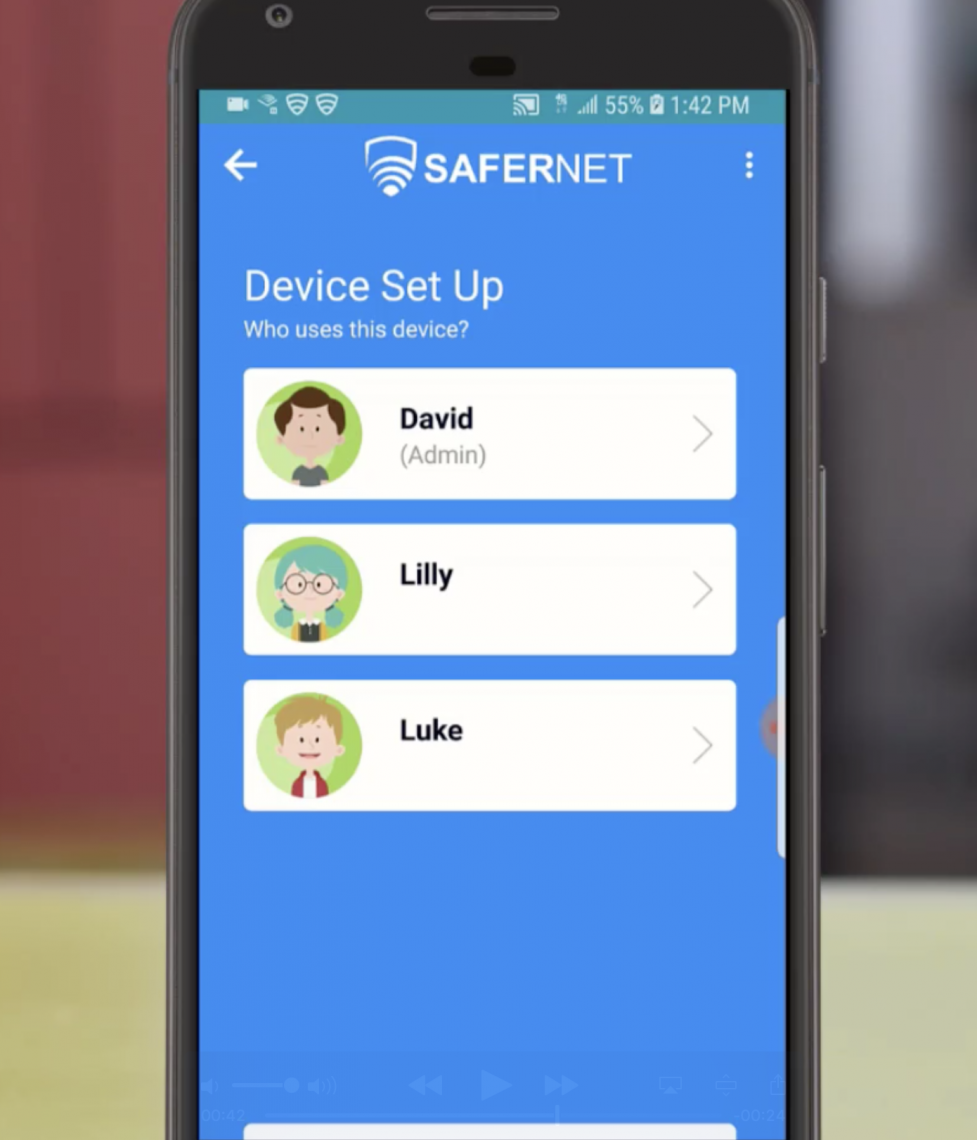
7. Choose the profile that you wish to be loaded onto this device.

8. Press OK to the VPN Connection request.

9. Success! Congratulations, SaferNet is now monitoring, controlling and protecting your Android Device!

How To Install SaferNet to MAC OS and Add Device

How To Install SaferNet to MAC OS and Add Device

        1. To download SaferNet to your MAC OS, first go to https://app.safernet.com/download/  in your preferred internet browser.

2. Next, click on the button that says “Download for Mac” or simply click this link… https://app.safernet.com/mac-installation-guide

3.This will download the SaferNet installation file to your MACOS.

4.Open SaferNet.Dmg file to begin the installation process.

5. Click on the “SaferNet” icon. A popup dialog box will appear, which states: ““SaferNet” is from an unidentified developer. Are you sure you want to open it?” Click on the “Open” button to proceed
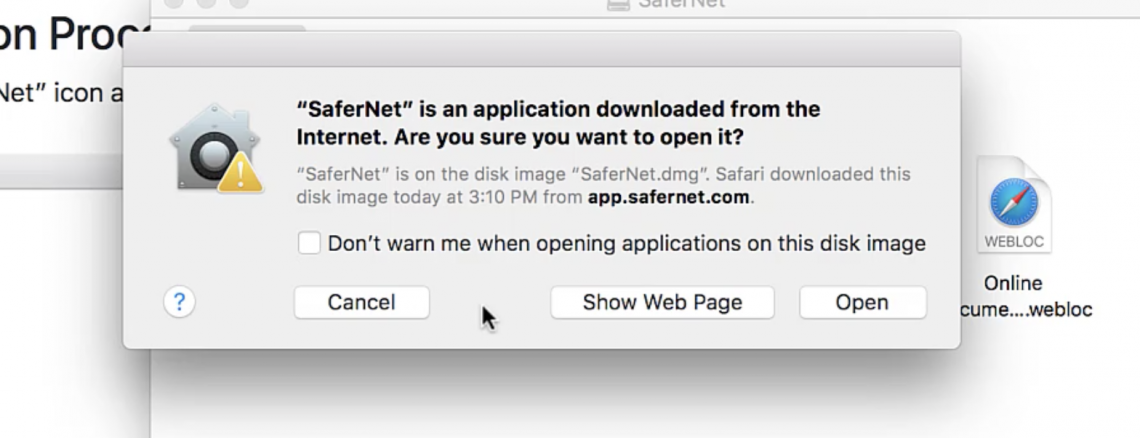
6.Please enter your MacOS credentials, and click OK to start the installation process.
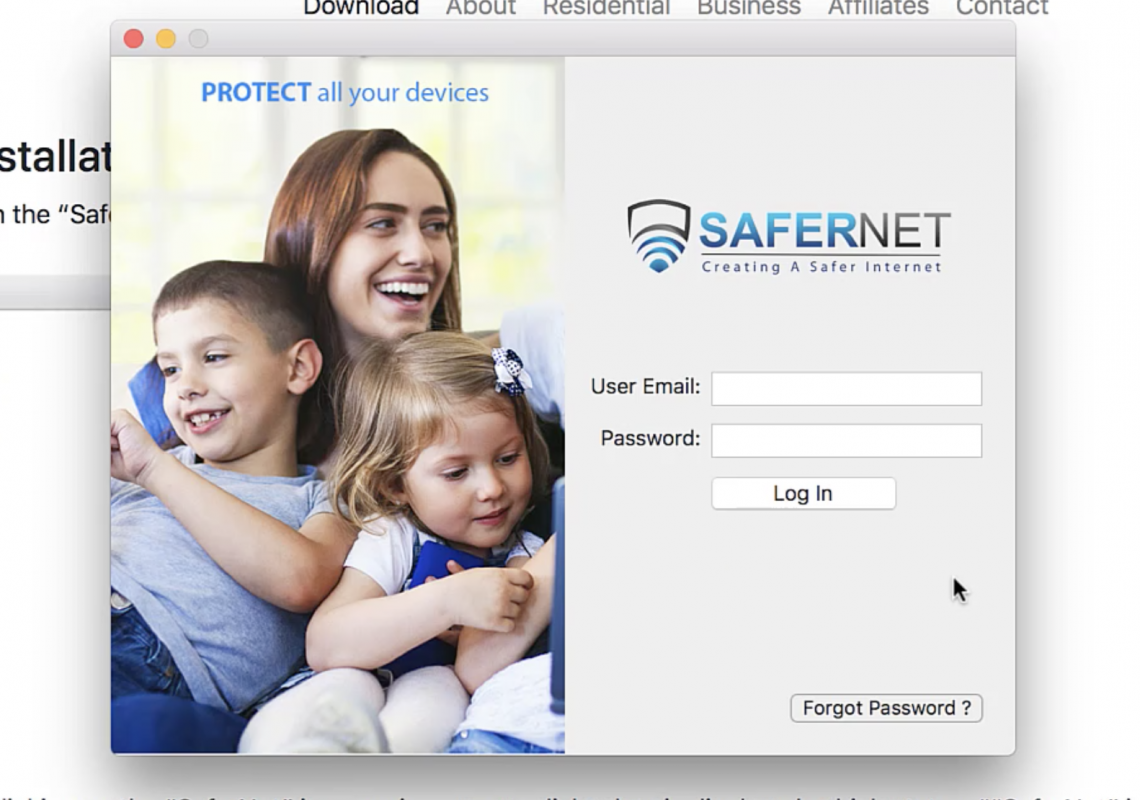
7.After Installation finishes, SaferNet will open.

8.Enter your SaferNet Username and Password.

9.A Device Setup menu will appear with all available profiles.

10.Choose the profile that you wish to be loaded onto this device.

11. Success! Congratulations, SaferNet is now monitoring, controlling and protecting your MAC OS!

How to Install SaferNet to A Windows PC and Add Device

  • How to Install SaferNet to A Windows PC and Add Device
    1. To download SaferNet to your Windows PC, first go to https://app.safernet.com/download/  in your preferred internet browser.

  1.  Next, click on the button that says “Download for Windows”.  or simply click this link…https://app.safernet.com/download/SaferNetSetup.exe
  2.  A “Save As” prompt will appear and ask you to choose where to download the SaferNetSetup application file.
  3.  Next, open the SaferNet setup application file where you saved it to begin the installation process.

4. The windows InstallShield Wizard will execute. Please follow all of the instructions to install SaferNet.

5. After installation, a SaferNet icon will be placed on your desktop. Double click it to open SaferNet.

6. Enter your SaferNet Username and Password and Press The Login Button

7. A Device Setup menu will appear with all available profiles.

8. Choose the profile that you wish to use on this device.

9. Success! Congratulations, SaferNet is now monitoring, controlling and protecting your PC!

Violent Video Games and Children

Do playing violent video games make children violent? This question has been asked by many concerned parents who’ve seen their kids passionately gun down people and steal cars in the name of fun. Academia has rigorously tested this proposition with mixed results. The debate has been raging for years and refuses to die down.

Recently, President Trump called a meeting to find a connection between mass shootings in school and violent video games. This might seem far fetched to many but incidents like 2016 shooting in Munich, Germany, where the 18-year-old shooter was found to be a fan of first-person shooter video games raises concerns. ABC reported an incident where two teenagers in Tennessee shot at passing cars and killed one driver. The teens had got the idea from playing Grand Theft Auto III.

These facts are eye-openers for all of us: 90% of children in the United States play video games (Source: American Psychological Association). The number rises to 97% for kids between the ages of 12 and 17. More than 90% of video games involve mature content including violence.

Impact of Violent Video Games on Kids:

  1. Fear- Children, especially tweens, who are not mature enough to distinguish reality from fantasy, can get disturbed by violent content and come to perceive the world as a violent, scary place.
  2. Increase in Aggression and Violent Behavior- Children imitate what they see, as the famous Observational Learning Theory points out. Studies prove this further. In a randomized experiment, researchers Irwin & Gross found that boys who played a violent video game showed more physical aggression towards peers (e.g., hitting, shoving, pinching, kicking) as compared to boys who played a non-violent video game.
  3. Desensitization to Violence- Amongst teens and young adults, repeated exposure to violent content can make them desensitized towards it. Researchers Carnagey, Anderson and Bushman found that young adults also show physiological desensitization to real-life violence, as measured by less of an increase in heart rate and skin conductance.
  4. Lower Empathy and Compassion- According to American Psychological Association, exposure to violent video games is associated with lack of empathy and kindness. Researchers Anderson and Bushman found evidence to support this. They found that individuals who had played violent games, compared with non-violent, were less likely to report hearing a fight staged outside the laboratory, judged the fight as less serious, and were slower to respond when asked for help.
  5. Impact on Brain- Neuroimaging research is now showing us how media violence is affecting kids’ brain development. For instance, one research has found that teens exposed to violent video games experience a decrease in activity in their prefrontal cortex, which is associated with problem-solving and controlling of emotions (Tom A. Hummer, 2015).

For reasons of brevity, we are not citing all studies related to kids and violent video games here. But this much is firmly established that playing violent video games is a powerful risk factor. Violent behavior in children is a combination of many factors, such as violence at home or in neighborhood, socio-economic factors, the child’s personality, and exposure to media violence.

The growing popularity of Mature-rated (M-rated) games and depiction of sexual violence towards women in some games should make the parents be cautious of what games their kids are playing online. Parental controls can help you monitor their online playtime. Protect Your Childs’ Innocence with SaferNet.

When Should Your Kids Start Using Social Media?

“My child is 10 years old and wants to join Instagram. She says all her friends in middle school already have an account on it. Should I allow her?”

“My 14-year-old kid wants to have a personal account on Facebook. Is it safe for a teen to be on Facebook?”

Yes, like you, all parents are concerned about the online safety of their child. Incidents like the sexting scandal in a local Colorado high school, cyber-bullying and ultimately the suicides of 15-year-old Canadian girl Amanda Todd, 15-year-old American girl Phoebe Prince and 18-year-old boy Tyler Clementi send shivers down our spine. Social media was the common thread in all these cases – it became a medium of circulation for inappropriate content and a medium of exploitation.

A recent study published in the journal JAMA Pediatrics reports that nearly 15% of teens have indulged in sexting.


No wonder parents share the Hamletian dilemma “To let them be or not be on social media.” Trust us when we say, no matter how hard you try, you can’t keep your children away from social media for long. You might as well lock them in a room never to venture out. Social media is as much a part of your child’s real life as going to school and meeting friends is. So, the next question you end up asking yourself first and Google later is:

What Age is Appropriate for Children to Join Social Media?

It’s 13. We don’t say that but social media sites such as Facebook, Instagram, Twitter, Snapchat, Pinterest, and Tumblr suggest this. This number is pure hogwash though.

About 50% of children in the age group of 8-13 are already on social media according to a study by CyberSafeIreland! American tweens are way ahead with 85% having at least one social media account. If you have a tween (a child between the age of 8 and 12) in your home, he or she would have probably come up to you saying they need an account on any of the popular social networking sites. An over-protective parent would have jumped the gun and said a big No. “Wait for your 14th birthday,” would be your rehearsed answer. But will this arbitrary number make your child safe online?

Parents who know the positives and negatives of social media, would give in sooner or later before the social media initiation age. As a precautionary measure, they would then follow their children on that social media platform to monitor their activity. But is that the right step? Are you sure your child hasn’t opened a secret account and is being exposed to things he shouldn’t be? So back to square one:

What Real Age is Appropriate for Children to Join Social Media?

It depends. Sorry, one-size-fits-all approach doesn’t work here and will never work. You, as a parent, are the best judge when it is the right time for your child to be on social media. These factors will help you arrive at the best answer to your dilemma:

  • Social Skills Of Your Child: Nobody knows your child better than you. He or she might be 15 and still be immature. A 9-year-old, on the other hand, might act quite responsibly, perform all chores and balance study and entertainment well. So, if you feel your child can handle themselves maturely on social media, you can trust your instincts and go ahead. With parental controls put into action, of course.
  • Creative Talents of Your Child: Social media is not only about sharing photos, gossiping and useless commenting. It’s a great medium to share your creative talents such as writing, sketching, dancing, or acting. The approval of peers on social media will further motivate them to hone their talents. Kids can make wonderful use of social media networks and should be allowed to join one social media platform, under supervision.
  • Social Media Platform They Wish To Join: Some social media sites are more dangerous than others. Facebook is potentially dangerous for children. There is a risk of them sharing personal information such as location, name and address. Instagram and Snapchat have their own share of risks. Pinterest is comparatively safer and more beneficial for kids to join. So, get them started on social media with sites like Pinterest. Tweens should be told to wait at least till the technical age of 13 if they wish to join Facebook. Strict monitoring of accounts is recommended.
  • Willingness Of The Child To Be Monitored: There are some kids who share everything with parents and understand that their parents are objecting or monitoring out of love. Some (majority in fact) might throw tantrums. Let them! It’s time to start social media disciplining as early as possible. Surfing online, for instance, during family time and bed time is a big no. If your child is ready to arrive at a mutual understanding, you can give the nod.

Parent Story From A Real SaferNet User

The Importance of Internet Safety as a Parent, Boundaries, and How SaferNet Helps

Hello, my name is Luke and I am a Dad to a 12-year-old boy. That’s us in the picture above. I wouldn’t change it for the world. However, there are quite a few things I wish I had more control of.

The internet is such a vast environment full of knowledge and answers that are extremely helpful to a developing child, but there are also some horrible avenues that our children could be exposed to. According to a Netmums Poll:

“42.1% of kids admit they have seen online porn. One in 16 have been exposed to hardcore pornography.”

Typically, when you search the internet for answers about internet safety the statistics are outstanding regarding the level of severity. It can be overwhelming and scary to find out what kind of things our kids can be at risk of seeing. As a parent, it’s 1000% my responsibility to keep my kid educated about the potential dangers of the web such as:

Predators – Older adults preying on children using fake accounts to talk to kids his age. This could be on social media, or even multi-player online games like World of Warcraft or Fortnite. 

Viruses – These days, the most common way to get a virus is through hacked accounts on social media or games that send a link that contain a virus that can fry your phone/tablet/computer or steal all of your valuable information. Unfortunately, these links can get through spam filters a lot easier than you’d think.

Explicit Content – The stuff my kid knows he’s not supposed to see. This can vary all the way from videos with bad language to pornography. 

It is also my sole responsibility to keep him safe from all of these potential dangers. He’s definitely at the age where he doesn’t appreciate me monitoring his internet usage, and can get an attitude if I command him to not do something. Then sometimes do it behind my back anyways! This is when I knew I had to set some boundaries that he couldn’t get around. I had to let him know I was serious about his safety and ultimately that I care for him enough to do something about it.

Investing in SaferNet helped bridge the gap of the unknown internet terrors and is helping keep my child safe. Not only are the privacy standards outstanding, but one of SaferNet’s main features allows me to set unlimited controls to manage his time on the internet. I can make this work throughout my whole Wi-Fi network or by individual profile/device. When it’s time to get off the computer and go to bed, he can’t just get on his phone and surf the internet anymore.

Another fantastic feature is that I can adjust content filters completely dependent on what is appropriate for his age, and it’s constantly being updated. An extra safety bonus is that even if I have the age filter level set to “Adult” on any device, SaferNet can block adult websites, access to the “dark-web”, and all illegal trafficking sites.

SaferNet actually protects my family and ultimately makes me feel like a better parent. Now my child is more respectful of my decisions and has a better understanding of why it’s so important to keep him safe.

SaferNet & Grandparents

The Importance of Grandparents & Grandchildren Interacting With Each Other On The Internet, and How SaferNet Can Keep Them Safe

Grandparents have a bigger impact on the development of grandchildren than you might think. According to statistics, more than 50% of grandparents see their grandchildren in person at least once a week, and over 7 million grandparents live with their grandchildren.

There is a level of wisdom and experience that grandparents have that builds a special bond with their grandchildren. It makes sense considering that they put their past parenting experience to use in their interactions with grandchildren.

An American Grandparents Association (AGA) survey indicated 63% of grandparents “say they can do a better job caring for grandchildren than they did with their own.”

That also builds a sense of respect and true listening for the child, 78% of grandparents say they have discussed values with their grandchildren.

Contrary to the myth of seniors who are confused in front of anything that’s electric and has buttons and isn’t a remote control, American grandparents have generally converted to using the tools and benefits of the digital age. More than 75% of grandparents use the internet and nearly half use social media regularly.

Older and younger generations interacting with each other on the internet show plenty of benefits. Studies show that families develop important digital citizenship skills and form stronger bonds when exploring the internet and learning about technology together.

About 11% of parents worry that their offspring deliberately seek out unsuitable material or spend too much time online while in the care of their grandparents.”

While many grandparents are concerned about their grandchildren’s access to various content containing; foul language, visually explicit websites, and ways of communicating with total strangers via online gaming (multi-player games such as World of Warcraft) or social media, surveys show that grandchildren are often far more advanced in technology use than their grandparents, who feel anxious about what boundaries they should set and how to do it. According to statistics, almost 3 in 10 parents (29%) let their kids use the internet without any restrictions or supervision, and on average about 16.7% of parents allow children three years old or younger to go online. Less than 31% of grandparents, have discussed digital rules with parents, even though 44% of families claim to have rules. (Source)

It is extremely important to build confidence and inform parents and grandparents of the ways to help children get the most out of technology while understanding the hazards, and also setting limitations. Those who manage to get to grips with their grandchildren’s internet usage find that they are valuable teachers and have more overall respect for their elders.

Now, there can be complications regarding trying to set boundaries with your grandchildren, such as them trying to outwit your limitations and can ultimately ruin the bond and trust between each other. BUT, there is an easier way around that. SaferNet is the leading parental control app and the best in class virus and malware protection service on the web.

SaferNet is not only user-friendly; making it an easy solution for older adults, but is the most effective content filtering system on the market.

In summary, we have 84 content categories that allow the SaferNet user to specifically target what is allowed or disallowed on a specific device or profile or on your entire WiFi network. To make it easy we have also established age appropriate category settings that are easily adjustable. You can also “blacklist” any website that your grandchild goes to at any time. Our preset age filters are only a guide. We give grandparents the ability to allow/disallow access to any website with just the click of a button whether you’re on a mobile device or computer.

SaferNet gives grandparents a sense of relief knowing that their grandchild won’t be accidentally exposed to pornography, gambling, alcohol, drugs or any unwanted redirection. The control is now in your hands.