Cuba Ransomware Gang Set to Continue Attacks Against US Local Government for the Duration of 2021

Ransomware is a lucrative business. While once a type of malware targeted mostly consumers, in the last decade, Ransomware has turned its sights on the business, financial, and government sectors. Though ever-evolving to new stages of complexity, the idea behind it is fairly simple. A computer, or phone, gets infected with Ransomware, and all the files on the device are locked up in a special type of encryption. The user will see a message on the screen from the hacker, stating that their files have been locked and must pay a sum of money for everything to be unencrypted.

It is most common for just files to be encrypted, but other types of Ransomware have been known to lock down entire operating systems.

The Cuba Ransomware was first sighted in late 2019 after infecting a number of individual machines. These incidents were not widely reported on, as they seemed to be isolated. It’s now thought the individuals behind this, known as the Cuba Ransomware Gang or just ‘Cuba Gang,’ were practicing and dipping their feet in the world of cybercrime.

Throughout 2020, the Cuba Ransomware was reported on several systems, though none major. However, the volume of reports that appear prompted cybersecurity researchers to publish data on the attacks’ exact nature.

Cuba Gang were marked as potential major threat actor, and in Feburary 2021 they lived up to their reputation.

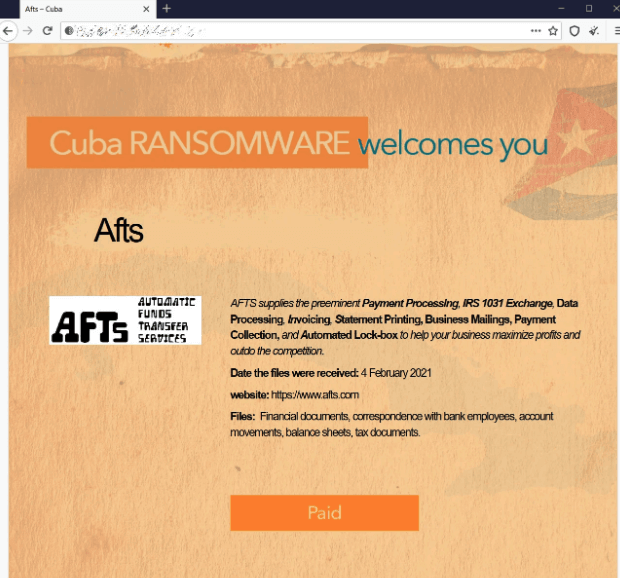
On the 4th, Cuba Gang attacked the Automatic Funds Transfer Services (AFTS). The AFTS are a billing and payment processing which operate out of Seattle. They operate with a number of local, municipal and state government entities in the state of Washington, but also across the United States.

Given the reach of the AFTS, it’s no surprise how many entities have been affected. The AFTS refused to pay the ransom on their data, and so Cuba Gang promptly transferred it back to their own servers to sell on the Dark Web.

For most cities using AFTS that were affected, the breach is not as destructive as it could have been. It is understood no Social Security Numbers were disclosed in the encrypted files; however, names, billing account numbers, addresses, and other categories of personal information have been. Within Washington, the following cities citizens are affected:

  • Seattle
  • Kirkland
  • Monroe
  • Lynnwood
  • Lakewood
  • Everett

The most notable victim in the attack is the California Department of Motor Vehicles, which used AFTS. It is believed the details of up to 38 Million citizens have been exposed, which are now being sold online for the purposes of identity theft.

The data exposed from the breach includes names, addresses, phone numbers, license plate numbers, VINs, credit card information, scanned paper checks, and billing details.

At the time of writing, the attack is still on-going, and more cities are finding themselves affected. The AFTS website is currently unavailable, and the authorities including the FBI are investigating the incident.

The Nature of Cuba Ransomware

Cuba targets only Windows devices, though it functions on all Windows OS versions from Windows XP to Windows 10, meaning it can penetrate legacy-server systems that many industrial institutes still use today to the most modern machines.
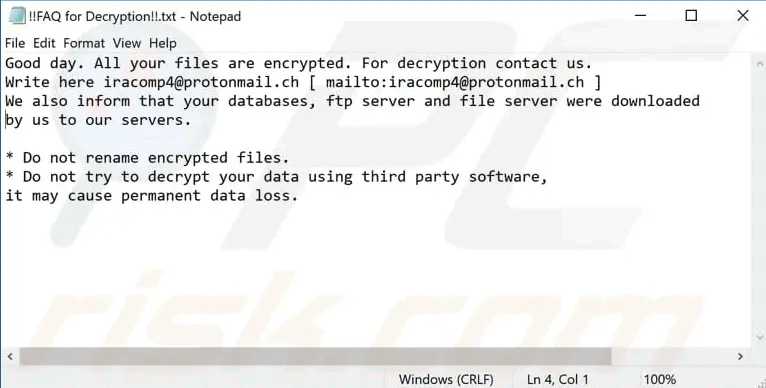
cuba ramsonware
The ransom note shown to users with infected devices


Once inside, the virus will encrypt all files with the .cuba extension, e.g., picture.jpg will become picture.jpg.cuba. These files will not be able to be opened by the victim while in this encrypted state.

The victim will be instructed via Notepad that if they want to decrypt their files, they will need to contact a protonmail based address to arrange the ransom – a money transfer to get the files back.

If the ransom is not paid, a backdoor within the virus activates. This backdoor funnels the encrypted files back to Cuba Gangs’ Command Center. Once decrypted on their side, the files are then sold on their website located on the Dark Web.
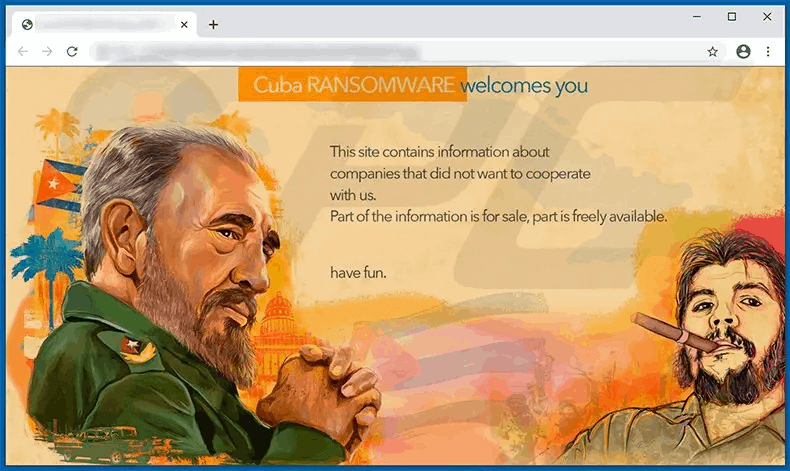
cuba ramsonware
Cuba Gangs’ homepage on the Dark Web as seen using TOR Browser


cuba ramsonware
AFTS files for sale on Cuba Gangs site
The identities of the hackers involved in Cuba Gang are unknown. The gang may have no affiliation with the country of Cuba; the name and website design could easily be a red herring.

The full scale of this attack has not yet been revealed, what is clear though is that Cuba Gang have gone from small-time crooks to large-scale criminals. Given the success of their attack on AFTS, it is likely they will continue this campaign against US local governments for duration of 2021.

The Genesis of the Attack
cuba ramsonware
In the modern-era of Software-as-a-Service and Gaming-as-a-Service, you would be correct to assume that Malware has taken up this trend too. Malware-as-a-service (MaaS) has led to a tidal wave of cyberattacks on the web in recent years.

No longer do hackers need to have extreme levels of technological literacy to start a campaign; instead, they can purchase or rent Malware on the dark web and begin in earnest.

Cybersecurity researchers have confirmed Cuba is the product of MaaS, being based on the Buran ransomware family.

Buran surfaced on a Russian dark web forum in early 2019, named for the Buran-class orbiters developed by the Soviet Space Program.

Buran is sophisticated ransomware known for its high speed and ability to easily bypass defenses and burrow into Windows system directories.

Before the advent of Buran, the MaaS space was dominated by big hitters such as REVil, GrandCrab, and Phobos. Some of these worked on a commission basis, their customers having to pay as much as 40% of their take back to the developers.

Buran started a price war in the scene, offering rates of 15-25% based on the volume of attacks.

Many ransomware clients have used the Buran core. It’s possible that if Cuba Gang continues their efforts throughout the year, they could be its most infamous user.

How You Can Stay Protected Against Ransomware

cuba ramsonware
In the world of Malware-as-a-service where just about anybody can get their hands on deadly digital tools, preparation is key.

2021 has started on ominous footing for the cybersecurity world and arming yourself, or your business with the right defensive tools against threats like ransomware now is the secret to that preparation.

SaferNet was created as a way to defend against the threats of today and those of tomorrow.

SaferNet is the perfect solution to the cybersecurity issues that individuals, families, and businesses face today. It not only connects every device using a secure, 24/7 always on, military grade VPN, but it also stops outside cyberthreats, malware and viruses as well. On SaferNet, all users are protected anywhere in the world, all the time, on any cellular or Wi-Fi network. In addition to SaferNet’s VPN and cyber protection, it also offers a range of employee or parental/family internet controls including internet filtering, monitoring, scheduling, and blocking access to websites or even entire website categories

Typically, a business or family would need 3 separate services for a VPN, Malware Protection, and Internet Controls; SaferNet offers all 3 features in one service. SaferNet truly is an endpoint security presence that can be implemented in minutes around the world, on phones, laptops, tablets, and computers at an economical price point that caters to all sizes of businesses and families. SaferNet guarantees a smooth setup and installation process that takes only minutes, and an easily accessible control hub for you to monitor all your employee’s or family members devices; including activity, time spent online, and threats blocked.


Try SaferNet Now
Phishing Attacks Up 6000% As Hackers Turn to Malformed URLs

Phishing attacks have long been the bane of consumer households, and in recent years have switched their target to Small and Medium Businesses (SMB). The number of Phishing attacks rose notably at the start of the pandemic when many workers began working-from-home. That increase has been somehow overshadowed by recent developments, as a new report by GreatHorn reveals Phishing attacks are up nearly 6000% since October. The increase is believed to be tied to a variation in attack vector for hackers carrying out phishing; Malformed URLs.
Many SMBs train their employees to look out for phishing practices in suspect emails. One of the most obvious practices is Typosquatting. This is a ubiquitous attack vector used by cybercriminals, where a misspelling will appear on a brand name website in the hopes the victim will fall for it. One example may be having “facebaok.com” instead of “facebook.com.”

Usually, a hacker will ‘sit’ on a domain like this, hoping someone will accidentally access the site. More common, however, is using it within a phishing email. People don’t always closely scrutinize the URL of a received email and often fall for the trick. As mentioned, this practice is reasonably well-known and not as successful as it once was.

The natural evolution of this and the vector that has caused such a staggering increase in phishing attacks is Malformed URLs.

Usually, on a website that has security certification, you will see “https://”, and if the certification is not in place “http://” appears. For a Malformed URL, the prefix will look something like “http:/\”, using a forward-slash followed by a back-flash, instead of two back-flashes.

While it may seem obvious written in this format, there are a couple of reasons why it’s so successful.

How Malformed URL Phishing Emails Trick Victims


Phishing


With any form of attack via email, the first and arguably largest obstacle the hacker has to circumvent is the email server itself. Many reputable email providers such as Outlook have security features built-in to ensure their users either don’t receive a malicious email or that the emails are placed in spam or junk.

These security features will scan the incoming URL for suspicious elements, and either reject the email entirely or mark it as spam.

Malformed URLs entirely bypass these scans. Email security is only in place to examine the body of the domain rather than the hypertext protocol preceding it. This security follows a list of guidelines called “Known Bad” which checks a series of conditions on an email before deciding how to handle it, and HTTP-checking is omitted.

The second hurdle a hacker must pass is one less-easily defined and much less tangible, and that is the suspicion of the victim and how well they can eye-ball URLs. The human brain is a complex machine, and amongst many of its odd features is the ability to detect things through eyesight that aren’t there or are inaccurate. Our periphery vision can quite easily match to form the same pattern as what’s in our direct line of sight.

This can be seen most clearly in Uniformity Illusions. This concept applies to reading, and in this case reading data, namely a URL. If we quickly parse a URL with our eyes looking for Typospotting, our periphery will rarely spot “http:/\” unless we intentionally look for it.

What The Attacks Look Like

Greathorns’ report states that across the board, SMBs running Microsoft Office 365 were more likely to witness these attacks at a much higher rate than those running other email services.

While many competitors are catching up, Office 365 remains the dominant email provider for SMBs, and so these attacks are widespread.

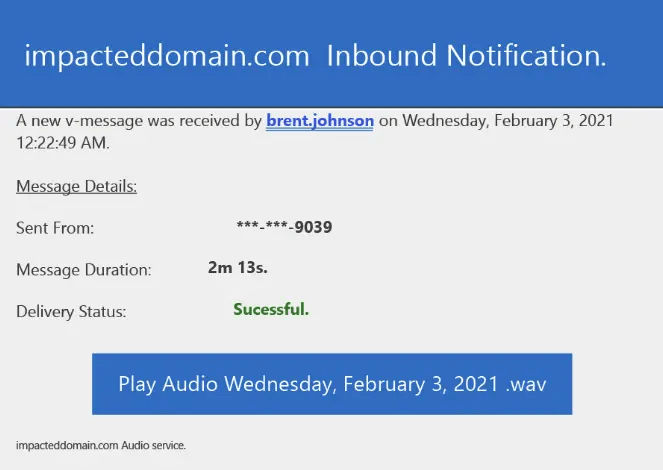
Greathorn provided an example of one such attack. The URL used was “http:/\brent.johnson.australiasnationalskincheckday.org.au//exr/[email protected]”. This specific phishing attempt impersonates a voicemail service, informing the recipient that they have a voice message. It emulates the appearance and behavior of many email platforms that use cloud-based voicemail services.


Phishing


Part of the phishing email, with the button linking to the malformed URL which many users would not pick up on

Following the link brings a user to a ‘Office 365’ page, which first contains a reCAPTCHA, a common security feature of legitimate websites, showing the sophistication and subtlety of the attempted attack.

Following this, the user is presented with a high-fidelity replication of an Office-365 login. Their email address will already appear, and they are prompted for a password. Entering the password here will provide hackers with complete login credentials. At this point, the hacker has a free pass; they gain access to the recipient’s email contact lists and other sensitive data, including cloud storage.

The Challenge of Phishing Attacks for SMBs

Phishing as an attack is relative simple to carry out for a cybercriminal. Set up the page, create the email, and start sending it out enmasse to emails. This ease has made phishing become the go-to attack method for targetting SMBs.

At the end of last year, Proofpoint published a report on the state of phishing attacks against SMBs in 2020. The results were troubling, finding that 75% of SMBs faced phishing attacks through the year, and 57% of these attacks were successful.

Many of these were spear phishing and whaling attacks – Specified attacks against managers and C-level executives at a business.

Phishing is without a doubt one of the great threats any SMB must deal with in the world of cybersecurity. Beyond educating employees and performing regular internal security audits, employers should equip themselves with the right tools to combat phishing.

SaferNet is one of these tools, which we engineered with attacks like Phishing in mind.

SaferNet is the perfect solution to the cybersecurity issues that individuals, families, and businesses face today. It not only connects every device using a secure, 24/7 always on, military grade VPN, but it also stops outside cyberthreats, malware and viruses as well. On SaferNet, all users are protected anywhere in the world, all the time, on any cellular or Wi-Fi network. In addition to SaferNet’s VPN and cyber protection, it also offers a range of employee or parental/family internet controls including internet filtering, monitoring, scheduling, and blocking access to websites or even entire website categories

Typically, a business or family would need 3 separate services for a VPN, Malware Protection, and Internet Controls; SaferNet offers all 3 features in one service. SaferNet truly is an endpoint security presence that can be implemented in minutes around the world, on phones, laptops, tablets, and computers at an economical price point that caters to all sizes of businesses and families. SaferNet guarantees a smooth setup and installation process that takes only minutes, and an easily accessible control hub for you to monitor all your employee’s or family members devices; including activity, time spent online, and threats blocked.

Poisoned Cookies: 5 Notable Attack Vectors For Session Hijacking Using Cookies

Cookies; a childhood delight for many, a fondness that continued throughout life. When you say the word, you think of one thing – sugary treats. Otherwise, most of us are aware that cookies in the digital world are present but don’t really understand what they do. Most of our interactions with cookies online come from visiting media sites that prompt us to accept cookies. However, cookies and their use online are an important underpinning of the worldwide web, and their functionality has changed throughout the years. Many technologies associated with the internet are used for nefarious purposes, and cookies are no different.

Cookies are tiny files which you generally receive when visiting a website. These are stored on your computer, and hold a small amount of data relevant to you, the user, and the website you’ve visited. This data is usually passwords, usernames, and session tokens. For example, you may have cookies from social media accounts. When you visit the social media webpage again, the website will access the cookies it previously transferred to you. It can identify you at this stage, and tailor the page for you.

This mostly consists of automatic logins and loading social feeds, but it has some other purposes many don’t realize. A shopping cart on any e-commerce website relies on cookies. Google Maps greatly relies on cookies too. Cookies shape our personalized experience of the web.

The cookies that store your passwords are called Permanent Cookies. If you’ve ever used Password Manager on Google Chrome, these are your permanent cookies. It’s generally good practice to delete these periodically.

When you were younger (and maybe even now), you didn’t want anybody stealing from your cookie jar. With online cookies, you should remember that it’s not a great feeling. Stealing from the digital cookie jar has several different names: Cookie poisoning, Cooking hijacking, and mostly commonly Session Hijacking.

Session Hijacking is rampant. Think of every single website you sign into. It is very likely that one or more is vulnerable to session hijacking. A number of years ago, a report stated that 31% of all e-commerce sites were vulnerable to session hijacking, and it’s only gotten worse. So how does it work?

When you log in to a website, the server sets temporary session cookies in your browser. These cookies are in place to ensure the website knows you’re logged in. All that website needs to know that you are really who you claim are those cookies. This is where a Man-In-The-Middle (MITM) can happen. When you connect to the website, a hacker can easily monitor the network to intercept your cookies and copy their session ID. With this ID, the hacker can return to the website and present the server with your cookies, and fool it into thinking that the hacker is you.

When the hacker is in, they can do anything that you’re authorized to do on the website. This includes purchasing items, stealing company information, starting money transfers from your bank account, and stealing information that can be used for identity theft.

For large enterprise systems that use a Single-Sign System, this can be devastating as entire financial records and company documents and details are uncovered in a single attack.

The two most common versions of these attacks involve Session Sniffing and Cross-Site Scripting (XSS).

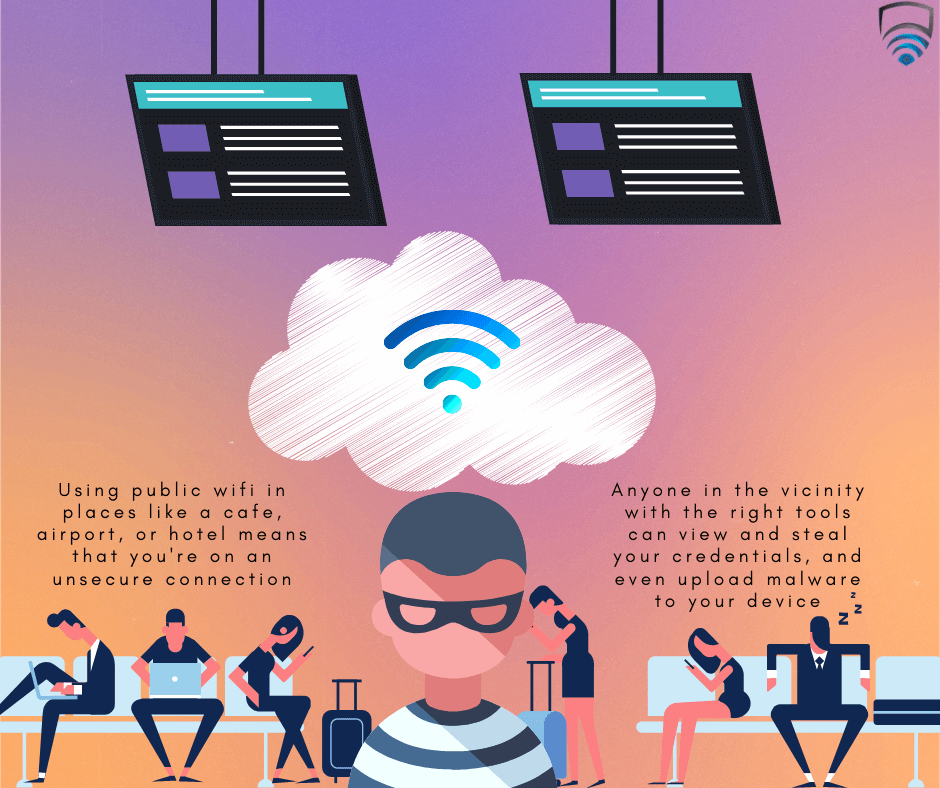
Session Sniffing occurs when a hacker uses a packet sniffer, which are often legitimate products, and scans all the traffic on the network. Included in this traffic are session cookies. The hacker will have his system set up to target these. Session Sniffing is most common on public-WiFi; coffee shops, airports, universities, city hotspots, etc.

XSS goes for a more complex approach but can often net more victims. XSS has a plethora of functionality outside Session Hijacking, but as a general rule, it occurs when a hacker injects malicious code into a vulnerable website. When a user accesses the website, it runs the code because their device trusts the website, leading to the hacker’s desired payload being executed. In the realm of Session Hijacking, XSS can be used to grab incoming cookies. This way, a popular website that is compromised can gather thousands of session IDs from users logging in.

If any of this sounds complicated to perform, it’s not. In the world of hacking, hackers are often fiercely intelligent individuals who develop malware far more complex than most of the apps we use on a day-to-day basis. Session Hijacking has been called “Hacking-For-Dummies” in the past, and a simple Google or Youtube search will give you a step-by-step guide. There are exceptions to this of course, and some methods are notable complex, which in turn makes them more effective.

Session Hijacking Attacks Using Cookies #5: WordPress XSS Exploits


Cookies


WordPress evolved from a beginner’s tool for web development to the de-facto name in the industry. While still exceptionally user-friendly, seasoned users of the service have created beautifully written websites using complex methods. Systems with a low barrier to entry but a high skill ceiling are often popular ones, and WordPress is no exception to this.

One of WordPress many popular features is it’s community-created modules, namely themes and plugins.

Themes are created to give a website its look-and-feel. This can be anything to color theme, image placement, blog post listings, and general layout. Themes are the skeletal structure of a WordPress website.

Plugins, on the other hand, are not so easily defined. Plugins can be anything created by the community to augment your website. This could be a contact form, image slider, Google Analytics Aid, Drag-And-Drop page builder, and more. As of 2020, there were 70,000 different plugins available for WordPress.

Community curated systems like these can be amazing, but they’re easily abused, especially when it comes to session hijacking.

OneTone was a popular WordPress theme several years ago but has since been discontinued. It was still used after its development, which made it an attractive target for hackers – Its original developers no longer supported it. A vulnerability within the themes function.php file allowed a hacker to inject malicious code into the website’s core. When the site administrator visited his page, he was redirected to the hackers’ own domain, where his cookies could be read easily. Even when the administrator had cleaned up the infected, the hacker already had his cookies which worked as a backdoor for later unauthorized entries.

A more recent and much more severe attack came last year. Ninja Forms is a popular forms plugin that allows the administrator to add a form to their website. A legacy version of the plugin was breached using XSS attacks. When an administrator used the form, the code was executed, and their cookies were stolen. Like OneTone, this allowed the hacker administrator access into that WordPress account. Additionally, infected websites would redirect users to malicious websites that attempted various attacks if they were unprotected.

Session Hijacking Attacks Using Cookies #4: FaceNiff


Cookies


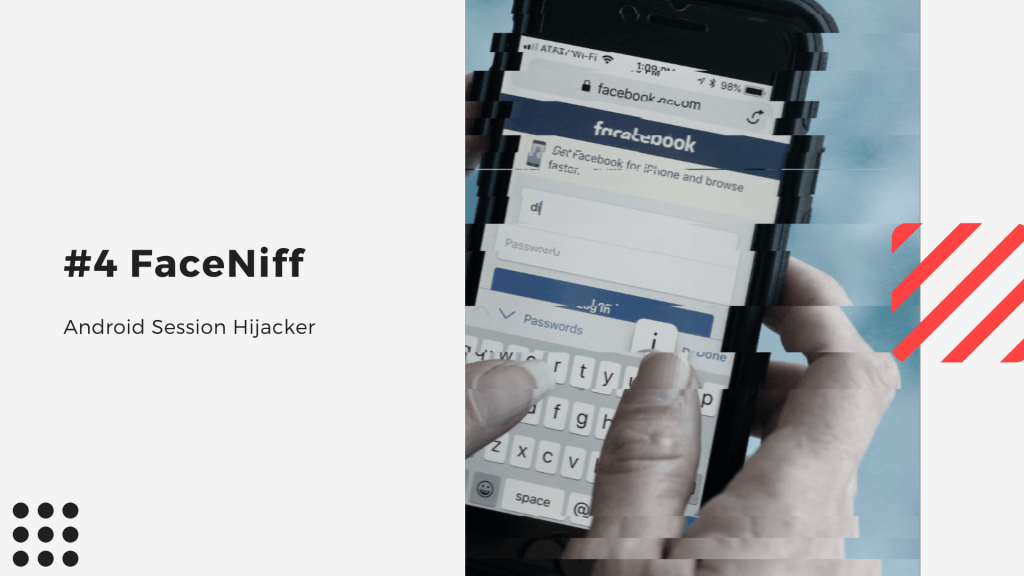
FaceNiff was one of the first popular Android based session hijackers that hit the mobile market. Google Play do not allow malicious apps on their store, and so the .apk which forms the application has to be found elsewhere on the internet. It also requires the hacker to have rooted their Android.

When opened, FaceNiff will scan it’s network using Session Sniffing. Initially it only searched for Facebook logins, but the app has branched out to include YouTube, Amazon, and others.

FaceNiff is used on Public WiFi usually. Once it detects Facebook (or other) session IDs, it will immediately do the heavy lifting in terms of ID translations, and will present the hackers with email addresses and passwords used for login.

Apps like FaceNiff are extremely easy to get, and to use. Often when we thinking of hacking on Public WiFi we get a mental image of a man with his hood up hunched over a laptop in a coffee shop. This idea is somewhat dangerous as it conceals the reality. A hacker using FaceNiff is more likely to be an ordinary looking individual, sitting an airport gate on their phone – Just like everybody else.

Session Hijacking Attacks Using Cookies #3: FireSheep


Cookies


FireSheep was effectively a more accessible version of FaceNiff.

Released in 2011 for Firefox browser, FireSheep would scan its network and display the list of session IDs for Facebook and other websites in the side bar. A FireSheep user could simply click on the ID it would automatically log them into the targets Facebook.

FireSheep was intended to display the Dangers of Public WiFi. This is certainly an educational proof-of-concept; however, a perhaps misguided step from Mozilla (the creators of Firefox) was to allow FireSheep as an extension on the Firefox addon store.

FireSheep required no rooting or no special knowledge, you simply had to use Firefox to run it. It was mass-adopted by would-be hackers and lead to many compromised accounts. Mozilla eventually removed it, but the damage was done.

Session Hijacking Attacks Using Cookies #2: DroidSheep


Cookies


DroidSheep was developed with the best of intentions. On an industry level, it allows companies to test the security of their network and of their websites. However given it’s ease-of-use, it’s overtaken FaceNiff as the go-to mobile hijacker.

Like FaceNiff, DroidSheep must be downloaded from the developers’ website onto a rooted Android. It is much more user-friendly than its predecessor and allows for much more functionality. It can scan for any cookies relating to any website and so isn’t hindered in options. It also has the functionality to execute a number of Linux commands.

While it is prevalent among hackers, it would be misleading not to mention that DroidSheeps’ developers knew this could be an issue. Alongside DroidSheep, they released DroidSheep Guard, an app that blocks out any sniffing that the main app can do. While DroidSheep Guard is a useful tool, it does not protect the user against other sniffing applications.

Session Hijacking Attacks Using Cookies #1: Pass-The-Cookie


Cookies


As session hijacking became more popular, methods to defend against it did too. One such method known to most today is 2-Factor-Authentication (2FA).

2FA works by transmitting a temporary password, or key, to a secondary device when you try login. Usually this can be a text to your phone, or a code on an authenticator app such as Google Authenticator. 2FA is a step in the right direction for securing all your accounts that offer the service and should be set up immediately.

The world of cybersecurity is effectively cyber-warfare, and just as the physical world’s warfare is an arms-race, so is cyber-warfare a cyber-arms-race. If 2FA was a leap forward by the ‘good guys’, Pass-The-Cookie is the new armament for hackers in the race for total security, or insecurity depending on your viewpoint.

With Pass-The-Cookie, a hacker will intercept the cookie the target used when logging in with 2FA. The hacker can then poison the cookie, and use it set Authentication as active for a long period of time, allowing them to freely move around within the compromised account.

This was once thought of as not possible, more so very unlikely. But since the start of 2021, there has been a series of attacks using this method. This has prompted the US government to release a report on the issue.

What You Can Do About Session Hijacking and Poison Cookies

Session Hijacking is without a doubt one of the most common forms of cybercrime. Thankfully, protection against it is simple. While no approach will guarantee 100% safety, SaferNet can get you pretty close!

Session Hijacking relies on being able to detect cookie IDs moving in a network. This assumes the network traffic is unencrypted, which is the case for most people. SaferNet uses 256-bit encryption in its advanced VPN, meaning that anyone sniffing the network you’re using could only make out garbled, nonsensical data. This shuts down network sniffing and stops session hijacking before it begins.

SaferNet is the perfect solution to the cybersecurity issues that individuals, families, and businesses face today. It not only connects every device using a secure, 24/7 always on, military grade VPN, but it also stops outside cyberthreats, malware and viruses as well. On SaferNet, all users are protected anywhere in the world, all the time, on any cellular or Wi-Fi network. In addition to SaferNet’s VPN and cyber protection, it also offers a range of employee or parental/family internet controls including internet filtering, monitoring, scheduling, and blocking access to websites or even entire website categories

Typically, a business or family would need 3 separate services for a VPN, Malware Protection, and Internet Controls; SaferNet offers all 3 features in one service. SaferNet truly is an endpoint security presence that can be implemented in minutes around the world, on phones, laptops, tablets, and computers at an economical price point that caters to all sizes of businesses and families. SaferNet guarantees a smooth setup and installation process that takes only minutes, and an easily accessible control hub for you to monitor all your employee’s or family members devices; including activity, time spent online, and threats blocked.

mHealth Breach: 23 Million Users of Mobile Health Apps Exposed to Attacks

mHealth (meaning ‘mobile health’) applications once had a niche place in the app ecosystem. mHealth first appeared to control chronic diseases, from diabetes to thyroid issues, maternal care, asthma, and more. mHealth evolved and expanded to include mental health and even holistic approaches like meditation. Pre-2020, perhaps the most significant surge for the mHealth market came from how we integrated fitness and the Internet. Instagram fitness influencers, wearables like Apple’s Smartwatch, and sharing our fitness statistics with friends and teammates – Thanks to mHealth, the pure scientific knowledge of our own fitness metrics are more apparent now more than at any other point in history. mHealth has seen a steady increase in popularity, especially amongst hospitals and caregivers. These apps grew ever more complex with additional functionality. At the higher end of the spectrum grew more personal – Many require personal medical information, medical history, names, address, and even social security numbers. In 2018, it was reported that “73% of hospitals surveyed have developed or were developing mobile strategies to address the communications, collaboration, and computing requirements of clinical professionals and other mobile workers across medical departments, standalone hospitals, and ambulatory environments.”. The World Health Organisation (WHO) said mHealth brought “New horizons for health through mobile technologies.” However, if you weren’t involved in the medical field, didn’t have a chronic illness or other health concerns, you prefer to track your fitness in a more analog sense, you may not have heard much about mHealth. Our approach to health as a whole changed, of course, with the beginning of the COVID-19 outbreak. mHealth stood out as the ideal way to track COVID-19 infections and implement contact tracing, and more than 60 governments implemented COVID-19 mHealth applications for their citizens. If anything becomes popular in our digital society, it will eventually draw cybercriminals and criminal organizations’ gaze. To combat this, best practices are put in place as the first line of defense. However, for mHealth, these practices have not been followed, which has led many mHealth users vulnerable in the face of data breaches and identity theft.

mHealth Vulnerability

app
In early February 2021, Knight Ink conducted a vulnerability study on the major mHealth apps and found startling results. Alissa Knight, the founder of Knight Ink, attempted to penetrate 30 leading apps under the agreement she would not publicly name the vulnerable ones. It turns out that all 30 had major vulnerabilities. The majority of the vulnerabilities were related to API attacks. An API, or application programming interface, is a module that allows apps and databases to talk to each other and exchange information. Most apps will use several APIs in their architecture. The weaknesses in how the API’s were established within the apps meant that hackers could very quickly intercept Personally Identifiable Information (PII) and Protected Health Information (PHI). Furthermore, nearly 30% of the apps had no code obfuscation mechanisms, meaning criminals could easily reverse-engineer them. Many also lacked security certifications that protect against a wide variety of attacks. 100% of the apps were vulnerable to Broken Object Level Authorization (BOLA) attacks. Functionally what this means is that the authorization to view data hasn’t been applied correctly, and access can be granted to anyone with the knowledge to view anyone’s PII and PHI they’d like. BOLA attacks are the most serious kind of attacks that can be carried out on any application that holds sensitive records. In her report, Knight said, “Simply put, a BOLA vulnerability enables an adversary to substitute the ID of a resource with the ID of another. When the object ID can be directly called in the URI, it opens the endpoint up to ID enumeration that allows an adversary the ability to read objects that don’t belong to them. These exposed references to internal implementation objects can point to anything, whether it’s a file, directory, database record or key.” Having access to patients’ records means that nearly all information is available to a hacker: lab results, x-ray images, blood work, family history, birth dates, Social Security numbers, and more.

Medical Records and Hackers

app
Medical records have long been high on any hackers list of targets, as they provide a treasure trove of information about thousands of individuals. We often hear of hospitals have data breaches, and this is why. When asked about the going rate for medical information for hackers, Knight stated a Social Security number is $1, and a credit-card number sells for about $110. Still, the real money is in full medical records, at about $1,000 apiece. Full medical records sell for such a price because they can completely set up an organization to carry out identity theft. All PII and PHI are stored within those reports. Though often making headlines for breaches, there is a much greater number of stories about how hackers couldn’t penetrate a hospital’s network. Given that they have such a target on their back, hospitals have some of the best cybersecurity within their buildings available in the industry. For that reason, a vulnerability in mHealth is much more notable. With the advent of COVID, hospitals are showing greater reliance on mHealth. Hackers no longer have to circumvent complex cybersecurity mechanisms but can easily penetrate a series of mHealth apps and steal the same information.

Better CyberSeurity Practices

app
Knight’s report was recent, and nearly all of the mHealth vendors on the list have been rushing to make security changes. However, this may be too late, and data may already be taken – Hackers don’t always leave a trail of bread crumbs after an information heist. Apps, mHealth or otherwise, nearly always have some vulnerabilities. Humans are flawed creatures, and the apps they write can be imperfect too. These vulnerabilities are usually on a smaller scale, and the vulnerabilities found within mHealth aren’t as much human error as they are human negligence. It is clear the developers of the apps and the management behind them did not follow best practices when it comes to cybersecurity. Certificates missing, foregoing code obfuscation, and leaving API’s open to BOLA attacks are not human errors but instead reflect a lack of planning and consideration. Outside of app development, many best practices are being ignored by individuals in the industry. Many breaches we hear about, especially in small and medium businesses, can be avoided with education, care, and the right tools to ensure protection. We are at a crossroads in cybersecurity in the workplace, and business leaders must take heed and act accordingly. One of tools business leaders can implement is SaferNet. SaferNet is the perfect solution to the cybersecurity issues that individuals, families, and businesses face today. It not only connects every device using a secure, 24/7 always on, military grade VPN, but it also stops outside cyberthreats, malware and viruses as well. On SaferNet, all users are protected anywhere in the world, all the time, on any cellular or Wi-Fi network. In addition to SaferNet’s VPN and cyber protection, it also offers a range of employee or parental/family internet controls including internet filtering, monitoring, scheduling, and blocking access to websites or even entire website categories Typically, a business or family would need 3 separate services for a VPN, Malware Protection, and Internet Controls; SaferNet offers all 3 features in one service. SaferNet truly is an endpoint security presence that can be implemented in minutes around the world, on phones, laptops, tablets, and computers at an economical price point that caters to all sizes of businesses and families. SaferNet guarantees a smooth setup and installation process that takes only minutes, and an easily accessible control hub for you to monitor all your employee’s or family members devices; including activity, time spent online, and threats blocked.    

The 5 Most Harmful Types of Email Phishing Attacks

Phishing, in one way or another, has been around longer than the internet or computers have. Phishing is an act in which an individual presents a fraudulent persona to gain trust and obtain something that doesn’t belong to them.

This fraudulent persona could really be a persona, or it could be a website, or an invoice, or an official document.

What they seek to gain could be money, passwords, login credentials, email lists, or other sensitive and private information.

There are many different attack methods in Phishing scams. It occurs over mail, phone calls, texts, but most frequently over email.

In our own lives, we are most used to seeing bulk phishing. This involves sending out mass texts or emails to large groups of individuals. Usually, these will include a link to a website that appears like an email login page we’re used to seeing, or Google, or really just about any service. It will ask us our login credentials and many people will willingly give them over, unaware that the page they’re on is a decoy for hackers to harvest information. Another common method here is to pose as a postal service requesting a fee for taxes or shipping. The fee may be small but this is done so successfully and so regularly it adds up quickly.

When Phishing makes the news, it’s usually Spear Phishing and specifically Whaling. Rather than sending out bulk messages, Spear Phishing is more precise and will go after a smaller group of individuals and employ a high degree of social engineering to extract the required information. Whaling is the natural conclusion to Spear Phishing – Whaling involves targeting high-level executives, managers, or other individuals of positions of power.

Seeing those headlines, you might think the attacks only go after the billion-dollar corporations or governments but that would be incorrect; Most of these attacks are carried out on small, medium, and large businesses. These kinds of attacks are known as Business Email Compromise (BEC), and every business no matter the size should educate employees on the dangers of BEC. The FBI has put the total cost of BEC between 2016 and 2019 at $26 billion in the United States.

Though the corporate world is certainly the biggest target for the hackers behind Phishing attacks, all of us are at risk in our private lives. Read on to learn more about the most harmful types of Phishing emails that you, your business, or your family can face.

The Invoice Scam

Phishing

The invoice scam, or invoice fraud, is one of the earliest forms of phishing which predates the Internet.

This occurs when your business or private email receives an Invoice that is not legitimate. The degree of success for the hacker here balances on a few factors. At home, you are aware of all the household work being carried out, and if any large invoices were coming in you’d expect them, and so could see through this. The smaller invoices may go unnoticed though, like the taxes and shipping fees we mentioned earlier.

For a business, this can get a little tricky. Oftentimes a business as multiple invoices at once, and it can be difficult to tell the real and fake apart. In 2019, Scott County Schools in Kentucky announced it had been hit by a major invoice scam, where they paid out $3.7 Million to an invoice that was “overdue”.

It isn’t just schools falling for this either – In 2019 again, and individual named Evaldas Rimasauskas scammed Facebook and Google with invoices, and made off with $100 million before being discovered.

The Executive Imposter Scam

Phishing

Executive Impersonation is an exceptionally successful form of Phishing. There is a thought that it is so successful because many businesses think they are too small to be targeted, but this is incorrect. Simply having a company LinkedIn with a visible hierarchy makes you a target.

In this type of Phishing, a hacker will pretend to be a high-level executive within the company, usually the CEO, President, etc. They will identify who in the company is responsible for handling money and send out emails to transfer money to another account – Which, of course, belongs to the hacker.

It may seem unlikely that a business could fall for this, but the hacker will often know the companies inner workings. This could be gained through social engineering techniques or using other forms of Malware, especially Spyware.

If somebody in your business contacts you and you’re unsure of their true identity – Call them.

Email Contacts Spam

Phishing

Email Contacts Spam is a form of phishing that not only takes elements of bulk phishing but nearly always uses some form of other Malware in taking its initial steps.

A hacker will target usually one person in the company, whose email they have obtained through another phishing attack, or using Spyware. For it to work, the target must remain unaware they have been compromised.

When the hacker has access to the victims’ email account, they will study company emails to learn the language used, the types of emails sent, and what positions everyone has within the company.

They will then take to the victims’ contact list, sending out a mass of emails to all relevant targets within the company requesting money transfers.

This attack is tricky to pull off successfully, but if pulled off successfully can be lucrative for the hacker and devastating for the business.

Attorney Impersonation

Phishing

The Attorney Impersonation scam is a type of Phishing that can affect business and residential targets equally.

Like the Executive scam, high-end Attorney Impersonation will often involve a large degree of social engineering, and study of the target’s habits and personal information.

These hackers most commonly impersonate the Department of Justice and will pose as an investigator. They will request personal information from the target, who will often hand it over. This particular type of Attorney Impersonation targets the elderly and senior citizens most commonly.

Companies who regularly deal with attorneys must be cautious here also. Hackers will pose as attorneys, looking to settle fees or impose other invoices. If an attorney you know is being impersonated, you should always try to call the real individual if you suspect something is amiss.

Data Theft

Phishing

Data Theft Phishing emails are the most common and most destructive of the methods talked about in this article.

Employees, or family members, will receive an email, which will lead to a fake login screen. The login screen can mimic just about anything; Email accounts, social media, banking, and IRS. Compromising one or more of these accounts can be devastating. Not only is the individual compromised, but it can be used as a launchpad to begin many of the other attack vectors listed above.

Data Theft emails like these can have a domino effect. If someone with a lower rank in the company is breached, the hacker can use their account to get access to someone higher up in the company, and so on until they get C-level access.

With that in mind, security and vigilance against this shouldn’t be reserved just for those at the top but needs to be company-wide to be successful.

Protection against Phishing

No form of protection against Phishing is 100% effective, and beyond doubt, your most useful tool is education. Social engineering is the lifeblood of Phishing, and most forms will fall flat if it doesn’t work. Educating yourself, employees, and family members on spotting what’s fake will secure you as nothing else will.

Even with education, Phishing can still be successful. In years gone, fake login pages were obvious and any familiarity with the real thing would make it immediately clear. In more modern times, these have instead become high-fidelity copies, and any social engineering that goes along with them can nearly be flawless.

For times like these, SaferNet can help fill in the gaps of education when the difference is too small to tell apart.

SaferNet is the perfect solution to the cybersecurity issues that individuals, families, and businesses face today. It not only connects every device using a secure, 24/7 always on, military grade VPN, but it also stops outside cyberthreats, malware and viruses as well. On SaferNet, all users are protected anywhere in the world, all the time, on any cellular or Wi-Fi network. In addition to SaferNet’s VPN and cyber protection, it also offers a range of employee or parental/family internet controls including internet filtering, monitoring, scheduling, and blocking access to websites or even entire website categories

Typically, a business or family would need 3 separate services for a VPN, Malware Protection, and Internet Controls; SaferNet offers all 3 features in one service. SaferNet truly is an endpoint security presence that can be implemented in minutes around the world, on phones, laptops, tablets, and computers at an economical price point that caters to all sizes of businesses and families. SaferNet guarantees a smooth setup and installation process that takes only minutes, and an easily accessible control hub for you to monitor all your employee’s or family members devices; including activity, time spent online, and threats blocked.


The 5 Most Notorious Spyware Attacks

Spyware is somewhat more offensive than other forms of malware in that the attack itself can feel somewhat more personal.

Many Malware categories can lock machines or steal credit card numbers but Spyware can take over a person’s life, harvesting every detail and even giving hackers insight into their private lives.

Spyware, as the name implies, is a piece of malicious spying software. When it takes root on a device, it will communicate back to the hackers’ control center, and there are a few different ways it can manifest.

Screen grabbing is a common Spyware behavior. This kind of Spyware takes screenshots of your devices’ current display. This is not as commonly used as some of the other methods.

Camera Control is an incredibly invasive Spyware manifestation. This Spyware will access a device’s camera, feeding all footage back to the hackers’ command center. There are some novel remedies around this, such as placing a block over your device’s physical camera lens. However, this issue has become much more serious with the adoption of Internet-of-Things devices worldwide. Many homes now have arrays of cameras, both inside and outside, controlled by or linked to an app. These are tempting targets for any hacker with Spyware in their command. Related to this is Microphone Control. This is the same idea, only recording the users’ audio.

Keylogging, or Keystroke logging, is perhaps the most common and most lucrative category of Spyware. When Spyware infects a device with a keylogger, every key pushed on the keyboard is recorded and returned to the hacker. This will return as streams of data, which will need to be searched by the hacker for user passwords and other credentials. This may seem like a cumbersome task, but a malicious program recording text data leaves a much smaller footprint than a bulkier program trying to return audio or video.

Spyware often walks a line between legal and illegal.

For example, many types of Spyware including keyloggers and screen grabbers are available over-the-counter for businesses who wish to install them on company computers to monitor employee activity at work.

Law-Enforcement agencies have long used Spyware. The Federal Bureau of Investigation developed Magic Lantern as a keylogger to monitor suspects and targets. MSNBC broke the news of Magic Lanterns’ existence publicly in 2001, and it lead to a wider conversation regarding if antivirus software should detect government-developed spyware for the user.

This conversation has again heated up. In 2016, The Shadow Brokers stole several tools for the National Surveillance Agency, many of which were Spyware orientated. Considering much government-development spyware has fallen into the wrong hands, it seems wise for antivirus companies to block them.

There has been thousands of Spyware incidents over the years, and many times the same names will appear in one form or another. Let’s look at the 5 most notorious Spyware attacks we’ve seen on the web.

Most Notorious Spyware Attacks #5: DarkHotel

Spyware

DarkHotel first appeared in South Korea in 2014 and has been a persistent threat since. DarkHotel is a remarkably complex form of Spyware and its attack campaigns specifically target hotels.

DarkHotel will target a hotel’s unsecured wifi. Once in, it will falsify certificates and prompt users to make software downloads updated with that network’s certification.

Once downloaded, DarkHotel will activated as keylogging Spyware.

Although anybody in the hotel can fall victim to this, DarkHotel was specifically engineered to target senior company executives.

The executives it targets are from various sectors; investments and development, government agencies, defense industries, electronic manufacturers, and energy policymakers.

The majority of the victims have been in Korea, Russia, China, and Japan, though DarkHotel has hit several US victims in the last 2 years.

DarkHotel will log a certain of keys before deleting itself to avoid detection. Business passwords, banking credentials, and even intellectual properties have all been stolen by DarkHotel.

Most Notorious Spyware Attacks #4: CoolWebSearch

Spyware

CoolWebSearch (also known as CoolWWWSearch or abbreviated as CWS) is not as complicated as its counterparts, but its longevity and propagation cement its place as #4 on the list.

CWS was first spotted way back in 2003, and has never left the digital landscape. Year after year, it tops lists as most-removed Spyware from antivirus companies because of how widespread it is.

When CWS is first installed on a computer is instantly noticeable. The main browser’s homepage will be redirected to coolwebsearch.com. The browser will continuously create pop-ups, usually to pornography and gambling websites. This classifies CWS as Adware as well as Spyware.

CWS will change permissions within the browsers, marking unsafe sites as unsafe and will try pull the user toward them. While it will key log all information typed into these sites, it will also try to key log every other site if it has burrowed deeply enough into a computer.

CWS is generally easy to remove with most antivirus software programs, however it is in a constant state of update, making it more difficult to remove each time.

Most Notorious Spyware Attacks #3: Olympic Vision

Spyware

Olympic Vision is a widespread and lucrative form of Spyware.

It is available to purchase online for just $25, which has lent to it’s global propagation – It is currently in 18 countries, including the United Sates.

Olympic Visions’ ability to make money resides in it’s most common target choice: Businesses.

Once installed in a system, Olympic Vision can access data stored within the Windows Registry (to avoid detection, within the browser, and within Email clients. It will key log nearly 100% of inputs on the host device and send them back to the hackers command center.

A regular attack vector for Olympic Vision campaigns requires a high amount of social engineering. By reading business emails, hackers will study the corporate infrastructure of it’s target, and find who is responsible for making bank transfers.

It will then craft convincing emails, requesting money. This will usually replace regular cash transfers that take place within a business. In 2016, the FBI reported that hackers using Olympic Vision had managed to make off with $800 million dollars from businesses.

Most Notorious Spyware Attacks #2: HawkEye

Spyware

HawkEye was considered dormant for many years, but it made a significant comeback in 2020 at the start of the COVID-19 Pandemic.

In 2013, HawkEye was a notable but standard piece of Spyware; Once it infected it machines, it keylogged some inputs and returned them to the control center.

It enjoyed some time in the center stage, but eventually began to be detected less. There were rumors that HawkEye had seen a change of management between criminal organizations.

The rumours were true, and in 2019 the Internet saw ‘HawkEye Reborn v9’. While operating much like it’s previous form, it now had exceptional anti-detection features, making it very difficult to remove from a host, or even find.

Furthermore, HawkEye had developed a business model for itself. The underworld organization behind it were now selling licenses that independent hackers could purchase, effectively renting HawkEye for a limited amount of uses.

The unscrupulous developers have gone a step forward with HawkEye, adding a constant stream of updates to improve the service.

When the COVID-19 Pandemic hit, HawkEye saw a huge surge in popularity.

The hackers decided to try prey on the fear of people, worried about the nature of COVID itself and of the vaccine.

It began being distributed as an email purports to be an “alert” from the Director-General of the World Health Organization (WHO). The alert email would have important information about either COVID or the vaccine contained in an attachment, but of course the attachment was simply to deploy HawkEye onto the users machine.

At time of writing, HawkEye is still being propagated on the same campaign.

Most Notorious Spyware Attacks #1: Agent Tesla

Spyware

As of February 2021, Agent Tesla (AT) is the most complex and most difficult to detect piece of Spyware available to hackers.

AT will access the machine as a trojan, usually within an email. It will then activate as Remote-Access-Trojan (RAT). What this means is that not only does AT have Spyware capabilities, but it can also control your device entirely.

The organization behind AT may, in fact, be the same as HawkEye’s – They operate a business, selling monthly licenses. They even offer 24/7 support for their users and a Discord (A popular messaging service similar to the chat rooms of the 90s and 00s) chat channel to brainstorm new attack vectors and ideas.

The developers even offer guides on how to proliferate across several avenues.

The combination of key-logging and remote access can prove to be very troublesome. If you have AT, the hacker could take your passwords and then wait until they can confirm your computer is active but unattended. They could then make changes to your accounts without you knowing – Automatic logins will skip 2-Factor-Authentication because they’re coming from a known device.

In January of 2021, AT received an update that allows it to modify the code in Windows Defender to avoid detection. This kind of complexity is a first for Spyware programs.

While initially detected in 2018, it is believed AT has been at large for 7 years without any detection.

With skilled developers, a decent schedule of updates, easy availability, reasonable pricing, and an ever-growing community of subscribers, Agent Tesla may remain #1 on the list of most notorious Spyware for quite a while.

Protection Against Spyware

Like stopping a bullet, there are no cybersecurity solutions that are always 100% effective against Spyware. But SaferNet gives you a fighting chance stopping one of the above deploying on your machine.

SaferNet is the perfect solution to the cybersecurity issues that individuals, families, and businesses face today. It not only connects every device using a secure, 24/7 always on, military grade VPN, but it also stops outside cyberthreats, malware and viruses as well. On SaferNet, all users are protected anywhere in the world, all the time, on any cellular or Wi-Fi network. In addition to SaferNet’s VPN and cyber protection, it also offers a range of employee or parental/family internet controls including internet filtering, monitoring, scheduling, and blocking access to websites or even entire website categories

Typically, a business or family would need 3 separate services for a VPN, Malware Protection, and Internet Controls; SaferNet offers all 3 features in one service. SaferNet truly is an endpoint security presence that can be implemented in minutes around the world, on phones, laptops, tablets, and computers at an economical price point that caters to all sizes of businesses and families. SaferNet guarantees a smooth setup and installation process that takes only minutes, and an easily accessible control hub for you to monitor all your employee’s or family members devices; including activity, time spent online, and threats blocked.


Safer Internet Day 2021: 5 Tips To Enhance Your Online Safety

Today, Tuesday the 9th of February, marks global Safer Internet Day 2021!

Safer Internet Day has been a yearly event since 2004; Internet Safety is highlighted by several companies, spearheaded each year by Google.

Safer Internet Day is targeted towards children and adults.

For children, it’s about teaching them about safe internet usage. Though their outlook on life is nearly always positive, it’s important to be aware that not everyone online is a good guy, and they need to take some extra steps to ensure they’re safe.

For adults, it’s a time to reeducate ourselves on the threats out there, as well as performing best-practice annual security checks on our accounts.

Safer Internet Day is a core part of our ethos here at SaferNet – We even have the same name, almost!

We believe the Internet is an amazing tool and should be safely enjoyed by all ages.

For Safer Internet Day 2021, we’ve put together our top 5 tips to ensure you and your loved ones enjoy a safer internet together.

Safer Internet Day Tip #5: Update Your Passwords

Safer Internet

Considering what they protect, we tend to be a little flippant with our passwords.

Our PIN Codes, Social Security Numbers, and other identification numbers are treated with the utmost respect and security. Still, the passwords we create online more often than not tend to be weak.

Combinations of catchy words, birthday years, and surnames are common but they are exceptionally easy to be cracked by a hacker.

There are a couple of best-practices we can follow here to ensure stronger passwords:

  • Use Google suggested password: When creating an account on Chrome, you’re given the option for Google to create a password for you. This is useful, depending on the service being used. While convenient for services we know we’ll only use on the browser, it can fall short when we need the password to login to an app and don’t know it.
  • Create a complex password: Creating a complex password can be tricky to do right but is one of the best options. Rather than the inherent complexity of a password, the defining strength is its length. Instead of using a short, Instead of using a short, complex password that is hard to remember, consider using a longer passphrase. A password like “Tr0ub4for83” is much easier for an automated program to crack than something like “correcthorsebatterystaple.”
  • Use a subscription-based password manager: There are many services out there that you can sign up to manage passwords for you. Two of the most popular are dashlane and lastpass.

Once you’ve gotten new passwords created, it’s important to perform a password security check with Google. This will scan previous passwords and find if any have been compromised. If they have, change it right away.

Safer Internet Day Tip #4: Enable 2FA

Safer Internet

2-Factor Authentication, or just 2FA, is one of the most important steps you can take in ensuring your accounts are safe online.

When you enable 2FA on a service, logging into that service will send a code to your authenticator app.

The code will be valid for 60 seconds, after which it will refresh, and a new code will appear and must be used instead.

It may sound like an inconvenience at first, but services that remember your device will usually not ask for the extra step every time.

The only way around 2FA is if a hacker somehow seizes your phone physically while trying to hack your account from miles away.

In previous years, many services had their own Authentication app. As the practice caught on, it was becoming cumbersome to have so many apps for different services.

Google standardized the idea, introducing Google Authenticator. The app is free and works with nearly every service that has 2FA as an option.

Safer Internet Day Tip #4: Learn How To Spot Suspicious Links

Safer Internet

Suspicious links appear all over the web – On blogs, social media like Facebook, in messenger services, on YouTube, and most of all, in email.

The browsers and internet security services we use can stop us if we fall for them. Still, the most effective strategy we have is educating ourselves to detect what’s legitimate or not ourselves.

Here are some methods to you can employ to identify if a link is suspicious

  • Consider the source – Do you know the person sending you the link? Is it a company or friend you’re familiar with?
  • Examine the domain – Though becoming more complex, a suspicious link will often try to look legitimate but is not on closer inspection. For example, an email from a company posing as Facebook may look like ‘Facebookadmin@asdasdsdasd.’ This is the same for domain names – If it looks off, it probably is. Any sign of garbled or nonsensical domain names is a giveaway.
  • Stay Away From Attachments – Any link that prompts you to download an attachment, or as an email with an attachment, should be avoided.
  • Spelling & Grammar – If a message accompanies a link, check it for spelling and grammar. Often times illegitimate sources contain plenty of errors.
  • Was It Expected – Were you expecting an email from the postal service asking to pay shipping? If not, it’s illegitimate.
  • Ask! – One of the most reliable ways of finding a link’s legitimacy is asking the source. If you are receiving emails from the likes of Amazon about account action, go onto their website and ask customer support directly if they have been sending emails. Many services, including Facebook, keep a record you can see for yourself of the emails they have been sending you.

Safer Internet Day Tip #2: Talk to your kids about online safety

Safer Internet

If you were a child when the Internet first became available, you’d know how much it’s after changing.

If you were a child when the Internet wasn’t yet available, you probably wonder why kids are so obsessed with it!

We can impose limits on our kids, but it’s no secret that the web plays a large part in our kids’ lives. Be that for education, especially in the COVID-era of online education or entertainment, with plenty of streaming services and video games geared for a young audience.

If children are going to use the internet, it’s important they do so safely.

Talk to your kids. Learn what they do online, get to know their digital habits, what sites they visit, and what apps they use.

Do some research – Are these habits healthy? Are those sites and apps appropriate for the child’s age group?

Talk to them about social media, if they’re using it yet. If they’re not, prepare them for doing so. Ensure things like online privacy and data sharing are being held up in importance. What a child or teenager shares online can very easily come back to haunt them in later life.

The Internet is a group tool and offers so much knowledge to enrich a child’s development, but it can even be damaging if misused.

Safer Internet Day Tip #1: Use a VPN

Safer Internet

The number one tip for online safety on Safer Internet Day is to use a VPN, both for yourself and your entire family or business.

SaferNet is the perfect solution to the cybersecurity issues that individuals, families, and businesses face today. It not only connects every device using a secure, 24/7 always on, military grade VPN, but it also stops outside cyberthreats, malware and viruses as well. On SaferNet, all users are protected anywhere in the world, all the time, on any cellular or Wi-Fi network. In addition to SaferNet’s VPN and cyber protection, it also offers a range of employee or parental/family internet controls including internet filtering, monitoring, scheduling, and blocking access to websites or even entire website categories

Typically, a business or family would need 3 separate services for a VPN, Malware Protection, and Internet Controls; SaferNet offers all 3 features in one service. SaferNet truly is an endpoint security presence that can be implemented in minutes around the world, on phones, laptops, tablets, and computers at an economical price point that caters to all sizes of businesses and families. SaferNet guarantees a smooth setup and installation process that takes only minutes, and an easily accessible control hub for you to monitor all your employee’s or family members devices; including activity, time spent online, and threats blocked.

Internet Security: The First Line of Defense Against Malware

Unlike traditional computer security, internet security is often an afterthought for many users, but it is the first-line defense against malware. Computer security is an area some of us have a little knowledge in – We get it bundled in when buying a device, we may be using a free trial we’ve found online, or most reliably, we use our computer operating systems native security solution.

These methods can be useful for file-scanning or treating a virus after it’s infected a device. Still, very often, they are either underwhelming or useless when it comes to internet security.

Internet Security is less about protecting and scanning files inside your hard drive and more about proactively protecting your machine when you’re using the internet before any attacks have been made.


Why Internet Security is Important

An antivirus may tackle what’s on your computer or phone already, but it’s important to make sure your devices don’t ever get to that stage.

Internet Security is the process of ensuring you and your devices’ safety while you use the Internet.

This can be broken into two areas – Safe browsing and internet security software.

Safe browsing could be thought of as ‘digital street smarts.’ It concerns making sensible decisions online.

The forefront of these decisions would be not following suspicious links or not opening email attachments from individuals you don’t.

On a social level, it’s smart choices like not putting all of your information online. Facebook, Instagram, and TikTok seem like the antithesis to this thought. Still, growing concern about privacy with third-party companies in the news recently reinforces the idea that you really don’t need to divulge every part of yourself in an online persona.

Internet security software is the practical part of internet security. Like you can have an antivirus to diagnose issues on your machine, you should always have a client that works while you’re browsing. Internet security software can be a fallback when you accidentally click that link or open that email attachment.

At a time where Malware attacks become more sophisticated, it can be difficult telling the real and illegitimate apart. Internet security software can sometimes be your only avenue of safety.

Hackers and other bad actors are becoming more and more aware that most people are unprotected online. Last year saw an increase in cybercrime across the board, with attacks occurring 2,244 per day on average.

As phone technology evolves, so does their environment for potential hacking. As they are now, phones are effectively tiny computers, and tiny computers are as vulnerable as regular sized ones!

Last year, 14,204,345 attacks were recorded on mobile devices. This is an overwhelming number, especially considering most mobile users have no antivirus, nevermind Internet Security.

In the battlefield of Internet Security, knowledge is power and knowing how the enemy attacks can ensure your safety.


Malware

Regarding Internet Security, Malware is a broad term and used as an umbrella for several different things. Short for malicious software, Malware encompasses all forms of unwanted software on your browser, machine, or associated with your online accounts.

While many things are classified under the Malware category, the most notable are Adware, Botnets, Phishing, Spyware, Trojans, and Ransomware.


Adware

Adware is one of the most common types of Malware. Many are familiar with it, and how irritating it can be.

When Adware infects your device or browser, it’s noticiable nearly immediately.

Advertisements will appear in places you’re not used to seeing them, including pop-ups all over your desktop, on the header of the screen, embedded within the browser, or even within text.

Adware is often said to be the least harmful of the Malware categories your device or browser can contract. That may be true, but Adware is usually a sign that other Malware has found its way to you.


Botnets

Botnets have become increasingly widespread and sophisticated in recent years, now able to burrow themselves deep within your browser or device.

When your device becomes infected with a botnet virus, it means that its processing power joins a large network of other infected devices and is used for malicious ends.

Usually, a botnet controller will have thousands of infected devices under their control. All these devices can be used at once, usually for distributed denial-of-service (DDoS) attacks or attempting data breaches.


Phishing

Malware is often manifested in a destructive client, but with Phishing, the focus is more on social engineering.

The core thought behind phishing attacks is older than computers themselves.

Phishing attempts to dupe the user into handing over sensitive credentials or details to sources that appear legitimate but are not.

Email is one of the most common attack vectors for phishing attempts. A user will get an email from what looks to be Microsoft, which will contain a link leading to a website seeking sign-in credentials for services like Outlook.

The website may appear in design and function identical to the Outlook website, but behind the page, the details entered are being given to hackers or illegal organizations.

With all the services the average person is signed up for today, Phishing has become widespread. Phishing attempts can often be seen with the naked eye, but higher fidelity attempts appear more regularly, and it’s sometimes too difficult to tell at first glance.


Spyware

When Spyware infects a device, it can spy on all information going through that device, as the name implies.

In the early 2000s, this mostly took the form of ‘Keylogging’ – Reading all the inputs from your keyboard. This may seem like a crude approach, but if the individual behind the keylogger was meticulous enough in their work, they could easily harvest your online banking credentials and other sensitive pieces of information.

Spyware has become more sophisticated since, now, having the ability to spy on network traffic, browser information, your entire screen, or even look through your device’s camera.

Spyware often treads the line between illegal and legal. Legal spyware, if often used by company network administrators, and governments are using it increasingly – this particular variant being coined ‘Govware.’


Trojans

Trojans are a unique category of malware. Rather than being a harmful virus themselves, they instead act as the vector for carrying a harmful payload.

Trojans are vessels that hold malware payloads inside them. They’re named for the wooden Trojan Horse, which was given to the city of Troy by the Greeks as a peace offering. Once inside the city, the gift was revealed to be a trap, as Greek soldiers emerged from the horse’s belly and sacked the city.

Similarly, a Trojan will find its way onto your system, often in an email attachment, and deploy malware.

Trojans have become complex, and some can act as a perpetual backdoor on your system. Once they have established a connection to the hackers’ control center, they can indefinitely bring more malware over undetected.


Ransomware

Ransomware has become one of the most deadly and devastating forms of Malware.

When your device becomes infected with Ransomware, it will ‘lock-up’ – You’ll be unable to use it, instead being brought to a splash screen installed by the software.

The screen will inform you that you’ve been infected and that you need to pay the individual or organization behind the Ransomware to free your device.

Ransomware can cripple companies and organizations in seconds. When a ransomware attack is planned, it is usually done so carefully and on a large scale. On an industrial scale, the most recent Ransomware was WannaCry, which held 66 government and corporate systems to ransom.


The Internet Security Software Solution

There are many software solutions for Internet Security, but SaferNet was built with it in mind.

SaferNet is the perfect solution to the internet security issues that individuals, families, and businesses face today. It not only connects every device using a secure, 24/7 always on, military grade VPN, but it also stops outside cyberthreats, malware and viruses as well. On SaferNet, all users are protected anywhere in the world, all the time, on any cellular or Wi-Fi network. In addition to SaferNet’s VPN and cyber protection, it also offers a range of employee or parental/family internet controls including internet filtering, monitoring, scheduling, and blocking access to websites or even entire website categories

Typically, a business or family would need 3 separate services for a VPN, Malware Protection, and Internet Controls; SaferNet offers all 3 features in one service. SaferNet truly is an endpoint security presence that can be implemented in minutes around the world, on phones, laptops, tablets, and computers at an economical price point that caters to all sizes of businesses and families. SaferNet guarantees a smooth setup and installation process that takes only minutes, and an easily accessible control hub for you to monitor all your employee’s or family members devices; including activity, time spent online, and threats blocked.


Emotet Disrupted By Global Law Enforcement Coalition

An international effort by law enforcement agencies lead to the take of the notorious malware strain.

In 2014, Emotet (Also known as Heodo) was first detected. For the last 7 years it has been one of the most infamous pieces of malware infecting businesses and individuals a like.

At it’s Genesis in 2014, Emotet operated as a Trojan. Specifically engineered for banking, Emotet aimed to infect hosts and harvest banking credentials. It was seen initially in Germany’s banking sector, before the group behind the malware – Mealybug – began targeting Swiss bank customers also.

During the attacks, Emotet began to show signs of evolution; Mealybug had improved on their initial design. Emotet was now also capable of DDoS, malicious spam, and crucially, had a separate module for it’s loader.

This meant that before Emotet was deployed on a system, the attacker could load Emotet with any kind of malware desired.

Most notable of it’s cargo since have been the TrickyBot botnet and UmbreCrypt ransomware.

Emotet Infection Methodology

emotet

Like many attack vectors, Emotet’s attack vector begins via email. The email sent to the target either contained a link to a malicious document download, or had the document itself attached. Once downloaded, Emotet had two components – It’s primary component, and an anti-analysis module. Often the key to solving malware is by reverse engineering them, and Mealybug were aware of this. The anti-analysis module would fire first, doing multiple checks to detect if the host machine was a cybersecurity research machine.

Once Emotet has confirm the host machine is not, it will deploy the main component. This will run through Javascript or Powershell, and begin to download the Trojan, which will deliver a packed payload to the host machine. Emotet at this stage is able to move around the machines directories and obfuscate itself. It can download further malware from the attackers server, or relay any information. Crucially, it can download and implement updates not only for itself, but for what every other malware it’s brought onboard.

As stated, Emotet could download any malicious package and execute, however the most common were:

  • Banking Module – A module which intercepts data from the network traffic to steal banking credentials from it’s host. This module was the initial and most commonly used, and so gave Emotet it’s reputation.
  • Email Module – A module which could access the hosts email server and read information.
  • Browser Module – A module which scanned the browser for data, including passwords.
  • DDoS Module – This module caused the host to become a part of a botnet, used for DDoS attacks.

Worldwide Propagation

As Emotet grew more capable, it spread outside of Europe and across the world. In 2017, Mealybug began coordinating attacks using Emotet against targets in China, the UK, Canada, and Mexico. From mid-2018 onward, it’s primary and almost sole target has been banking customers in the United States.

In their report, the FBI stated that, “Emotet hit nearly every sector within the U.S.—paralyzing school systems, small and large businesses, non-profits, government services, and individuals… Emotet did not discriminate”

The cost of infection was high, costing local, state, tribal, and territorial governments up to $1 million per incident to remediate.

International Takedown

On the 27th of Janaury, the European Union Agency for Law Enforcement Cooperation (Europol) announced that ‘Operation Ladybird’ was successful – the name of the Operation which aimed to bring down Emotet and neuter it.

The method of the takedown was unique to say the least.

emotet

Ukrainian polices forces raided Emotet operators, and seized their systems.

With the systems retrieved, Europol dug through Emotet’s hierarchal infrastructure. All redirects sent to servers controlled by Mealybug were instead sent to servers controlled by law enforcement agencies.

There are 45,000 infected hosts in the US, and many more worldwide – These now have a harmless version of Emotet, which only communicates with government servers.

Public Wifi Versus Private Wifi – The Unseen Dangers Of A Connected Society

Our society, whether we like it or not, is becoming more connected at an exponential rate. Not just in a broader sense as the global community forms with the spread of the internet, but in a practical sense in terms of infrastructure that the movers and shapers of society are building.

On the grand scale, we can see this most clearly in designs like China’s smart cities. For a more visible view of this future-proofing phenomenon, cast your eyes to the sky at the right place, at the right and you’ll be able to catch a glance of SpaceX Starlink satellites.

These tectonic shifts of society are rarely defined by those vast events, but rather the bedrock of any movement – The grassroots level.

In our transformation to an interconnected society, we first saw these grassroots movements in hotel lobbies and cafés. Both are institutes that benefit from supplying their patrons with a sense of comfort and ease, implanting a desire to stay longer or make a return trip. For customers coming from home, this meant supplying the internet connection they were used. For business trippers and those wanting to hold a meeting on neutral ground, it meant supplying the same.

Thus began the spread of public wifi on a consumer, everyday level. After the hotels and cafés, it began creeping into airports, gymnasiums, bus terminals, and of course sporting arenas. Only a handful of years ago, you might see a café get good reviews because it had some public wifi. Nowadays, a café without public wifi will face bad reviews. Public wifi, once a modern and attractive feature to have on your premises, has become an expectation – A necessity as common as fire insurance.

It has been said that technology evolves so quickly that legislation cannot be written and passed fast enough to accommodate for the change it brings. That is true, but it is also true that technological adoption evolves so quickly that the security practices that should protect it cannot hope to keep up.

It is widely accepted by every technological industry is extremely unsafe, but this has not hindered its growth. On the contrary, its inherent danger allowed it to catch on so quickly. Without rigid protocols or secure sign-on processes, public wifi is trivially easy to install at just about any place of business that requests it.

The public, for the most part, seems unaware of this or are generally unaware of how to approach security when it comes to public wifi. Moving forward as a society, public wifi isn’t going away and will continue to propagate in our cities, towns, and villages. It may be too late to halt that, but it is not too late to educate ourselves on public wifi, and how best to protect ourselves when using it.

What is Public Wifi?

Public Wifi, very simply, is mostly any wifi connection your device can connect to in public. As mentioned, this is most commonly seen in establishments like hotels, cafés, and airports. Local governments in cities globally have also been establishing HotSpots of connectivity to busy locations – streets, or busy parks in a city.

The private sector has caught on to this too, most notably Comcast in the United States. Every consumer Comcast router broadcasts a secondary network that acts as public wifi, allowing anyone with Comcast account credentials to use that network. Take a walk down any residential suburb in America and take a glance at your phones available networks and it will become clear Comcast has built up a substantially large network of public wifi across the population hubs.

Mass-adoption at this scale has built a familiarity in public wifi for people, and therein lies the danger.

Wifi

The nature of public wifi means anybody can access it, and because these networks are unsecured, all traffic can be seen on the network.

What this means on a practical level is that all data you send – login credentials, emails, messages and even banking information – can be intercepted by anyone who’s interested.

It is easy for us to picture in our head the individual who may too this, sweater hood up and hunched over a massive laptop (Admittedly, my own image above is guilty of this). It’s true that hackers will often use laptops, but advanced in technology has meant that the required tools needed to spy on you are available on just about any Android phone.

That means that anybody just holding a phone in your vicinity while on public wifi can see what you’re doing, what you’re receiving, and what you’re sending.

What is Private Wifi?

The majority of us are more used to private wifi. Often public cannot be avoided, but most of our work is done using a private connection.

Private Wifi is mostly commonly found in homes and offices. The network makes up of one or more routers, to which you, your family members, or your colleagues are all connected to.

Though often public wifi makes use of passwords, private wifi nearly always requires a password.

One of the key difference between public and private wifi is trust. Trust that your family members and colleagues have your best interests at heart and aren’t secretly cybercriminals, which, thankfully is unlikely to happen. The other members in your network aren’t interested in taking your details, so you’re much safer.

This safety from immediate attackers certainly makes using private wifi much safer than public wifi, but you are nowhere near being fully safe.

Wifi

Like all points of connection to the internet, you are still vulnerable to being attacked from the exterior. Malware, adware, spyware, trojans, and more are rife on the Internet, and the nature of your connection being over private wifi doesn’t protect you or change that fact. Precautions and sensible security practices are always advised.

Do’s and Don’ts of Public Wifi

Hopping on public wifi is often unavoidable unless we have a very good book in our possession or a generous data plan and decent cellular. For those long train journeys, airport layovers, or simply passing the time in a café, try to keep these Do’s and don’ts in mind.

  • Do try to choose public wifi which requires a password or login.
  • Don’t access anything that requires a login, like social media and especially banking accounts.
  • Do ask for assistance if multiples of the same network appear. For example, in a café, you may see two networks with the same name and password. Ask the employees which is the legitimate one, as honeypot clone networks are often an attack vector set up by hackers
  • Don’t leave automatic connectivity or sharing switch on with any of your devices. Connecting automatically to any open network is dangerous while sharing means your files are easy pickings for anyone on the same network as you.
  • Do use a VPN. A VPN can neutralize the negatives of public wifi, and you can browse as you would on private wifi. VPN services, like SaferNet, will encrypt all your data and so it will remain private.

Virtual Private Networks and Public Wifi

As stated above, a VPN can effectively negate any attacks one might encounter on public wifi. SaferNet was engineered to tackle many ills of the internet we find ourselves facing today, including threats encountered on public wifi. Your device – Phone, laptop, or computer – are encrypted before they communicate with the network, public or private. This means your security is assured wherever you find yourself.

Wifi

SaferNet is the perfect solution to the cybersecurity issues that individuals, families, and businesses face today. It not only connects every device using a secure, 24/7 always-on, military-grade VPN, but it also stops outside cyber threats, malware and viruses as well. On SaferNet, all users are protected anywhere in the world, all the time, on any cellular or Wi-Fi network. In addition to SaferNet’s VPN and cyber protection, it also offers a range of employee or parental/family internet controls including internet filtering, monitoring, scheduling, and blocking access to websites or even entire website categories

Typically, a business or family would need 3 separate services for a VPN, Malware Protection, and Internet Controls; SaferNet offers all 3 features in one service. SaferNet truly is an endpoint security presence that can be implemented in minutes around the world, on phones, laptops, tablets, and computers at an economical price point that caters to all sizes of businesses and families. SaferNet guarantees a smooth setup and installation process that takes only minutes, and an easily accessible control hub for you to monitor all your employee’s or family members’ devices; including activity, time spent online, and threats blocked.