VPN Protection: 5 Threats A VPN Protects Against

VPN Protection. VPNs, or virtual private networks, are one of the most heavily marketed tools advertised on the net today. VPN Protection is spoken about often, but rarely is this concept explained. What does a VPN protect against, and what doesn’t? Are all VPNs built the same? These are important questions, especially considering the vast differences between VPN providers.

But what is a VPN? A VPN, or virtual private network, is a digital tool with the core functionality of helping its users stay secure and private in the digital age. Though mostly privacy-focused, VPN Protection should be at the center of all conversations are VPNs.

Under the hood, extends a private network across a public network which allows users to send and receive data privately as if on a private network.

When a data packet is sent from the user, it sends it through the VPN. The VPN adds an Authentication Header (AH) for routing and authentication. This data is then encrypted, and enclosed with an Encapsulating Security Payload (ESP), which dictates how the data is handled.

VPN Protection

The encryption process that occured here is the soul of a VPN. Encryption usually involves using a key to scramble and unscramble data being sent from your device. Only your device and the VPN provider have the decryption key – to everyone else, your data appears like a garbled mess.

There are different types of encryption that different VPN services use. But for the most part any major VPN service uses an acceptable level of encryption.

VPNs were considered a ‘nice to have, but not required’ tool for many years, but now in 2022, they truly a necessary tool.

VPNs were first conceived in 1996 by Gurdeep Singh-Pall. Singh-Pall was a Microsoft employee who invented PPTP (Point-to-Point Tunneling Protocol). PPTP was a critical element in implemented VPNs. The engineer did this to allow other Microsoft employees to have a secure Internet connection while working from home. Though starting as an in-house tool, this was the genesis of VPN technology as we know it today.

Since then, VPN technology has changed dramatically, though the core remained the same. There are different types of VPNs, and different protocols, such as L2TP/IPsec, OpenVPN, PPTP, SSTP. As mentioned earlier, there is also different types of encryption used, including hashing, symmetric, asymmetric.
VPN Protection

Even today, encryption is changing and being improved upon constantly. The number of VPN users has increased too, with 1 in 4 internet users owning a VPN of some kind. However, this number is still not high enough in today’s world. VPN Protection truly is critical.

The basics of VPN Protection and the technology behind the tool has been laid out. Now, let’s take a look at some things VPNs can protect you against, and what they can’t.

5 Things VPNs Can Protect You Against

Download Monitoring
VPN Protection

When you torrent or download files, your identity is not hidden from your internet service provider (ISP). This means that your ISP can see everything that you’re downloading. As well as ISPs, government and some advertisers can see what you’re downloading. If streaming or torrenting the likes of movies not available on your regular broadcasting servicers, this can lead to fines or harsher legal action. A VPN can prevent this. When connected to a VPN, the encryption applied to your connection will make your download activity seem garbled, and unreadable to anyone looking in.

Streaming/Gaming Monitoring

Both streaming and gaming can use a large amount of bandwidth, which is something ISPs want to avoid at all costs. If you game or stream a lot, your account may be flagged and your ISP may throttle your bandwidth during these sessions. This is also the case during peak 5pm-11pm hours, which is often when internet usage is high in many households.

Thankfully, a VPN can protect you here. Like with Downloading Monitoring, the VPN will scramble your activity, and you won’t be flagged by ISP automatic systems.

Search Engine / Activity Monitoring

Using a search engine, or visiting just about any website, will trigger several third parties to start monitoring your activity. Aside from governments and ISPs, a very command tracker here comes in the form of advertisers, who follow you around the web as best as they can.

To advertisers, the data metrics you supply are like gold, which can be sold on to other advertisers. While annoying, it is relatively harmless, but there are many more malicious advertisers out there trying to profile you based on your activity, and sell more aggresively and instruivly to you.

These are breaches of privacy and trust, and problems a VPN can solve.

A VPN will secure both your search history and general web activity. These include activity from your ISP, advertisers, government, and cybercriminals.

It is important to note that this activity is not hidden from your browser provider – Google, for example. It is advised to use a privacy-focused browser to remain as private as possible.
VPN Protection

Packet Inspection Protection

Packet Inspection protection is an interesting topic and can easily be assumed to similar to activity monitoring, which it is.

Packets make up the blood of any internet interaction. Essentially they allow users to interact with websites, send emails, play video games – really any online activity. Packets are sent and received at an extremeley high rate per second.

Packet inspection then is a very real threat, and a common one too. Anyone inspecting the packets you send can figure out exactly what you’re doing.

When you have no encryption in place, all these packets can be inspected. A VPNs encryption protocols can act against this, and any onlookers will only see nonsensical code when trying to inspect the packets you send.

Man-in-the-Middle Attacks

A man-in-the-middle attack is similar to packet inspection, but goes a step further. While monitoring packets, a hacker can interject themselves into your activity – For example, accessing a online banking system.

In the classic case, these are performed over public wifi spaces such as airports and cafes. However given how accessible public wifi is around many of our cities, it has seen huge gains in popularity.

These attacks can be deadly, and when they happen when you use a banking service, they can cause lasting damage. A VPN encryption process will again prevent these attacks from taking place.
VPN Protection

3 Things VPNs Don’t Protect You Against

Account Activity Monitoring

Despite an encrypted connection, account activity on certain platforms will still be monitored. These are most obvious in things like social media platforms – When using Facebook, Facebook will always see what you can do. As mentioned earlier, this goes for browser activity too depending on the browser provider. Try drift toward services that champion consumer privacy.

Online Identity Protection

100% online identity protection, that is to be 100% anonymous, is possible, but the steps to do so are so complex that they go beyond the scope of this article. For people using day-to-day internet, 100% anonymity isn’t possible.

However, much of this is on the users shoulders. If you reveal everything about yourself online, a VPN can do nothing for you. Practice good digital hyigene, and you can remain more anonymous online.

Malware – Hacking, Viruses, General Cybercrime

To preference this point – The overwhelming majority of VPNs, especially the popular ones, have zero malware protection. This is not always the case – But more on this later.

Cybercrime is a huge danger online, more than many internet users know.

There are a range of threats online facing users every second, including:

Ransomware – Ransomware is a type of malware that encrypts a victim’s device entirely.  Ransomware then demands a monetary fee, or ransom, for the safe release of the data. During this time, the victim cannot access any of their files. Ransomware is a sophisticated type of virus, and will often laterally spread across a network. Ransomware can take down large scale organizations like hospitals in seconds. Though it only became more popular in the last decade, Ransomware has become the number one threat in the cybersecurity world. Ransomware operators can generate billions of dollars in a successful attack campaign.

Spyware – The primary goal of Spyware is to steal sensitive information and relay it back to some kind of server or service. This information could be anything – internet usage, what is typed on the device, camera or microphone activity – truly any activity that occurs on the device. This information can be relayed to a number of different entities. Very often, these are advertisers or big data companies. In more malicious cases, it could be sent to private servers belonging to a lone hacker, or hacking group.

Botnets – At its core, a Botnet is a network of hijacked host devices that are used in a number of illicit activities, chiefly cyberattacks. The word is a portmanteau of ‘robot’ and ‘network’. Botnets are primarily used to automate large scale attacks, or to distribute additional malware. Users are unaware if a device they own is infected. While infected, besides for carrying out attacks, the host device can also be used to infect nearby devices or devices in any part of the world.

Phishing Attacks – Phishing is perhaps the most well-known attack vector a hacker can utilize. Nearly everyone has seen a phishing attempt at some point in their lives. To put it simply, Phishing is a cybercrime in which a target or targets are contacted by email, telephone or text message by someone posing as a legitimate institution to lure individuals into providing sensitive data such as personally identifiable information, banking and credit card details, and passwords. Phishing is not necessarily all about grabbing credentials, though. Modern phishing methods often revolve around having the target download a file that is covertly malware or enabling macros on a Word document which in turn deploy a virus. Phishing and the act of social engineering come hand in hand.

Remote Access Trojans – Remote Access Trojans, or RATs, are a type of malware capable of infecting just about any kind of device. These type of viruses allow hackers to remotely machine infected hosts, similar to products like Teamviewer. They are often spoken about in tandem with other malware strains such as Spyware, as the two share common traits. Different RATs have varying levels of complexity in their capabilities of monitoring and controlling infected devices. Usually, a remote access trojan will initialize the connection to a command and control center (C2). The C2 connects the machine to the hacker’s own. This will allow a hacker to send a number of commands back to the RAT, which will then execute on the host machine.

As stated, the majority of VPNs offer no anti-virus features. This is not the case for SaferNet’s always-on VPN, which was built with twin goals in mind – To offer both the privacy of a VPN and the antivirus capabilities of anti-malware software. While most services require a number of different software solutions to achieve both privacy and security, SaferNet gets it done all-in-one.

SaferNet: The First Name In VPN Protection

SaferNet is the perfect solution to the cybersecurity issues that individuals, families, and businesses. SaferNet connects every device using a secure, 24/7 always on, military grade VPN. SaferNet stops outside cyberthreats, malware and viruses as well. On SaferNet, all users are protected anywhere in the world, all the time, on any cellular or Wi-Fi network. In addition, SaferNet offers a range of employee or parental/family internet controls including internet filtering, monitoring, scheduling. Also, SaferNet offers blocking access to websites or even entire website categories

Typically, a business or family would need 3 separate services for a VPN, Malware Protection, and Internet Controls; SaferNet offers all 3 features in one service. SaferNet truly is an endpoint security presence that can be implemented in minutes around the world, on phones, laptops, tablets, and computers at an economical price point that caters to all sizes of businesses and families. SaferNet guarantees a smooth setup and installation process that takes only minutes, and an easily accessible control hub for you to monitor all your employee’s or family members devices; including activity, time spent online, and threats blocked.

Using The Internet Without A VPN Is Like Leaving Your House Without Locking The Front Door

Do you know using the internet without a vpn is like leaving your house without locking the front door? We’ve heard time and again how critical the threat of hacking is. Still, most of us either think we’ll avoid it or have nothing to hide for hackers to expose anyway – so why worry? This is akin to thinking that we don’t need to bother locking the door because we don’t have an illegal store of drugs stashed away in our houses. Every person with an online presence benefits from using a VPN. It’s not about not having anything to hide. It’s about not having your information stolen or shared.

This is not necessarily a matter of theft. This is, first and foremost, a matter of privacy. Every 39 seconds, somebody is hacked, and there’s a 1 in 4 chance that it will be you on the receiving end. Hacking is not a far-away, dystopian threat; it is immediate and gaining urgency each year. Therefore, we must increase awareness of the severity of cyber-attacks and encourage more people to use VPN networks to protect themselves.

The pandemic-fuelled shift to remote working led to a significant spike in hack-attacks. For example, the volume of ransomware doubled in 2021, surpassing the 600 million mark. This form of hacking involves hackers encrypting your data and demanding large sums in return for giving your data back. The average cost was an incredible $4.44 million.

These kinds of attacks present a lose-lose situation for users – either they are forced to pay exorbitant sums to these cyber-criminals, or, as is often the case, they cannot afford the ransom, and their personal data is leaked. This is not merely a case of losing your favorite holiday photos. This can involve losing your PIN codes and passwords. In 2021, Americans lost a record $3.5 billion to cybercrime. In 2020, 37 billion data records were leaked, which was a staggering 140% increase from the previous year.

The most frustrating aspect of these figures is that cyber-attacks are relatively easy to defend against. Firstly, people aren’t aware of just how severe and extensive the cyber-security threat has become. Secondly, a substantial number of those who feel vulnerable do not know how to protect themselves.

Using a VPN

The answer is easy: use a VPN network every time you surf the internet. VPNs – Virtual Private Networks – mask the user’s traffic patterns and block access to their IP address, which would otherwise reveal specific information about the computer being used.

Safernet VPN: Safer Internet

Around a third of the global population of internet users have a VPN installed, leaving the vast majority susceptible to cyber-attacks. This figure is even lower for the US, with only a quarter of North America using a VPN when they browse online. By contrast, almost three-quarters of Americans are fearful of their personal or financial information being stolen.

VPNs are widely available and low-cost, yet most of those online do not have this protective software installed. The issue, then, is one of awareness. To tackle this, we can look to what can arguably be called the cyber-security capital of the world: Estonia.

In 2007, Estonia suffered a series of hack-attacks in what was largely considered to be the world’s first cyber-war. The swathe of cyber-criminality was spawned by the controversial moving of a soldier’s statue, which served as a harrowing reminder of the years of Soviet oppression faced by Estonians. Since this incident, Estonia has established itself as a cyber-security hub; the keystone to this success has been boosting cyber-awareness across its population.

Some of the measures included in Estonia’s Cyber Security Strategy included offering cyber-training to preschoolers and older children and introducing various Media Literacy courses in secondary schools. In 2013, the government also instigated a state-private partnership project, which was designed to improve the security awareness of smart-device users, developers, and distributors. Furthermore, a Masters Degree in Cyber Security was launched in 2009, and the Police and Border Guard Board even appointed a ‘web constable,’ whose primary role was to boost public understanding about cyber-security and to help protect young people online. There are a multitude of VPN’s out there that offer huge protections at a low cost, such as Private internet access, Safernet VPN, Express VPN, tunnel Bear and Proton VPN among others.


The proof is in the Kohuke : Estonia is now the most cyber-secure country in the EU. The US government has reason to be reluctant about enforcing wider VPN usage, given that it regularly benefits from the gathering of voter data. However, it must act to improve awareness of core cyber-security issues at the very least. As is evident from the Estonia blueprint, education is essential for this; we must introduce more purpose-built Cyber-Security degrees, along with training programs for children and young people. The benefits far outweigh any negatives of using a VPN for the global community.

To see the article, CLICK HERE.

The Top 10 Best VPN Services in 2022 | A Data Privacy Guide

In this article, we will be discussing the Top 10 Best VPN Services in 2022. Most operations in the digital world today happen online. You may rely on the internet for virtually everything, from business to banking to entertainment. However, your digital footprint and data might be unsafe from prying eyes — that’s where a virtual private network (VPN) comes in.

Best VPN

VPN software safeguards information by masking a device’s IP address and encrypting the data before rerouting it through secure networks to servers in different states or countries. Therefore, you can browse the internet anonymously and comprehensively without worrying about leaking your online identity. We’ve created a top 10 best VPN services list to get you started if you’re looking for VPN services. Read on to learn more about those secure servers.

SaferNet VPN

Google review score: 4.7 out of 5

SaferNet VPN offers comprehensive cybersecurity services for individuals and organizations. Our team strives to secure your online data from hackers and online predators, keeping your computers and cell phones safe throughout.

The SaferNet cybersecurity app features secure VPN technology, and there’s no limit to the number of devices or users. We also offer low-cost cloud-based products like internet controls and virus protection to reinforce your online security.

Our customers often enjoy 14-day free trials on all our services. The remaining thing to do is create a SaferNet account, set up user profiles and download our application on all your devices.

Express VPN

Review score: 4.6 out of 5

If you often engage in high bandwidth activities and need VPN services, Express VPN is worth trying. It’s a fast and secure virtual private network with a 30-day money-back guarantee.

It’s easy to secure your online activities, with multiple high-speed servers in 94 countries and browser extensions present. The Express VPN team prides itself on delivering round-the-clock live chat support.

Private Internet Access

Review score: 4.5 out of 5

Private Internet Access has over 10 years of experience in the VPN trade. It features 24-hour live customer support from privacy protection experts.

The high-speed VPN offers advanced security measures, including a dedicated IP address. Private Internet Access has servers in 84 countries with unlimited bandwidth to get the most from your internet connection.

TunnelBear

Google review score: 4.5 out of 5

TunnelBear offers a virtual private connection to its encrypted servers in 49 countries. It allows consumers to secure up to a maximum of 5 devices with one paid account.

The VPN provider stands out by performing and publishing security audits annually. And regarding VPN free trials, you can test the service for free using the complementary but limited 500 MB of browsing before buying an unlimited plan.

Proton VPN

Google review score: 4.2 out of 5

Proton VPN has applications to support your online security needs across multiple platforms, from personal computers to smartphones and even routers. The Swiss-based VPN provider utilizes VPN Accelerator technology to increase server speeds and limit buffering.

The VPN service has 1,745 servers in 63 countries that help spoof IP locations and defend internet users against web-based attacks. While consumers can choose to go with the free version, you could upgrade to a paid plan and enjoy faster speeds and extensive features.

McAfee

Google review score: 4.1 out of 5

The McAfee VPN helps online users to browse securely by protecting personal information through bank-grade data encryption. You can acquire the service no matter the operating system, whether Windows, iOS or Android. 

McAfee’s VPN can safeguard multiple devices, with security features like a firewall and file shredders for higher paid plans. Users often benefit from a free VPN trial for 30 days before the first purchase.

CyberGhost

Review score: 4.0 out of 5

CyberGhost, founded in 2011, offers secure VPN connections for a maximum of 7 devices. While you could go for a monthly plan, the two or three-year payment plans provide more savings and a 45-day free trial period.

Customers can enjoy high and unlimited bandwidth with CyberGhost. The company also offers 24-hour live chat customer support.

IPVanish

Review score: 4.0 out of 5

Although a popular VPN for Android users, IPVanish is compatible with devices across multiple platforms. The VPN service provider has over 2,000 servers serving global clients.

Thanks to the WireGuard® VPN protocol, IPVanish offers fast internet connections. It also features a pool of more than 40,000 shared IP addresses that enhance anonymity.

Surfshark

Review score: 3.9 out of 5

Surfshark is a fast VPN service for beginners and expert VPN users alike, allowing unlimited same-time device connections. It has over 3,200 secure servers in 65 countries, with the RAM-only capability ensuring they don’t store data.

The VPN kill switch automatically disconnects devices from the internet if the VPN connection suddenly drops. Surfshark also features a strict no-logs policy that assures your data is free from monitoring or tracking.

Norton

Review score: 3.5 out of 5

Norton Secure VPN can help secure your online activities from hackers, whether on public Wi-Fi or a home network. Its no-log policy means that the servers don’t monitor or store browsing activities.

The VPN service features a kill switch to automatically disconnect the internet connection, ascertaining privacy on your Windows or Android device if the VPN connection suddenly drops. An annual membership for Norton VPN offers a 60-day money-back guarantee.

NordVPN

Review score: 3.1 out of 5

The NordVPN staff helps its consumers to keep their online activities private and securely access sensitive information via an encrypted internet connection, with one VPN account connecting a maximum of 6 devices. It has a strict, no website logs policy that inhibits the tracking, storage or sharing of private data.

NordVPN has more than 5,300 servers in 60 countries, complemented by 24-hour live chat support. It also features built-in malware protection to safeguard your data from cyber threats like trackers, intrusive advertisements or malware.

The Best VPN Services in 2022

The benefits of a virtual private network are immense. First off, you can hide internet activity and protect sensitive data from getting into the hands of online strangers. You could also benefit from disguising your IP address, thereby watching your favorite entertainment shows without geographic restrictions by making it seem like you’re browsing from elsewhere.

As you can tell from the list above, there are multiple VPN options at your disposal. You can find the best one for your needs by checking out online reviews and comparing costs. While we might be biased to recommend our qualified team here at SaferNet VPN, any provider on the list could comprehensively take care of your VPN needs.

Is it time to secure your devices with a virtual private network?
Contact SaferNet VPN to get expert cybersecurity help today. Our team will help you take charge of your digital world without risking your data or personal habits, and you can monitor and control your little ones’ online activity with our VPN+.

Phishing Campaign Uses Adobe Cloud To Target Office 365

Hackers are using Adobe Creative Cloud to target Office 365 in an ongoing phishing campaign. The malicious links within the phishing emails appear to come from Cloud users but instead direct victims to a link that steals their credentials, researchers have discovered.

Cybersecurity researchers with Avanan discovered the campaign in December, according to a recent report they published.

Adobe Creative Cloud is a popular suite of apps for file-sharing and creating and includes widely used apps such as Photoshop and Acrobat.

The phishing attacks are mostly targeting Office 365 users, a popular platform for phishing emails owing to its high amount of business users. The phishing attacks have also hit Gmail inboxes, according to Jeremy Fuchs at Avanan.

According to Fuchs, the attacker creates a free account in Adobe Cloud, then creates an image or a PDF file that has a link embedded within it, which they share by email to an Office 365 or Gmail user.

“Think of it like when you create a Docusign,” Fuchs explained to reporters. “You create the document and then send it to the intended recipient. On the receiving end, they get an email notification, where they click to be directed to the link.”

Though the links inside the documents sent to users are malicious, they themselves are not hosted within Adobe Cloud but, rather, from another domain controlled by attackers, he added.

Researchers shared screenshots of the attack they observed in the report. One shows attackers sending what looks like a legitimate PDF called Closing.pdf sent from Adobe with a button that says “Open” to open the file.

When the user clicks on the link, he or she is redirected to an Adobe Document Cloud page that includes an “Access Document” button that supposedly leads them to the Adobe PDF. However, that link actually leads to “a classic” credential-harvesting page, which is hosted outside the Adobe suite, according to the report.

Attackers can use this model for sending various legitimate-looking Adobe Cloud documents or images to unsuspecting users, Fuchs told Threatpost.

“Though the several hops to get to the final page may cause some red flags from discerning end-users, it won’t stop all who are eager to receive their documents, especially when the title of the PDF – in this case ‘Closing’ – can instill urgency,” researchers wrote in the report.

Researchers at this point don’t know who is behind the campaign, which for now is sticking to its goal of harvesting credentials.

Avanan recommended users have robust security in place, as well as employee training that focuses on avoiding phishing attempts.

Protection Against Phishing

SaferNet is the perfect solution to the cybersecurity issues that individuals, families, and businesses face today. It not only connects every device using a secure, 24/7 always on, military grade VPN, but it also stops outside cyberthreats, malware and viruses as well. On SaferNet, all users are protected anywhere in the world, all the time, on any cellular or Wi-Fi network. In addition to SaferNet’s VPN and cyber protection, it also offers a range of employee or parental/family internet controls including internet filtering, monitoring, scheduling, and blocking access to websites or even entire website categories

Typically, a business or family would need 3 separate services for a VPN, Malware Protection, and Internet Controls; SaferNet offers all 3 features in one service. SaferNet truly is an endpoint security presence that can be implemented in minutes around the world, on phones, laptops, tablets, and computers at an economical price point that caters to all sizes of businesses and families. SaferNet guarantees a smooth setup and installation process that takes only minutes, and an easily accessible control hub for you to monitor all your employee’s or family members devices; including activity, time spent online, and threats blocked.

Teabot And Flubot Malware Campaigns Strike Android Devices Worldwide

New Teabot and Flubot Malware attack campaigns have been noted across a range of countries, including Australia, Germany, Poland, Spain, and Romania. The campaigns use SMS-phishing and malware-loaded apps to infect devices.

Flubot Malware uses a number of lures in its SMS campaign, including fake courier messages, “Is this you in this video?” coaxes, phony browser updates, and fake voicemail notifications.

BitDefender have been tracking the latest Flubot Malware campaign, and have intercepted 100,000 malicious SMS since last month.

According to BitDefenders report, the Flubot Malware operators conduct attacks in short-term waves using different lures for each country.

Once a device is infected with Flubot malware, the contact list is hijacked to send out additional SMS lures, increasing infection rate exponentially as it continues.

Flubot Malware was active throughout 2021, and given the operators activity in the last few weeks, they seem keen to continue their work.

Teabot, a peer of Flubot Malware, was spotted initially in January 2021. According to the Bitdefender report, Teabot has been seen to hide in apps in the Google Play Store since December 2021.

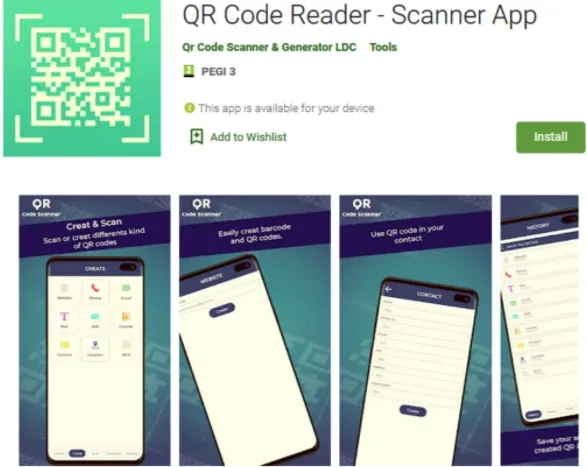
According to the researchers, TeaBot is distributed to unsuspecting victims via trojanized apps on the Google Play Store, including:

  • QR Code Reader – Scanner App – 100,000 downloads
  • QR Scanner APK – 10,000 downloads
  • QR Code Scan – 10,000 downloads
  • Smart Cleaner – 1,000 downloads
  • Weather Cast – 10,000 downloads
  • Weather Daily – 10,000 downloads
Screenshot 2022 01 26 at 15.04.53

None of these applications featured malicious functionality, and all offered the promised features, which allowed them to pass the Google Play Store’s review process and reach a wider infection pool.

Moreover, the actors actively promoted these apps by paying to appear in Google Ads served within other applications and games.

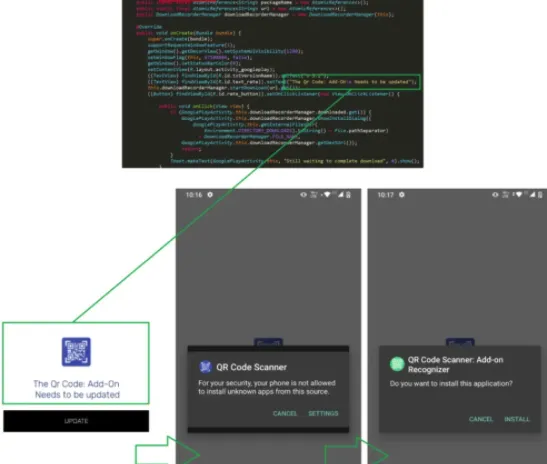
However, once installed and executed on the victim’s device, the apps started a background service that checked the country code and stopped if the result was Ukraine, Uzbekistan, Uruguay, or the United States.

The app retrieved its configuration for all other victims and fetched an APK from a GitHub repository, which contained a TeaBot variant. At the same time, the apps prompted the user to allow third-party sources to install packages.

Screenshot 2022 01 26 at 15.05.24

Between December 6, 2021, and January 17, 2022, Bitdefender analysts have counted 17 different versions of TeaBot infecting devices through the listed apps.

The TeaBot campaign illustrates that even when installing software from the Google Play Store, it does not mean that you will always be safe.

Therefore, it is advisable to remain vigilant with new installations, check user reviews, monitor the app’s network and battery usage, and only grant non-risky permissions.

Overall, the malware families in this sample have received 5,974 transfers from victims in 2021, up from 5,449 in 2020.

Which malware families were most active?

Protection Against Teabot and Flubot Malware

SaferNet is the perfect solution to the cybersecurity issues that individuals, families, and businesses face today. It not only connects every device using a secure, 24/7 always on, military grade VPN, but it also stops outside cyberthreats, malware and viruses as well. On SaferNet, all users are protected anywhere in the world, all the time, on any cellular or Wi-Fi network. In addition to SaferNet’s VPN and cyber protection, it also offers a range of employee or parental/family internet controls including internet filtering, monitoring, scheduling, and blocking access to websites or even entire website categories

Typically, a business or family would need 3 separate services for a VPN, Malware Protection, and Internet Controls; SaferNet offers all 3 features in one service. SaferNet truly is an endpoint security presence that can be implemented in minutes around the world, on phones, laptops, tablets, and computers at an economical price point that caters to all sizes of businesses and families. SaferNet guarantees a smooth setup and installation process that takes only minutes, and an easily accessible control hub for you to monitor all your employee’s or family members devices; including activity, time spent online, and threats blocked.

SysJoker Backdoor Strikes Windows, Mac, and Linux

A new multi-OS backdoor malware dubbed SysJoker has been discovered, targeting Windows, Mac, and Linux. Sysjoker has the ability to evade detection in all three environments.

SysJoker was discovered by cybersecurity researchers at Intezer, who first observed its activity in December after investigating an attack on a Linux-based web server.

The researchers have published a detailed report on SysJoker following their investigation.

SysJoker is written in C++, with each variant tailored for its targeted OS. VirusTotal, which uses 57 different antivirus detection engines, wasn’t able to detect any of them.

On Windows, SysJoker employs a first-stage dropper in the form of a DLL, which uses PowerShell commands to do the following:

fetch the SysJoker ZIP from a GitHub repository,
unzip it on “C:\ProgramData\RecoverySystem\”,
execute the payload.
The malware then sleeps for up to two minutes before creating a new directory and copies itself as an Intel Graphics Common User Interface Service (“igfxCUIService.exe”).

Screenshot 2022 01 12 at 13.45.24

“Next, SysJoker will gather information about the machine using Living off the Land (LOtL) commands. SysJoker uses different temporary text files to log the results of the commands,” explains Intezer’s report.

“These text files are deleted immediately, stored in a JSON object and then encoded and written to a file named “microsoft_Windows.dll”.”

After gathering system and network data, the malware will create persistence by adding a new registry key (HKEY_CURRENT_USER\Software\Microsoft\Windows\CurrentVersion\Run). Random sleep times are interposed between all functions leading to this point.

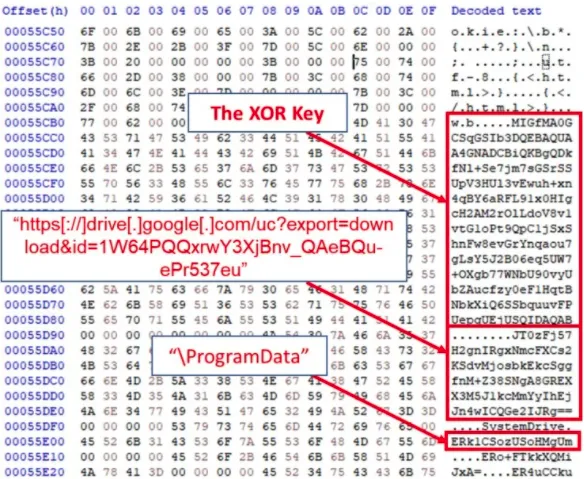
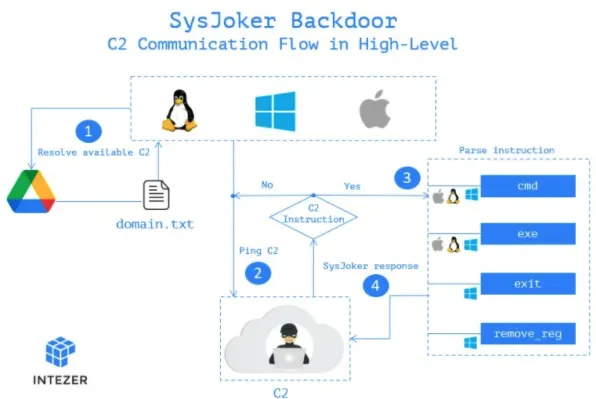
The next step for the malware is to reach out to the actor-controlled C2 server, and for this, it uses a hardcoded Google Drive link.

Screenshot 2022 01 12 at 13.45.49

The link hosts a “domain.txt” file that the actors regularly update to provide available servers to live beacons. This list constantly changes to avoid detection and blocking.

The system information collected in the first stages of the infection is sent as the first handshake to the C2. The C2 replies with a unique token that serves as the identifier of the infected endpoint.

From there, the C2 may instruct the backdoor to install additional malware, run commands on the infected device, or command the backdoor to remove itself from the device. Those last two instructions haven’t been implemented yet, though.

Screenshot 2022 01 12 at 13.46.10

The Linux and Mac variants of SysJoker don’t have the first-stage dropper in DLL form, they do perform the same malicious behaviour.

Intezer has provided full indicators of compromise (IOCs) in their report that admins can use to detect the presence of SysJoker on an infected device.

On Windows, the malware files are located under the “C:\ProgramData\RecoverySystem” folder, at C:\ProgramData\SystemData\igfxCUIService.exe, and C:\ProgramData\SystemData\microsoft_Windows.dll. For persistence, the malware creates an Autorun “Run” value of “igfxCUIService” that launches the igfxCUIService.exe malware executable.

On Linux, the files and directories are created under “/.Library/” while persistence is established by creating the following cron job: @reboot (/.Library/SystemServices/updateSystem).

On macOS, the files are created on “/Library/” and persistence is achieved via LaunchAgent under the path: /Library/LaunchAgents/com.apple.update.plist.

The C2 domains shared in the Intezer report are the following:

  • https[://]bookitlab[.]tech
  • https[://]winaudio-tools[.]com
  • https[://]graphic-updater[.]com
  • https[://]github[.]url-mini[.]com
  • https[://]office360-update[.]com
  • https[://]drive[.]google[.]com/uc?export=download&id=1-NVty4YX0dPHdxkgMrbdCldQCpCaE-Hn
  • https[://]drive[.]google[.]com/uc?export=download&id=1W64PQQxrwY3XjBnv_QaeBQu-ePr537eu

If you found that you have been compromised by SysJoker, follow these three steps:

  • Kill all processes related to the malware and manually delete the files and the relevant persistence mechanism.
  • Run a memory scanner to ensure that all malicious files have been uprooted from the infected system.
  • Investigate the potential entry points, check firewall configurations, and update all software tools to the latest available version.

Protection Against Threats Like SysJoker

SaferNet is the perfect solution to the cybersecurity issues that individuals, families, and businesses face today. It not only connects every device using a secure, 24/7 always on, military grade VPN, but it also stops outside cyberthreats, malware and viruses as well. On SaferNet, all users are protected anywhere in the world, all the time, on any cellular or Wi-Fi network. In addition to SaferNet’s VPN and cyber protection, it also offers a range of employee or parental/family internet controls including internet filtering, monitoring, scheduling, and blocking access to websites or even entire website categories

Typically, a business or family would need 3 separate services for a VPN, Malware Protection, and Internet Controls; SaferNet offers all 3 features in one service. SaferNet truly is an endpoint security presence that can be implemented in minutes around the world, on phones, laptops, tablets, and computers at an economical price point that caters to all sizes of businesses and families. SaferNet guarantees a smooth setup and installation process that takes only minutes, and an easily accessible control hub for you to monitor all your employee’s or family members devices; including activity, time spent online, and threats blocked.

White Rabbit Ransomware Linked To FIN8 Hackers

White Rabbit Ransomware appeared in the cybersecurity wild, and a recent suggests the strain may be a side-project of the FIN8 hacking group.

FIN8 is a financially motivated actor who has been spotted targeting financial organizations for several years, primarily by deploying POS malware that can steal credit card details.

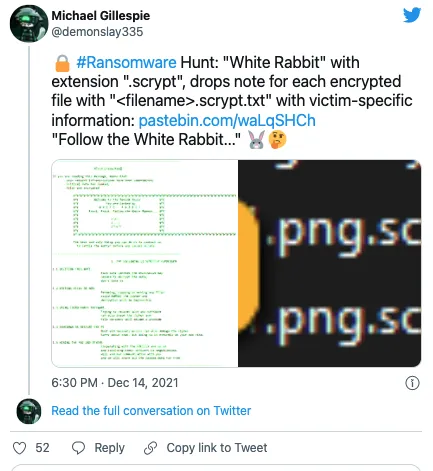
White Rabbit Ransomware was first reported on by ransomware expert Michael Gillespie on Twitter.

Screenshot 2022 01 18 at 18.53.20

Trend Micro investigated a sample of White Rabbit Ransomware which was discovered after an attack on a US bank in December 2021.

The White Rabbit Ransomware payload is tiny compared its peers at just 100KB. It requires a password to be entered on the command line for decryption.

Password-protected payloads have been previously seen by other strains, such as Egregor, MegaCortex, and SamSam.

When the correct password is entered, White Rabbit Ransomware will scan all folders on the device and encrypt targeted files, creating ransom notes for each file it encrypts.

While encrypting a device, removable and network drives are also targeted, with Windows system folders excluded from encryption to prevent rendering the operating system unusable.

The ransom note informs the victim that their files had been exfiltrated and threatens to publish and/or sell the stolen data if the demands are not met.

The deadline for the victim to pay a ransom is set to four days, after which the actors threaten to send the stolen data to data protection authorities, leading to data breach GDPR penalties.

The evidence of the stolen files is uploaded to services such as ‘paste[.]com’ and ‘file[.]io,’ while the victim is offered a live chat communication channel with the actors on a Tor negotiation site.

The Tor site includes a ‘Main page,’ used to display proof of stolen data, and a Chat section where the victim can communicate with the threat actors and negotiate a ransom demand.

As noted in the Trend Micro report, evidence that connects FIN8 and ‘White Rabbit’ is found in the ransomware’s deployment stage.

The connection between White Rabbit Ransomware and FIN8 has also been confirmed by researchers at Lodestone.

“Lodestone identified a number of TTPs suggesting that White Rabbit, if operating independently of FIN8, has a close relationship with the more established threat group or is mimicking them.”

For now, White Rabbit has limited itself to only targeting a few entities but is considered an emerging threat that could turn into a severe menace to companies in the future.

Protection Against White Rabbit Ransomware

SaferNet is the perfect solution to the cybersecurity issues that individuals, families, and businesses face today. It not only connects every device using a secure, 24/7 always on, military grade VPN, but it also stops outside cyberthreats, malware and viruses as well. On SaferNet, all users are protected anywhere in the world, all the time, on any cellular or Wi-Fi network. In addition to SaferNet’s VPN and cyber protection, it also offers a range of employee or parental/family internet controls including internet filtering, monitoring, scheduling, and blocking access to websites or even entire website categories

Typically, a business or family would need 3 separate services for a VPN, Malware Protection, and Internet Controls; SaferNet offers all 3 features in one service. SaferNet truly is an endpoint security presence that can be implemented in minutes around the world, on phones, laptops, tablets, and computers at an economical price point that caters to all sizes of businesses and families. SaferNet guarantees a smooth setup and installation process that takes only minutes, and an easily accessible control hub for you to monitor all your employee’s or family members devices; including activity, time spent online, and threats blocked.

NHS Warn Of More Attacks Using Log4j Vulnerabilities

The National Health Service (NHS) in the UK has issued an alert warning of an unknown gang of hackers targeting VMware Horizon deployments with Log4j vulnerabilities.

Log4Shell is in an exploit within Apache Log4j 2.14, and is classed as vulnerability CVE-2021-44228. The Log4j vulnerabilities have seen high activity since December 2021.

Apache has addressed the Log4j vulnerabilities, and version 2.17.1 is now considered adequately secure

Apache addressed the above and four more vulnerabilities via subsequent security updates, and Log4j version 2.17.1 is now considered adequately secure.

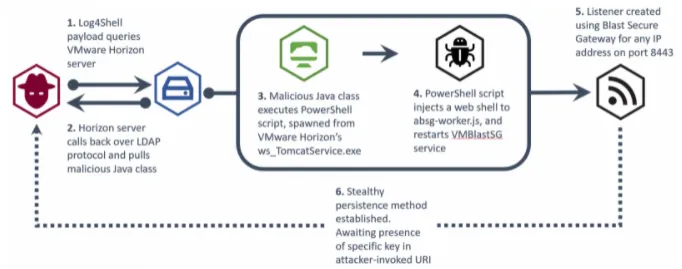
According to the NHS notice, the threat actor is leveraging the exploit to achieve remote code execution on vulnerable VMware Horizon deployments on public infrastructure.

“The attack likely consists of a reconnaissance phase, where the attacker uses the Java Naming and Directory InterfaceTM (JNDI) via Log4Shell payloads to call back to malicious infrastructure,” explains the alert.

“Once a weakness has been identified, the attack then uses the Lightweight Directory Access Protocol (LDAP) to retrieve and execute a malicious Java class file that injects a web shell into the VM Blast Secure Gateway service.”

“The web shell can then be used by an attacker to carry out a number of malicious activities such as deploying additional malicious software, data exfiltration, or deployment of ransomware.”

The actor is taking advantage of the presence of the Apache Tomcat service embedded within VMware Horizon, which is vulnerable to Log4Shell.

The exploitation begins with the simple and widely used payload and spawns the following PowerShell command from Tomcat.

This command invokes a win32 service to get a list of ‘VMBlastSG’ service names, retrieve paths, modify ‘absg-worker.js’ to drop a listener, and then restart the service to activate the implant.

The listener is then responsible for executing arbitrary commands received via HTTP/HTTPS as header objects with a hardcoded string.

At this point, the actor has established persistent and stable communication with the C2 server and can perform data exfiltration, command execution, or deploy ransomware.

Screenshot 2022 01 10 at 15.07.19

VMware Horizon is not the only VMware product targeted by threat actors using the Log4j vulnerabilities.

The Conti ransomware operation is also using Log4j vulnerabilities to spread laterally to vulnerable VMware vCenter servers to more easily encrypt virtual machines.

VMware released a security update for Horizon and other products last month, fixing CVE-2021-44228 and CVE-2021-45046 with versions 2111, 7.13.1, and 7.10.3

As such, all VMware Horizon admins are urged to apply the security updates as soon as possible.

NHS’s report also highlights the following three signs of active exploitation on vulnerable systems:

  • Evidence of ws_TomcatService.exe spawning abnormal processes
  • Any powershell.exe processes containing ‘VMBlastSG’ in the command line
  • File modifications to ‘…\VMware\VMware View\Server\appblastgateway\lib\absg-worker.js’ – This file is generally overwritten during upgrades and not modified

Protection Against Log4j Vulnerabilities

SaferNet is the perfect solution to the cybersecurity issues that individuals, families, and businesses face today. It not only connects every device using a secure, 24/7 always on, military grade VPN, but it also stops outside cyberthreats, malware and viruses as well. On SaferNet, all users are protected anywhere in the world, all the time, on any cellular or Wi-Fi network. In addition to SaferNet’s VPN and cyber protection, it also offers a range of employee or parental/family internet controls including internet filtering, monitoring, scheduling, and blocking access to websites or even entire website categories

Typically, a business or family would need 3 separate services for a VPN, Malware Protection, and Internet Controls; SaferNet offers all 3 features in one service. SaferNet truly is an endpoint security presence that can be implemented in minutes around the world, on phones, laptops, tablets, and computers at an economical price point that caters to all sizes of businesses and families. SaferNet guarantees a smooth setup and installation process that takes only minutes, and an easily accessible control hub for you to monitor all your employee’s or family members devices; including activity, time spent online, and threats blocked.

Google Docs Commenting Feature Used For Spear Phishing Attacks

A new spear phishing attack vector emerged in December 2021, which saw hackers abusing the commenting feature of Google Docs to send emails that appear trustworthy.

Google Docs is widely used by employees collaborating or remotely working, so recipients of said emails are familiar with these notifications.

Googles’ own security systems are being tricked into sending emails, it is very unlikely for email security to flag the incoming Google emails.

It is believed the spear phishing attacks have been on-going since at least October of last year. Google has taken steps to mitigate the issue, but are not fully covered yet.

The spear phishing campaign has become more popular in recent weeks amongst hackers, and is being monitored by threat analysts at Avanan, who have shared their report with other researchers.

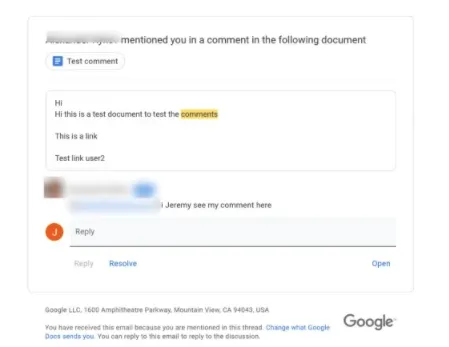
According to Avanan, hackers use their Google account to create a Google Document and then comment it to mention the target with an @.

Google then sends a notification email to the target’s inbox, informing them that another user has commented on a document and mentioned them.

Screenshot 2022 01 06 at 15.49.54

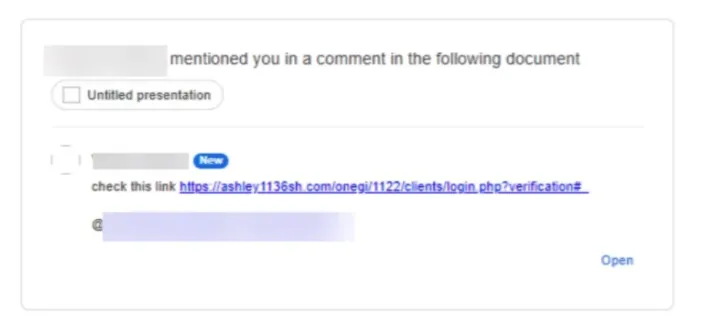
The comment on the email can carry malicious links that lead to malware dropping web pages or phishing sites, so there are clearly no checking/filtering mechanisms in place.

Secondly, the threat actor’s email isn’t shown in the notification, and the recipient only sees a name. This makes impersonation very easy, and simultaneously raises the chances of success for the actors.

Screenshot 2022 01 06 at 15.50.08

The same technique works on Google Slide comments too, and Avanan reports having seen actors leveraging it on various elements of the Google Workspace service.

To make things worse, attackers don’t have to share the document with their targets since mentioning them is enough to send malicious notifications.

According to Avanan, the threat actors behind these attacks appear to favor Outlook users, but the target demographic is not limited to them.

This ongoing spear-phishing campaign uses over 100 Google accounts and has already hit 500 inboxes across 30 organizations.

The only way to mitigate the risk of this and similar campaigns is to:

  • Confirm that the sender email matches your colleague’s (or claimed person)
  • Avoid clicking on links that arrive via email and are embedded on comments
  • Deploy additional security measures that apply stricter file-sharing rules on Google Workspace
  • Use an internet security solution from a trustworthy vendor that features phishing URL protection

Protection Against Spear Phishing

SaferNet is the perfect solution to the cybersecurity issues that individuals, families, and businesses face today. It not only connects every device using a secure, 24/7 always on, military grade VPN, but it also stops outside cyberthreats, malware and viruses as well. On SaferNet, all users are protected anywhere in the world, all the time, on any cellular or Wi-Fi network. In addition to SaferNet’s VPN and cyber protection, it also offers a range of employee or parental/family internet controls including internet filtering, monitoring, scheduling, and blocking access to websites or even entire website categories

Typically, a business or family would need 3 separate services for a VPN, Malware Protection, and Internet Controls; SaferNet offers all 3 features in one service. SaferNet truly is an endpoint security presence that can be implemented in minutes around the world, on phones, laptops, tablets, and computers at an economical price point that caters to all sizes of businesses and families. SaferNet guarantees a smooth setup and installation process that takes only minutes, and an easily accessible control hub for you to monitor all your employee’s or family members devices; including activity, time spent online, and threats blocked.

Purple Fox Malware Deployed Via Telegram Installers

Purple Fox Malware is making the rounds by using a malicious Telegram For Desktop installer, which is further used to install additional malware payloads on infected devices.

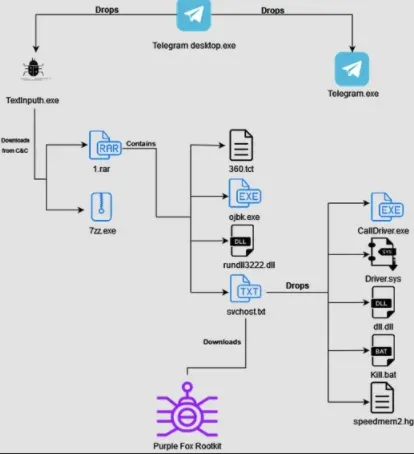
The malicious installer is compiled in a script named “Telegram Desktop.exe” that drops two files – the malicious downloader and an actual Telegram installer.

The legitimate installer is not executed, and instead, a downloader is run (TextInputh.exe).

When TextInputh.exe is executed, it will create a new folder (“1640618495”) under “C:\Users\Public\Videos\” and connect to the C2 to download a 7z utility and a RAR archive (1.rar).

The files contain the Purple Fox Malware payload, as well as configuration files. It also unpacks everything into the ProgramData folder.

As detailed in an analysis by Minerva Labs, TextInputh.exe performs the following actions onto the compromised machine:

  • Copies 360.tct with “360.dll” name, rundll3222.exe, and svchost.txt to the ProgramData folder
  • Executes ojbk.exe with the “ojbk.exe -a” command line
  • Deletes 1.rar and 7zz.exe and exits the process

Screenshot 2022 01 04 at 16.31.12

Next, a registry key is created for persistence, a DLL (rundll3222.dll) disables UAC, the payload (scvhost.txt) is executed, and the following five additional files are dropped onto the infected system:

  • Calldriver.exe
  • Driver.sys
  • dll.dll
  • kill.bat
  • speedmem2.hg

The purpose of these extra files is to collectively block the initiation of 360 AV processes and prevent the detection of Purple Fox Malware on the compromised machine.

The next step for the malware is to gather basic system information, check if any security tools are running on it, and finally send all that to a hardcoded C2 address.

Once this reconnaissance process is completed, Purple Fox Malware is downloaded from the C2 in the form of an .msi file that contains encrypted shellcode for both 32 and 64-bit systems.

Upon execution of Purple Fox Malware, the infected machine will be restarted for the new registry settings to take effect, most importantly, the disabled User Account Control (UAC).

To achieve this, the dll.dll file sets the following three registry keys to 0:

HKLM\SOFTWARE\Microsoft\Windows\CurrentVersion\Policies\System
ConsentPromptBehaviorAdmin HKLM\SOFTWARE\Microsoft\Windows\CurrentVersion\Policies\System\EnableLUA
HKLM\SOFTWARE\Microsoft\Windows\CurrentVersion\Policies\System\PromptOnSecureDesktop

Disabling bypassing UAC is vital because it gives any program that runs on the infected system, including viruses and malware, administrator privileges.

In general, UAC prevents the unauthorized installation of apps or the changing of system settings, so it should stay active on Windows at all times.

Disabling it permits Purple Fox Malware to perform malicious functions such as file search and exfiltration, process killing, deletion of data, downloading and running code, and even worming to other Windows systems.

At this time, it is unknown how Purple Fox Malware is being distributed but similar malware campaigns impersonating legitimate software were distributed via YouTube videos, forum spam, and shady software sites.

Protection Against Purple Fox Malware

SaferNet is the perfect solution to the cybersecurity issues that individuals, families, and businesses face today. It not only connects every device using a secure, 24/7 always on, military grade VPN, but it also stops outside cyberthreats, malware and viruses as well. On SaferNet, all users are protected anywhere in the world, all the time, on any cellular or Wi-Fi network. In addition to SaferNet’s VPN and cyber protection, it also offers a range of employee or parental/family internet controls including internet filtering, monitoring, scheduling, and blocking access to websites or even entire website categories

Typically, a business or family would need 3 separate services for a VPN, Malware Protection, and Internet Controls; SaferNet offers all 3 features in one service. SaferNet truly is an endpoint security presence that can be implemented in minutes around the world, on phones, laptops, tablets, and computers at an economical price point that caters to all sizes of businesses and families. SaferNet guarantees a smooth setup and installation process that takes only minutes, and an easily accessible control hub for you to monitor all your employee’s or family members devices; including activity, time spent online, and threats blocked.